
Instant text translation
Select text in any app and use the default ⌘⌥T hotkey or the menu-bar item to open the result in a floating window.

Awnsy is a menu-bar translation app for Apple silicon Macs running macOS 15 or later. It translates selected text or text captured from a screen area, using an offline on-device model or an optional personal OpenAI or Anthropic key.
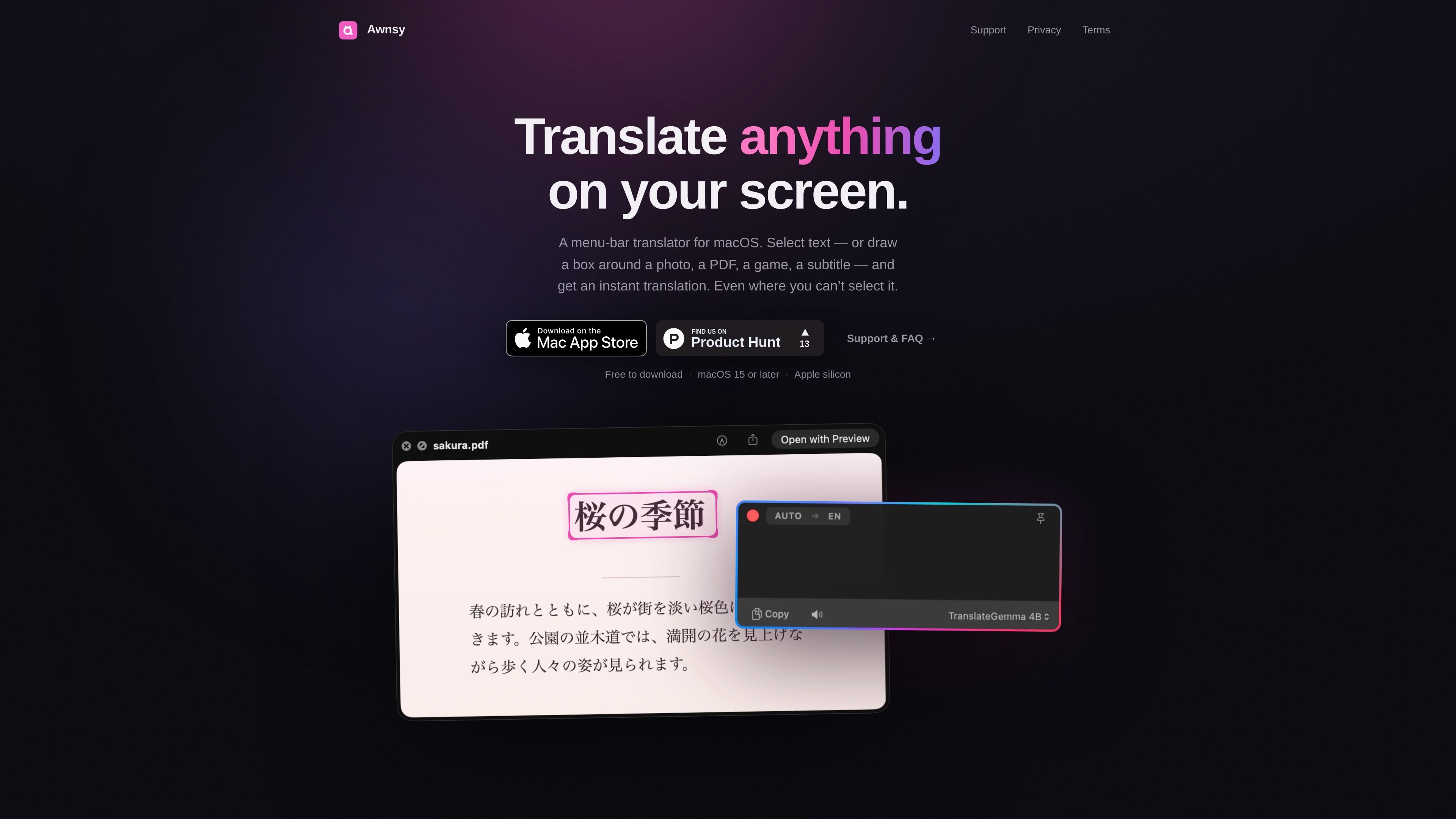
Awnsy is a macOS menu-bar translator for translating selected text and text that cannot normally be selected. Users can invoke it with a keyboard shortcut or the menu-bar item, and translations appear in a small floating window.
For screen content such as images, PDFs, games, videos, photos, and app interfaces, Translate Screen Area lets users draw a box around the relevant text. Awnsy reads the region with Apple’s on-device text recognition and then translates it. The app includes an offline on-device model and optionally supports personal OpenAI or Anthropic keys for cloud models.
Select text in any app and use the default ⌘⌥T hotkey or the menu-bar item to open the result in a floating window.
Press the screen-area command and draw a box around text in images, PDFs, games, videos, photos, or apps that do not allow text selection.
Apple’s on-device text recognition extracts words from selected screen regions before translation. Recognition coverage includes Latin, Cyrillic, Chinese, Japanese, Korean, Arabic, Thai, and other languages supported by the current macOS release.
The built-in model runs on the Mac and works offline without an account, API key, or telemetry according to the product site.
Optionally connect a personal OpenAI or Anthropic API key from Settings → Models. Awnsy stores the key in the macOS Keychain rather than sending it to Awnsy.
Awnsy runs as a native Swift menu-bar app rather than an Electron application, with live-streaming translations and in-window language or model switching.
Translate text in websites, documents, messages, and other Mac apps by selecting it and using the keyboard shortcut or menu-bar command.
Capture text from a scanned document, photograph, PDF, or image when the source does not expose selectable text.
Understand dialogue, menus, or subtitles in games and videos by drawing a box around the visible text.
Use the offline model while traveling or handling text that should stay on the Mac, without creating an account or configuring an API key.
Compare the built-in model with a personal OpenAI or Anthropic key, switching the model in the translation window when a different cloud provider is preferred.
Awnsy is available from the Mac App Store. It requires a Mac with Apple silicon (M1 or newer) running macOS 15 or later. Intel Macs are not supported.
Select text and press the default ⌘⌥T hotkey, or use the menu-bar item. The translation opens in a small floating window.
Choose Translate Screen Area from the menu bar or use its hotkey, then draw a box around the text. Awnsy uses Apple’s on-device text recognition to read the selected area before translating it.
No account or API key is required. The built-in on-device model works offline. You can optionally add your own OpenAI or Anthropic key in Settings → Models; keys are stored locally in the macOS Keychain.
Text translation is free and unlimited. Translate Screen Area includes 10 free translations; Awnsy Pro unlocks unlimited screen translation and adds a custom translation prompt for cloud models. Pro is offered as a monthly or yearly subscription, or a one-time Lifetime purchase, with current prices shown in the app under Settings → Awnsy Pro.

MagicSlides is an AI presentation generator that turns text, topics, documents, URLs, and videos into slide decks. It creates presentations in Google Slides by default and supports PowerPoint export, with multilingual output and AI-assisted editing.

Letra is a menu bar OCR utility for macOS Sonoma 14 or later that copies text from screen regions, videos, PDFs, screenshots, and screen shares to the clipboard. It also supports on-device recognition, QR and barcode decoding, searchable capture history, and copied image or file input.

Microsoft Translator is a Bing translation web app for translating short text between English and more than 100 languages. It also supports image capture translation and basic output actions like listen and copy.

Rubriq 是一款面向科研写作的 AI 学术论文润色与翻译工具,支持个人订阅、机构方案和论文查重相关服务。它帮助研究人员在上传稿件后快速生成带修订痕迹的可审阅文档。

Globalize.now is an AI localization tool that converts hardcoded app text into repo-owned locale files and keeps translations synced on every Git push. It is aimed at developers shipping multilingual web apps in tools like Cursor, Claude Code, GitHub, GitLab, Lovable, and common frontend stacks.

KlutterAI is an AI-powered expense tracker that helps people capture receipts, categorize spending, and monitor budgets from iOS or Android. The product also surfaces recurring charges, spending alerts, and exportable reports.