
List and calendar views
See events and tasks in one chronological list, with a separate monthly calendar view for scanning scheduled events.

Brainlist Calendar is an iPhone productivity app that brings calendar events, tasks, notes, reminders, and focus sessions into one list-and-calendar workflow. It is designed for people who want to plan daily work, capture thoughts, and manage scheduled commitments in one place.
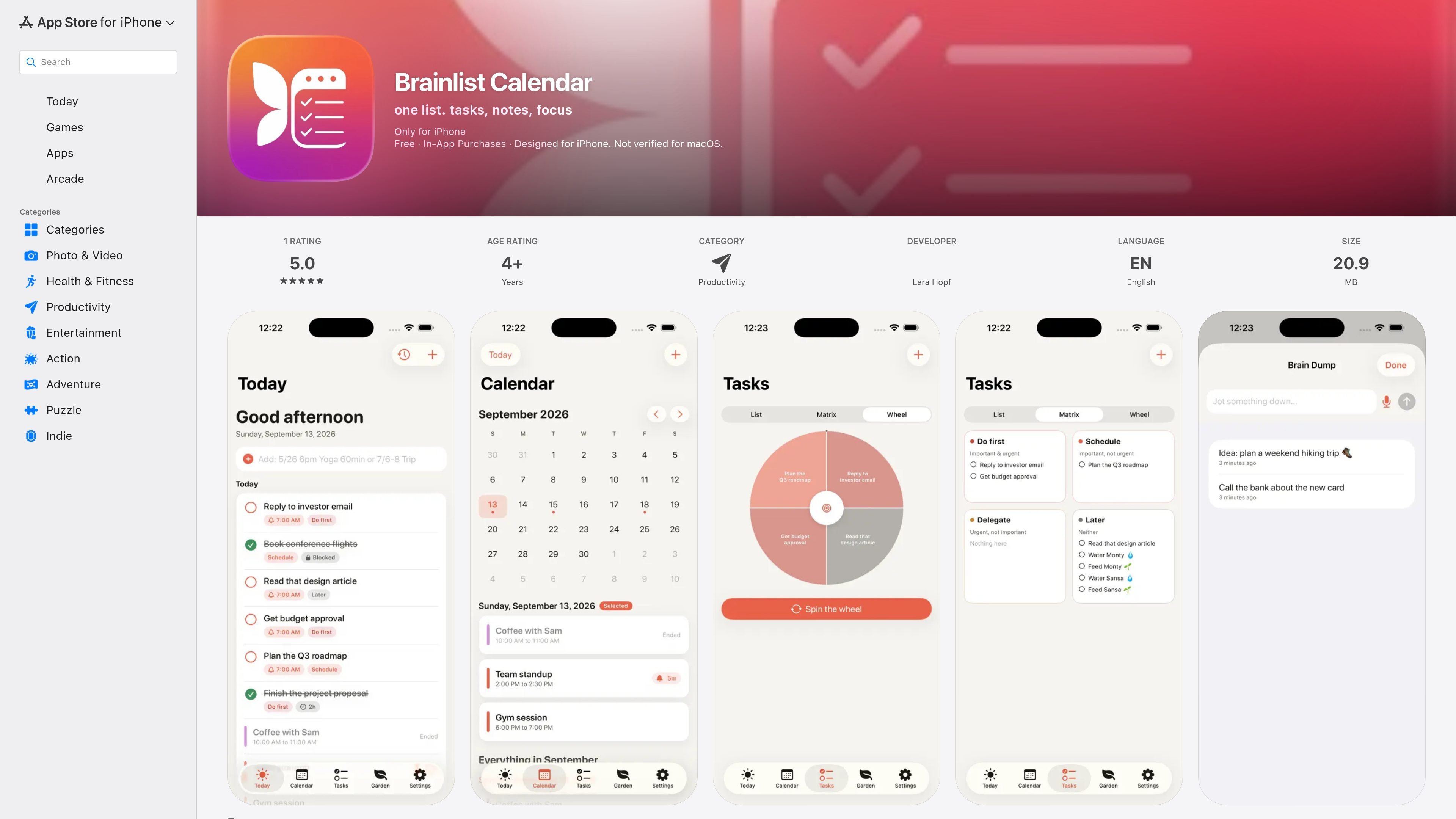
Brainlist Calendar is an iPhone productivity app that combines calendar events, tasks, quick notes, and timed focus work in one day-planning workspace. Its central workflow presents entries in a list as well as a calendar, giving users a way to manage scheduled commitments and actionable work without relying on a separate notes app.
The app supports both lightweight capture and more structured planning. Users can import events from device calendars, create tasks with reminders and subtasks, sort work by importance and urgency, and use a focus timer for estimated work periods. Optional Brainlist Pro features add AI planning tools, plant-care tracking, travel-time reminders, and full-day insights. The listing also states that the app is ad-free and that data is stored on the device and synced through the user’s private iCloud.
See events and tasks in one chronological list, with a separate monthly calendar view for scanning scheduled events.
Import events from device calendars, including linked Google and Exchange accounts, and use the export option when moving calendar data elsewhere.
Add reminders and multi-stage alerts to entries. Tasks can also include notes, effort and time estimates, subtasks, and other planning details.
Organize work with an Eisenhower importance/urgency Matrix, or use the spin-the-wheel picker when choosing what to start.
Capture a thought by typing or dictating it in Brain Dump, then return to it later. The Pro version also describes meeting transcripts converted into action lists.
Assign a time estimate and run a Timed Focus session inside the app. Reusable task templates support recurring routines, and the timer continues while the screen is off.
Keep appointments and actionable tasks in the same timeline, then check the monthly view when planning around a fuller schedule.
Capture a sudden idea or spoken thought in Brain Dump instead of interrupting current work, then process it into a later task or note.
Break a demanding task into subtasks, estimate the required time, and run a timed Focus session without opening another timer app.
Use the importance/urgency Matrix to sort competing tasks, or let the picker help select a starting point when several tasks feel equally pressing.
Use Pro planning features for suggested event times, prep reminders, meeting-to-task conversion, personalized insights, travel-time alerts, and houseplant watering or feeding reminders.
Brainlist Calendar combines a list timeline with a calendar view. Events and tasks can appear together, while notes, focus sessions, reminders, and task-planning tools are available in the same app.
The app can import events from device calendars, including linked Google and Exchange accounts, and it provides an export option for moving data back out if needed.
Yes. Brainlist Calendar includes a timed Focus session for tasks. The screen can turn off while the timer continues running.
Brainlist Calendar is free to download and offers Brainlist Pro as an in-app subscription. The App Store lists weekly, monthly, and yearly options, each with a seven-day free trial; subscriptions renew automatically unless canceled at least 24 hours before the current period ends.
The App Store lists the app for iPhone and requires iOS 18.0 or later. The listing describes it as designed for iPhone and says it is not verified for macOS.

Goldfish is an AI memory app for macOS that helps you reply, write, summarize, and continue using the context already on your Mac. It stores memory locally and writes in your tone.

ArtDeck is a visual reference board app for iPhone, iPad, and Mac that lets artists collect mixed reference material on one canvas and study it with ToolBox lenses. It works offline, supports optional iCloud sync, and is sold as a one-time purchase with no account required.

Biji ist eine vielseitige Plattform, die entwickelt wurde, um die Produktivität durch innovative Werkzeuge und Funktionen zu steigern.

Malyatko is a baby tracker for logging feeding, sleep, growth, teething, and milestones in one app. It works on iPhone, Apple Watch, and widgets, with no sign-up, offline use, and family sharing through iCloud.

Liam is an AI copilot for managing inboxes, writing replies, prioritizing email, and scheduling meetings. It is offered free for individuals, with custom pricing for teams and enterprise.

Gemma AI is a phone call reminder app that calls you with scheduled reminders instead of push notifications. It helps people who want a more direct way to stay on schedule, with Google Calendar sync and conversational call interactions.