
Detects song structure
Drop in a finished song and Clips identifies its tempo and song sections, such as the intro, verses, pre-chorus, chorus, and bridge.

Clips is a Mac app that turns finished songs into beat-cut lyric and lip-sync videos, including multiple song sections and visual variations. It is aimed at artists, labels, studios, and music promoters who want to create and test batches of short-form music videos.
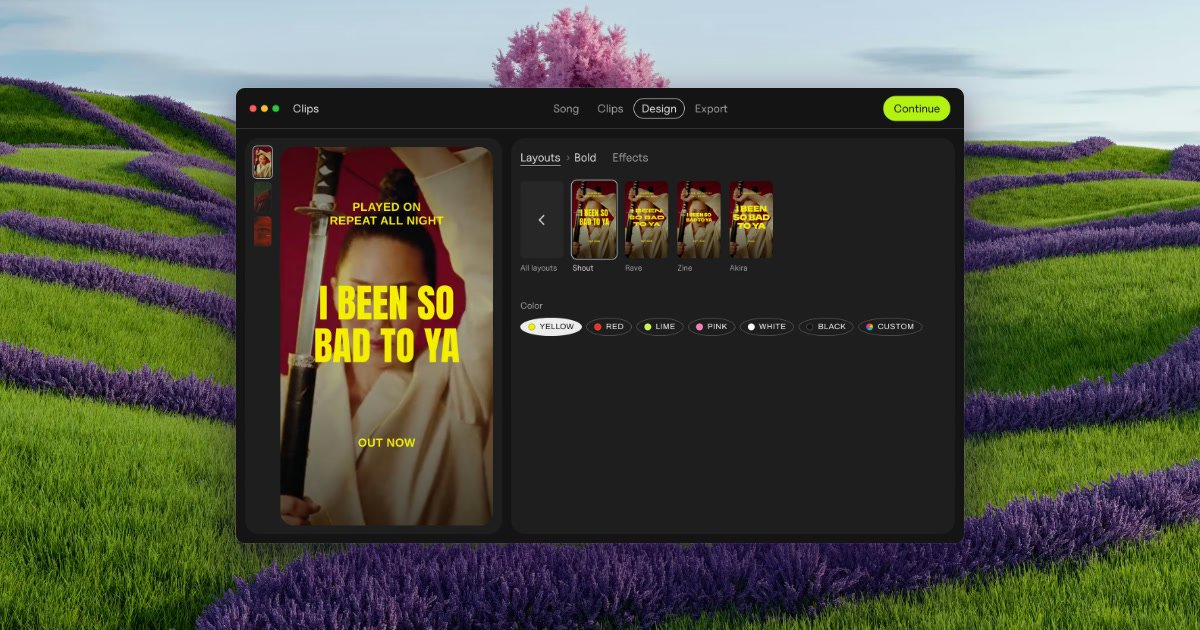
Clips is a Mac app for making lyric and lip-sync videos from finished songs. It finds the tempo and sections of a track, then turns song parts and selected snippets into short videos cut on the beat. Lyrics can be synchronized word by word or line by line, and a hook line can be placed over the visual.
The workflow is designed for testing creative variations rather than assembling one video at a time on a timeline. Users can combine song sections with their own footage or photos, adjust visual effects, export a batch in vertical or square formats, and compare which part of the song performs best in advertising or social promotion. Clips works offline, so the site says unreleased songs stay on the Mac.
Drop in a finished song and Clips identifies its tempo and song sections, such as the intro, verses, pre-chorus, chorus, and bridge.
Turn selected parts of a song into clips cut on the beat, rather than building each segment manually on a timeline.
Add a hook line over the video with lyrics synchronized word by word or line by line on the beat.
Use your own footage or photos; Clips can animate still images, and the site says one phone clip is enough to create a batch.
Apply visual effects whose strength can be adjusted, including effects shown on the site such as Paper, Glow, Vertigo, Riso, Xerox, Tape, Bitmap, Lines, Heatwave, Drift, and Negative.
Export song parts across backdrops in vertical 1080 × 1920 or square 1080 × 1080 video, with files named by song, part, and backdrop.
Generate videos for the intro, verses, chorus, bridge, and other sections of a new track, then test several versions to identify which hook deserves more promotion.
Create a batch of lyric videos from a finished song without manually cutting each ad in a timeline. Named exports help distinguish song parts and backdrops during campaign setup.
Turn a photo, cover image, or a small amount of phone footage into multiple visual treatments for a song when a full video shoot is not available.
Keep unreleased music on a local Mac while creating lyric and lip-sync assets offline for a release campaign.
Produce videos for a roster or client projects under the Label / Studio license, which the site positions for artists you manage, sign, or work for.
Clips runs on macOS 13 or later on Apple silicon or Intel Macs. It is Mac-only today, and the site recommends macOS 26 for the best lyric-sync experience.
Drop a finished song into Clips, choose or add footage or photos, select song sections, add a hook line, and export the resulting vertical or square videos.
Clips exports vertical video at 1080 × 1920 and square video at 1080 × 1080. The exported batch can include every selected song part and backdrop combination.
No. The product states that it works offline and that an unreleased song never leaves the Mac. The site does not document cloud integrations or destination-specific publishing.
The free version has no time limit and includes every feature, unlimited exports, and a Clips tag on exports. The Artist license removes the tag for your own music; a Label / Studio license is intended for work made for other artists, managed artists, or clients.

Virvid is an AI shorts generator for creators and marketers who want to make faceless short-form videos for TikTok, Instagram Reels, and YouTube Shorts. It supports both manual video creation and automated daily posting workflows.

Wallie is an open-source AI streamer that watches your screen, hears chat, and generates live commentary in a configurable persona. It runs locally on your machine with your own keys and is aimed at faceless content, autonomous streams, and real-time reactions.

Video Effects SDK adds real-time webcam effects such as background blur, background replacement or removal, denoising, framing, beautification, and color grading. It is built for teams shipping live video experiences on web, desktop, and mobile platforms.

Official HeyGen API documentation for building AI avatar videos, translations, lipsync, and interactive video-agent sessions. It supports direct API use plus MCP and CLI-style workflows for developers and AI agents.

DeepMotion is a web-based AI motion capture and 3D animation platform with Animate 3D for video-to-animation and SayMotion for text-to-animation. It helps creators and teams generate motion in a browser and export results in common production formats.

Zella is a screen recorder and on-device AI video editor for Mac and iPhone. It helps creators record screens or cameras, automatically clean up footage, add captions, reframe clips, and export videos without uploading the core project to the cloud.