
Stitch logs by request ID
LogStitch reads the request ID on each CloudWatch line and reconstructs one Lambda invocation in order, so concurrent executions are easier to follow than a raw timestamp-sorted stream.

LogStitch is a native macOS AWS Lambda log viewer that stitches CloudWatch log lines into per-invocation views. It helps developers inspect, correlate, and analyze Lambda activity locally across accounts and regions.
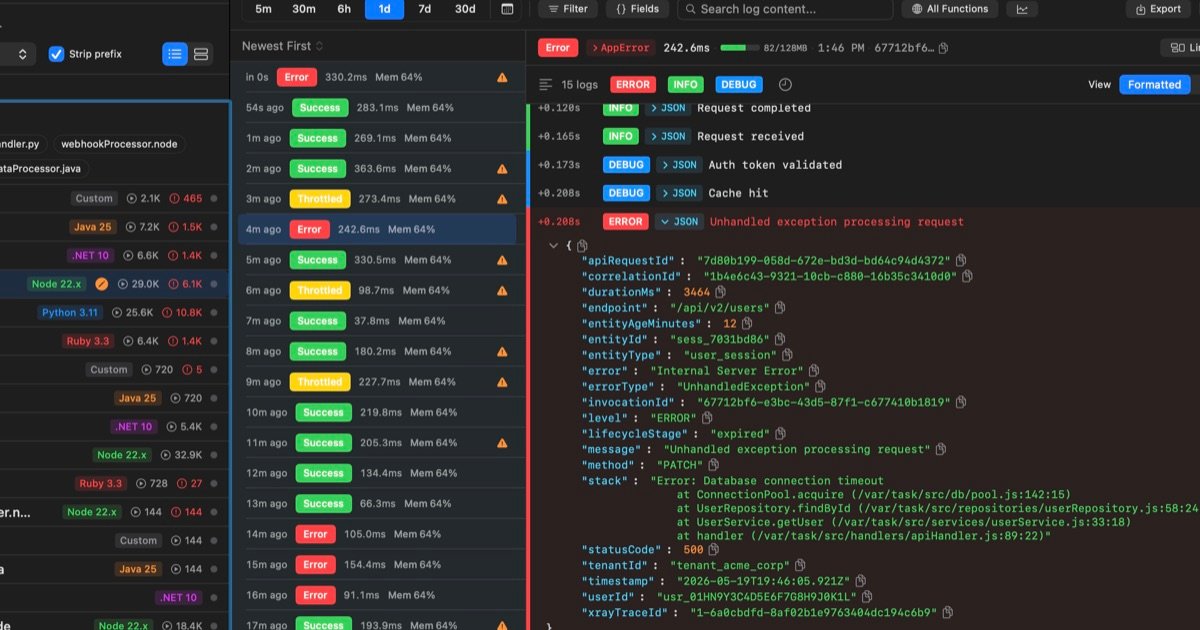
LogStitch is a native macOS app for reading AWS Lambda logs in a more usable format than the raw CloudWatch stream. Instead of leaving concurrent invocations interleaved by timestamp, it groups lines by request ID and presents each invocation as a single stitched record.
The product is built for local, repeated investigation. It fetches logs from AWS, stores them on the Mac in a local SQLite database, and lets users search, filter, re-open, and analyze invocations without re-querying CloudWatch every time. The site also positions LogStitch for multi-account and multi-region Lambda workflows, live tailing, performance analysis, and error pattern detection.
LogStitch reads the request ID on each CloudWatch line and reconstructs one Lambda invocation in order, so concurrent executions are easier to follow than a raw timestamp-sorted stream.
It can follow a request across functions, accounts, and regions with a swim-lane timeline, propagation latency, and the function that originated the error.
The app keeps fetched logs in a local SQLite database, enabling re-searching and filtering without rescanning CloudWatch each time.
A live tail window supports raw streaming or invocation-stitching modes, and completed invocations are saved automatically.
Built-in analytics cover p99 trends, cold-start distributions, memory right-sizing, and a monthly cost projection in the same interface as the logs.
LogStitch clusters repeated error messages into patterns and surfaces anomalies using statistical scoring across duration, errors, cold starts, and cost.
Open a Lambda function’s logs and inspect one invocation at a time instead of reconstructing the request from interleaved CloudWatch lines.
Trace a user request through several functions, accounts, or regions using the swim-lane correlation view and propagation timing.
Keep a live 15-minute tail open while investigating an incident, switching between raw streaming and stitched invocations as logs arrive.
Review p99 duration trends, cold-start behavior, memory utilization, and projected cost for a function in the same window as its logs.
Cluster repeated failures into patterns and inspect anomalies when the same error, cold start, duration spike, or cost spike keeps returning.
LogStitch is a native macOS app for viewing AWS Lambda logs. It groups interleaved CloudWatch log lines by request ID so you can read each invocation as one stitched timeline.
The source describes LogStitch as using your AWS profiles to fetch logs, then storing them locally in SQLite. After that, searches, re-queries, and filters run from local storage.
Yes. The comparison page says LogStitch can stitch invocations across multiple accounts and regions, using separate AWS profiles.
The source says LogStitch includes a built-in MCP server for Claude and other MCP-aware clients that can reach a local port.
The pricing page was not accessible in the collected evidence, so the exact pricing and plan structure could not be verified from the source text provided.

PromptScout tracks how ChatGPT, Gemini, Google AI Overviews, and Perplexity mention your brand or competitors, then pairs those results with source analysis and website audits. It helps teams decide what to fix in content, positioning, or site readiness next.

Sleek Analytics is a privacy-friendly web analytics tool with real-time visitor tracking, Core Web Vitals, and revenue attribution. It helps site owners understand traffic and conversions without cookie banners or a heavy setup.

MacSpoof ist ein MAC-Adressenwechsler für macOS: WLAN-MAC ändern oder randomisieren, um Verbindungen zu erneuern und die Protokollierung auf öffentlichem WLAN zu reduzieren.

ClawTick is an AI agent automation platform for scheduling jobs from the CLI, dashboard, or REST API. It is aimed at developers and teams running LangChain, CrewAI, webhook, or custom agent workflows that need monitoring, alerts, and logs.

OpenFlags is an open-source, self-hosted feature flag platform for modern JavaScript teams. It supports local evaluation, targeted rollouts, and controlled launches while keeping flag data in your own infrastructure.

Benchspan is an AI agent security platform that discovers agents, blocks prompt injection and data exfiltration in real time, and supports pre-launch red teaming. It is aimed at teams running agents in production and includes Python and TypeScript SDKs.