
Text-prompt generation
Generate a drum kit or loop from a text prompt. The home page includes example prompts such as textured percussion kits, flute-led loops, forest-floor kits, and arcade-inspired sounds.

MCP 2000 is a browser-based generative drum machine and sampler for creating kits or loops from prompts, then editing and exporting the result. The site shows tempo, sequence, mixer, effects, pad editing, microphone recording, and export controls.
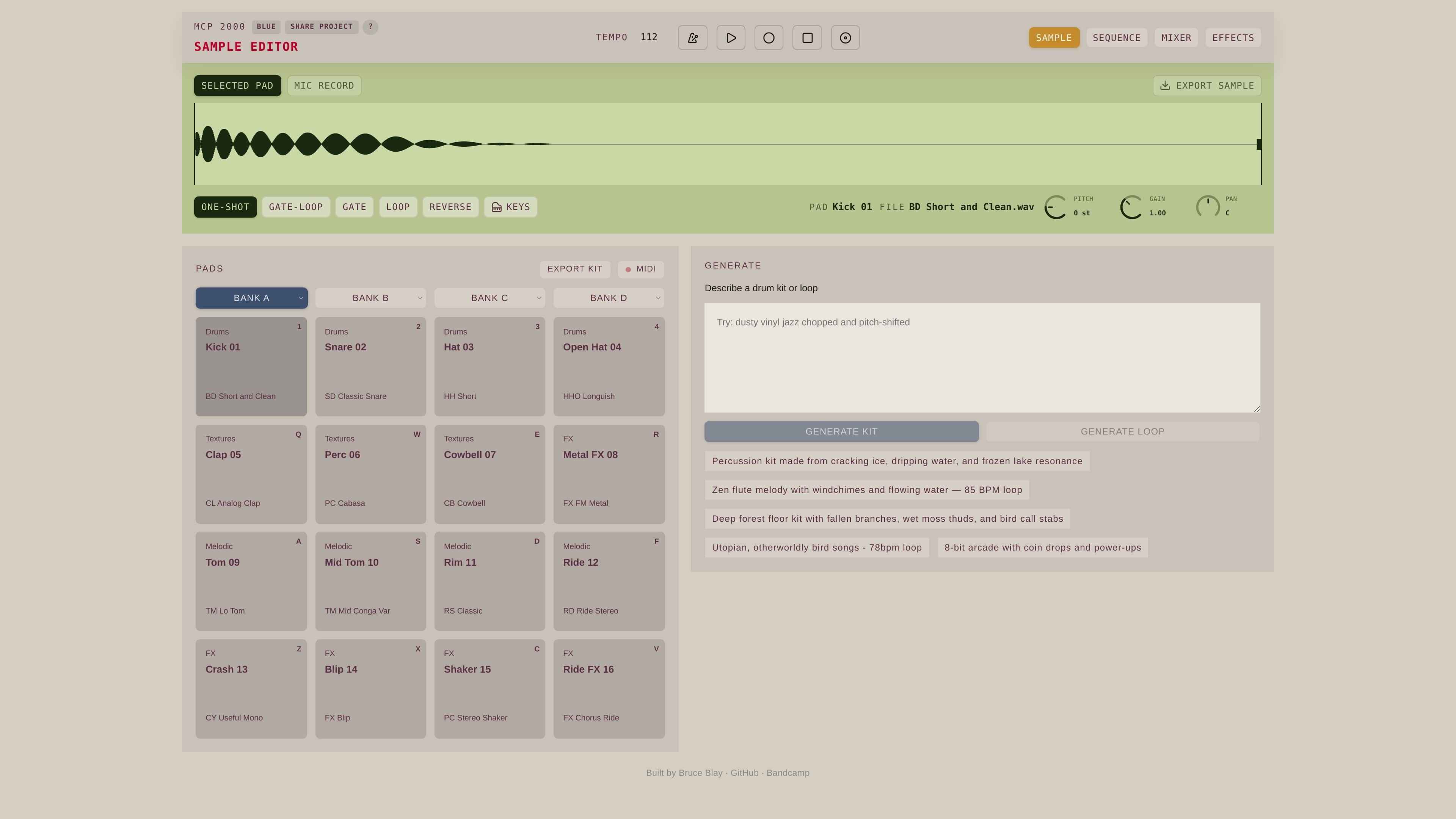
MCP 2000 is a browser-based generative drum machine and sampler. It combines prompt-driven sound creation with a pad-based editing interface so users can build kits or loops and then shape individual sounds inside the same session.
The home page shows controls for tempo, sequence, mixer, effects, sample editing, microphone recording, and export. That makes the product look aimed at quick idea generation as well as hands-on refinement, rather than a purely automated generator.
Generate a drum kit or loop from a text prompt. The home page includes example prompts such as textured percussion kits, flute-led loops, forest-floor kits, and arcade-inspired sounds.
Work with a browser-based sampler and drum machine interface. The visible UI includes pads, tempo control, sequence, mixer, and effects sections.
Edit selected pad samples directly in the interface. The page shows sample editor controls for pitch, gain, pan, reverse, and playback mode options such as one-shot, gate, and loop.
Record audio from a microphone into the selected pad. The interface includes a mic record control, indicating that users can capture new source material during a session.
Export generated material as a sample or kit. The page shows both sample export and kit export actions, suggesting outputs can be saved for reuse.
Describe a kit in plain language and let MCP 2000 generate a starting point for percussion, textures, or more unusual sound palettes.
Generate a loop at a target tempo, then adjust sequencing, mixer balance, and effects to shape the result into a usable sketch.
Load or capture a sound on a pad, then use pitch, gain, pan, reverse, and playback mode controls to refine the sample before export.
Record a microphone source into the session when you want to fold in a live performance, vocal hit, or field recording idea.
Export a finished kit or sample once the idea is ready to move elsewhere or save for later reuse.
The site presents MCP 2000 as a browser-based generative drum machine and sampler. The home page copy and interface labels suggest you can describe a kit or loop, generate material, edit samples, and export a kit or sample.
The available evidence shows the product runs in the browser. No separate desktop installation is mentioned on the site copy provided.
The home page shows controls and labels for tempo, sequence, mixer, effects, selected pad, mic record, export sample, and export kit, which implies a browser workflow that combines generation, editing, and export.
The pricing page URL returns a 404 in the collected evidence, so the source does not confirm any current plan structure, free tier, or paid tier.
The supplied page text does not confirm collaboration features, team accounts, or shared workspaces. The only visible sharing-related text is a project-sharing prompt on the home page.

AI Song Maker is a web-based AI music generator that creates songs from text or lyrics and includes related tools such as vocal removal, track extension, and section replacement. It offers free and paid plans with credits, downloads, and commercial-use terms described on the pricing page.

LALAL.AI is an AI audio processing platform for stem separation, voice cleanup, and voice transformation. It supports browser-based upload, preview, and download workflows for audio and video files, plus premium and enterprise options.

Kits AI is an AI music production platform for voice cloning, vocal generation, and vocal processing. It offers a Free plan, paid tiers, and a Windows desktop app for producers and creators working with studio-style audio workflows.

ElevenMusic is a web-based music platform for discovering tracks, remixing music, and creating original songs. It also supports prompt-led generation with mood tags and account-based saving for libraries, generations, and playlists.

Hedra is an AI creative platform for planning and producing video, image, and audio content. It serves creators and teams that want an agentic workflow for generating media, reusing brand elements, and scaling content production.
MusiKey ist eine plattformübergreifende Desktop-Anwendung, die traditionelle Passwörter durch verschlüsselte musikalische Kompositionen für eine sichere Authentifizierung ersetzt.