
Full-text search across media
Search across text found in images, words spoken in videos, object labels, person names, places, and camera metadata from a single library index.

Memoria is a mobile app for searching photos and videos by text, speech, faces, objects, and metadata on the device. It helps people find specific moments in a personal library without uploading content to a cloud service.
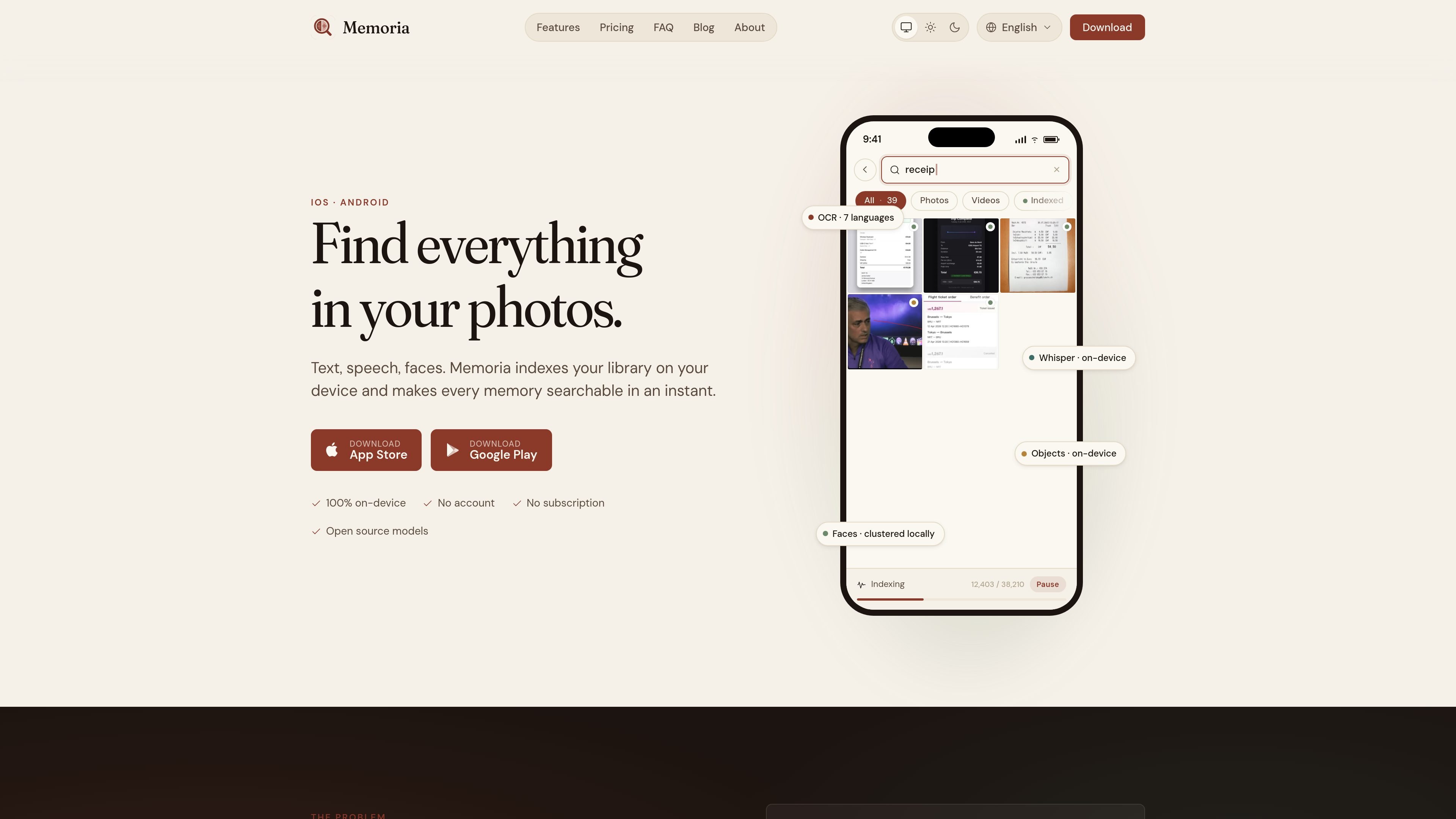
Memoria is a mobile photo and video search app for finding specific moments inside a personal library. It indexes text, speech, faces, objects, and metadata on the device so you can search for what appears in a photo or what was said in a video without uploading your library to a cloud service.
The product is built around local processing: OCR, transcription, face clustering, and object recognition all run on the phone. That makes it suited to people who keep lecture slides, whiteboards, screenshots, receipts, memes, or recorded meetings in the same photo library and need a faster way to retrieve them later.
Search across text found in images, words spoken in videos, object labels, person names, places, and camera metadata from a single library index.
Memoria suggests search terms based on vocabulary from your own library rather than a remote dictionary, which helps when you are not sure what to type.
You can narrow results by media type and indexing status, including photos, videos, not-indexed-yet, needs-reindex, and no-text-found.
Photos are read with the device's native OCR engines, and video frames are sampled so text in slides, captions, and screen recordings can be indexed too.
Speech transcription runs on device with Whisper in 99+ languages, with an Apple Speech option available when you want a lighter setup.
Faces are detected and grouped locally, objects are recognized on device, and location metadata can be turned into searchable place names without sharing your photos or location.
Search for a phrase seen on a whiteboard, slide deck, screenshot, receipt, or meme when you remember the wording but not the file location.
Index recorded lectures, meetings, or voice notes and search for a spoken term or topic later using the transcription index.
Group and search by people in a personal library when you want all photos of one person without manually creating albums.
Use object labels and metadata to find images of a bicycle, a document, or a location such as a beach or Berlin.
Keep large libraries usable on a phone by running indexing in the background, pausing on low battery, and optionally limiting it to charging only.
No. Memoria processes photos and videos on your device. The only outgoing network request mentioned is the optional download of a Whisper transcription model.
No account is required. Memoria says there is nothing to sign up to or log into.
Yes. Memoria can run offline after installation. Network access is not needed for normal use, aside from the optional Whisper model download.
The free tier lets you index up to 250 media items. Memoria Plus is a one-time purchase handled by Apple or Google.
Yes. You can export the local database from Settings → Advanced and import it on a new device to skip reindexing. Memoria currently indexes each device independently, so there is no sync yet.

ArtDeck is a visual reference board app for iPhone, iPad, and Mac that lets artists collect mixed reference material on one canvas and study it with ToolBox lenses. It works offline, supports optional iCloud sync, and is sold as a one-time purchase with no account required.

Snapmark is a VS Code extension that lets you annotate clipboard screenshots before pasting them into AI chats. It supports blur redaction, numbered callouts, and automatic resizing for large images.

Goldfish is an AI memory app for macOS that helps you reply, write, summarize, and continue using the context already on your Mac. It stores memory locally and writes in your tone.

Lasso is an ecommerce product data platform for enriching catalog records, processing supplier files, generating product content, and monitoring competitors. It combines a web app with a REST API, SDK, and MCP server for teams and developers.

Codex Plugins bundle reusable skills, app integrations, and MCP servers into workflows you can install in the Codex app or use from Codex CLI. They help extend Codex with connected-service tasks, reusable instructions, and shared team workflows.

Struere is an AI-native platform for turning spreadsheet data into structured operational software with dashboards, alerts, and automations. It is aimed at teams that want to replace manual spreadsheet workflows without building custom tools from scratch.