
Fast capture
Start a take from the app, Apple Watch, Lock Screen, Control Center, Siri, or Shortcuts. Pause, resume, or restart over, with a live waveform showing microphone input.

Music Dawn is a music recording app for capturing, processing, organizing, and reviewing song ideas on iPhone, iPad, and Apple Watch. It offers one-tap 24-bit lossless recording, click-assisted takes, a tuner, library tools, and optional Pro effects and monitoring.
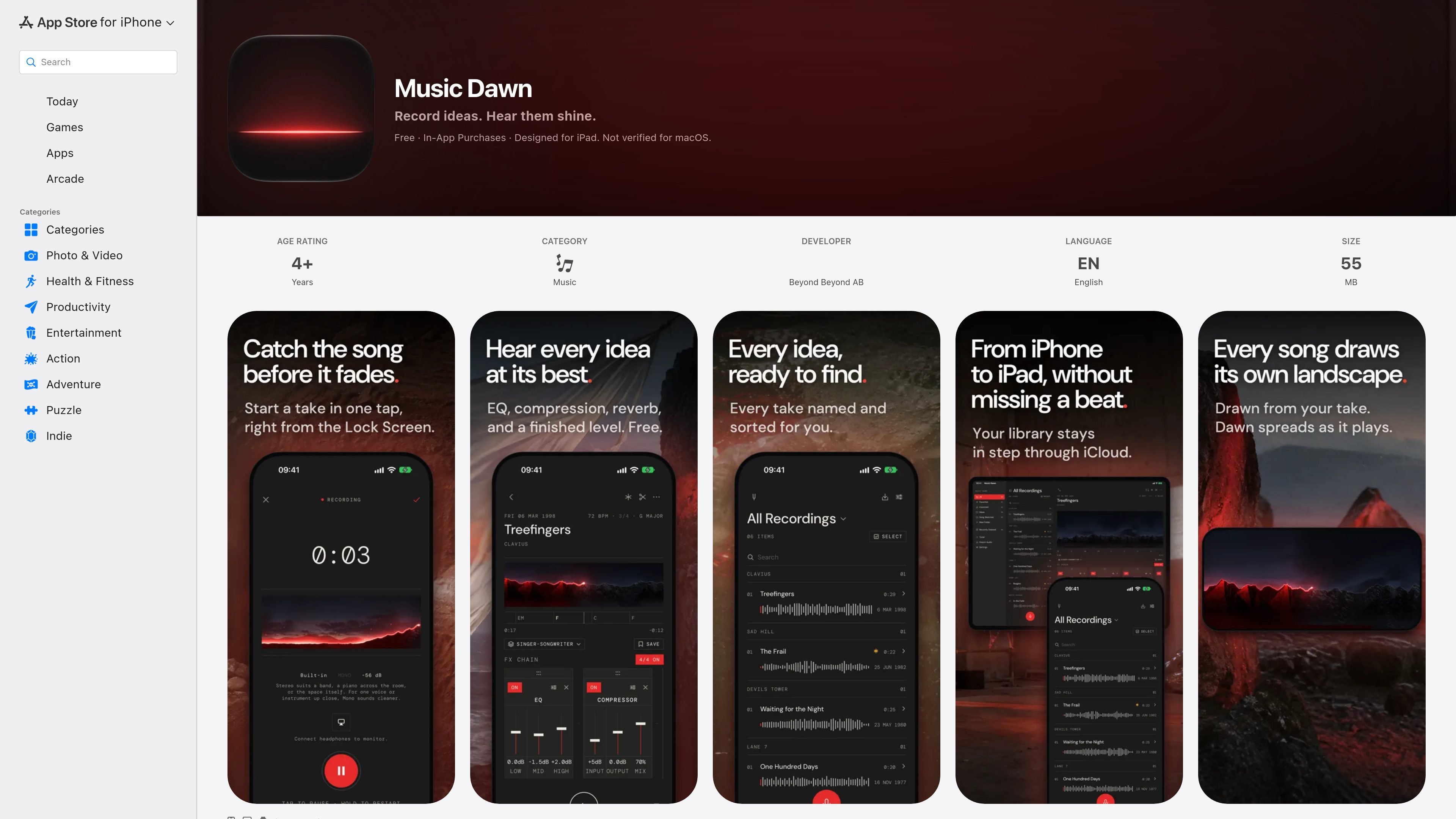
Music Dawn is a music-focused recording app from Beyond Beyond AB for capturing song ideas on iPhone, iPad, and Apple Watch. It is built around one-tap recording, immediate playback with a finished-sound processing chain, and a library for finding and reviewing takes later.
The app records in 24-bit lossless audio, supports click-assisted practice when headphones are connected, and includes a tuner alongside the recording workflow. Its free feature set covers recording, playback effects, organization, trimming, importing, and sharing; the optional Music Dawn Pro tier adds monitoring, cleanup, presets, expanded effects, custom chains, and beta analysis for chords, key, and tempo.
Start a take from the app, Apple Watch, Lock Screen, Control Center, Siri, or Shortcuts. Pause, resume, or restart over, with a live waveform showing microphone input.
Record takes in 24-bit lossless audio. With headphones connected, use a click from 40 to 240 BPM and choose meters from 2/4 to 7/4; the click is excluded from the saved recording.
Every take plays through EQ, a compressor, plate reverb, and Master at no charge. Pro adds Clean, presets, and 16 effects with adjustable controls and custom effect chains.
Search by title, mark favorites, sort recordings into folders, and browse by recording location. New takes receive a title automatically, and original recordings can be trimmed without altering the source.
Record on Apple Watch and keep the library aligned between iPhone and iPad through the user’s iCloud. Audio can also be imported from Files, Voice Memos, and other apps, including multiple recordings at once.
Open the tuner without leaving the song to see the note, frequency, and cents deviation. It supports standard guitar-string targets and A4 reference settings of 432, 440, or 442 Hz.
Capture a melody, lyric idea, riff, or arrangement fragment immediately from an iPhone or Apple Watch, then give the take an automatic title so it remains identifiable later.
Use headphones and the adjustable click while practicing vocals or instruments at a chosen tempo and meter. Review the saved take without the click embedded in the audio.
Bring recordings together from Files, Voice Memos, and other apps, then search, favorite, and sort them into folders when developing a larger set of song sketches.
Compare a raw performance with processed playback, use the tuner from the recording screen, and apply Pro monitoring or cleanup when a take needs more controlled listening.
Music Dawn is designed for iPhone, iPad, and Apple Watch, and requires iOS 26.0 or later, iPadOS 26.0 or later, or watchOS 26.0 or later as applicable. The App Store listing also shows compatibility with Apple silicon Mac and Apple Vision, while noting it is not verified for macOS.
Yes. Recording, playback, effects, and tuning run on the device. The developer states that the app has no account, no ads, and no third-party analytics, and the App Store privacy label indicates that data is not collected, subject to Apple’s note that the developer’s responses have not been verified.
The free experience includes one-tap recording, playback with EQ, compressor, plate reverb, and Master, as well as trimming, sharing, importing, organizing, and tuning. Music Dawn Pro adds real-time monitoring, noise and room-echo reduction, presets, the full set of 16 effects and effect-chain controls, and beta chord, key, and tempo detection.
Yes. The app can record with a click from 40 to 240 BPM in meters from 2/4 through 7/4 when headphones are connected. The click is not included in the saved take.
Music Dawn can import audio from Files, Voice Memos, and other apps, including several recordings at once. The source does not specify particular export destinations, so sharing is described generally rather than as integration with a named service.

CAMB.AI Streams dubs live audio in multiple languages in real time for broadcasts on platforms like YouTube, Twitch, and X. It plugs into existing live workflows using common streaming protocols and avoids a post-production step.

LALAL.AI is an AI audio processing platform for stem separation, voice cleanup, and voice transformation. It supports browser-based upload, preview, and download workflows for audio and video files, plus premium and enterprise options.

Optimo is a free, open-source CLI for optimizing and converting images and videos with format-specific commands built on ImageMagick and FFmpeg. It helps developers prepare web assets, batch process media, and automate compression from the shell or a Node.js script.

Kits AI is an AI music production platform for voice cloning, vocal generation, and vocal processing. It offers a Free plan, paid tiers, and a Windows desktop app for producers and creators working with studio-style audio workflows.

Converleon is an offline file converter for Mac that handles images, video, audio, documents, PDFs, and archives without uploading files. It supports batch conversion, preset-based compression, and common workflows like HEIC to JPG, MOV to MP4, and HTML to PDF.

ElevenMusic is a web-based music platform for discovering tracks, remixing music, and creating original songs. It also supports prompt-led generation with mood tags and account-based saving for libraries, generations, and playlists.