
24-hour dial and extended views
View one complete day on a circular 24-hour face, with a live current-time indicator and faded past blocks. Switch to list or timeline views for planning across multiple days.

Reassign is a browser-based day planner that organizes a full 24-hour schedule on a circular dial, letting users draw, move, and reshape time blocks. It is designed for people managing changing workdays, tasks, focus sessions, and connected calendars.
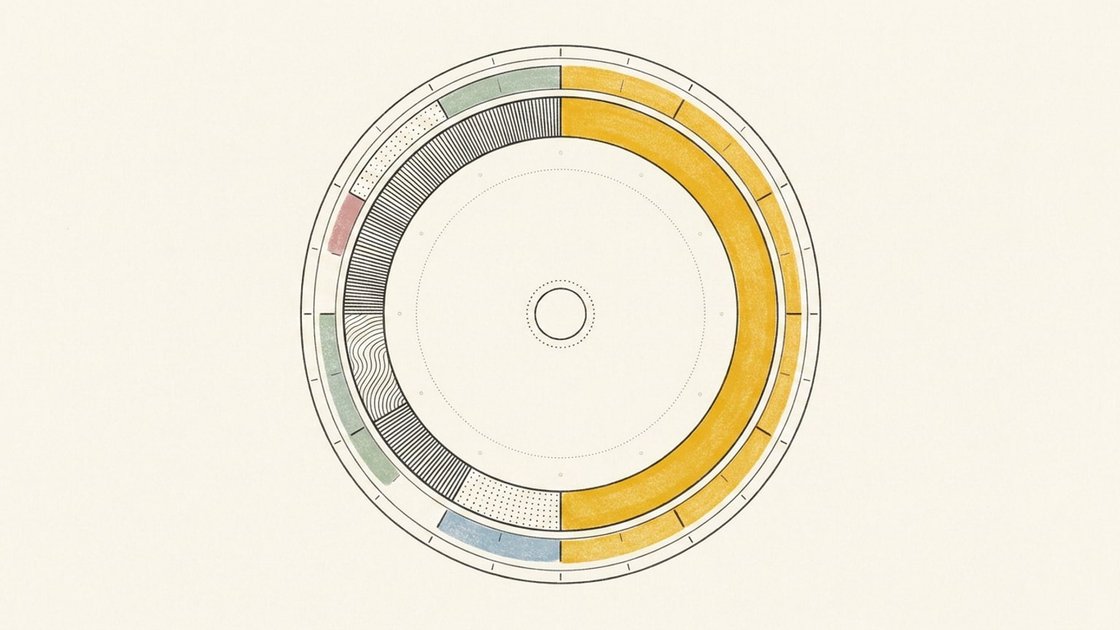
Reassign is a browser-based day planner that represents a full 24-hour day as a circular dial rather than a conventional list. Midnight is positioned at the top and noon at the bottom, so users can see how planned blocks, open time, and the current point in the day relate spatially.
Users plan by drawing blocks directly on the dial, then moving or resizing them as circumstances change. The planner also includes list and timeline views for looking ahead, recurring events, microtasks, focus intervals, and layers for information such as energy, weather, mood, and personal moments.
Reassign is intended for people who want to coordinate appointments, tasks, focused work, and personal routines in one day-shaped workspace. It can connect to external calendars and task services, and Claude can be connected through MCP to inspect and reshape a plan.
View one complete day on a circular 24-hour face, with a live current-time indicator and faded past blocks. Switch to list or timeline views for planning across multiple days.
Press and drag on the dial to create blocks, then move or resize them as plans change. Multiple blocks can be selected and moved together, and later events can shift around protected time.
Bring supported calendars and task lists into the same planning surface. Reassign supports two-way sync with Google Calendar, Outlook, Todoist, Google Tasks, Microsoft To Do, Linear, and TickTick.
Use the command palette to create items in plain language, capture a list in the Inbox, ask questions about the day, or braindump items for later scheduling. Changes can be undone.
Connect Claude through MCP so it can read the schedule and write planning changes, such as moving work or protecting a time window. Users can ask Claude to review a plan first.
Divide a block into focus and break intervals, add microtasks, and use a focused one-block view. Weather, mood, moments, and energy layers provide additional context around the day.
Draw meetings and fixed commitments onto the dial, then place focused work into the open spaces around them. If an appointment moves, shift the surrounding blocks instead of rebuilding the day from scratch.
Use the Inbox to capture several tasks at once, then schedule each item into available hours or send it to a connected task app. Microtasks can remain inside a larger work block as a checklist.
Connect Claude through MCP and describe the planning outcome in ordinary language, such as protecting a focus window or replanning an afternoon after a meeting changes. Claude can inspect the schedule and write the requested updates.
Split a work block into focus and break intervals, open the one-block focus view, and track small steps without leaving the planned session.
Review planned versus actual time at the end of a day by marking blocks as completed as planned, changed, or not completed. Use the resulting record to adjust future planning habits.
Reassign draws one day as a 24-hour circular dial, with midnight at the top and noon at the bottom. Morning runs down the right side, while afternoon and evening return up the left. A live red indicator shows the current time, and past blocks fade.
Create an account at reassign.app using Google, Apple, or a six-digit email code. After signing in, press the ring and drag to draw a time block. Passkeys can be added later for subsequent sign-ins.
Reassign connects with Google Calendar, Outlook, Todoist, Google Tasks, Microsoft To Do, Linear, and TickTick. The pricing page describes these connections as two-way sync, allowing calendar and task changes to be reflected across services.
New accounts receive seven days of Pro access without a card or automatic charge. After the trial, a subscription is required to keep using the planner; data remains if the user does not subscribe.
An internet connection is required to save changes. Reassign can be installed on a device home screen and syncs the day across devices, but offline saving is not supported.

Goldfish is an AI memory app for macOS that helps you reply, write, summarize, and continue using the context already on your Mac. It stores memory locally and writes in your tone.

ArtDeck is a visual reference board app for iPhone, iPad, and Mac that lets artists collect mixed reference material on one canvas and study it with ToolBox lenses. It works offline, supports optional iCloud sync, and is sold as a one-time purchase with no account required.

Biji ist eine vielseitige Plattform, die entwickelt wurde, um die Produktivität durch innovative Werkzeuge und Funktionen zu steigern.

Malyatko is a baby tracker for logging feeding, sleep, growth, teething, and milestones in one app. It works on iPhone, Apple Watch, and widgets, with no sign-up, offline use, and family sharing through iCloud.

Liam is an AI copilot for managing inboxes, writing replies, prioritizing email, and scheduling meetings. It is offered free for individuals, with custom pricing for teams and enterprise.

Gemma AI is a phone call reminder app that calls you with scheduled reminders instead of push notifications. It helps people who want a more direct way to stay on schedule, with Google Calendar sync and conversational call interactions.