
Right-click font inspection
Open the extension from the page context menu to inspect live typography details such as family, weight, size, color, contrast, and available font file information.

Tinkerfont is a browser extension for inspecting and testing fonts on live websites in Chrome and Firefox. It lets you swap typefaces with Bunny Fonts or custom uploads, scope changes to parts of a page, and save rules per site.
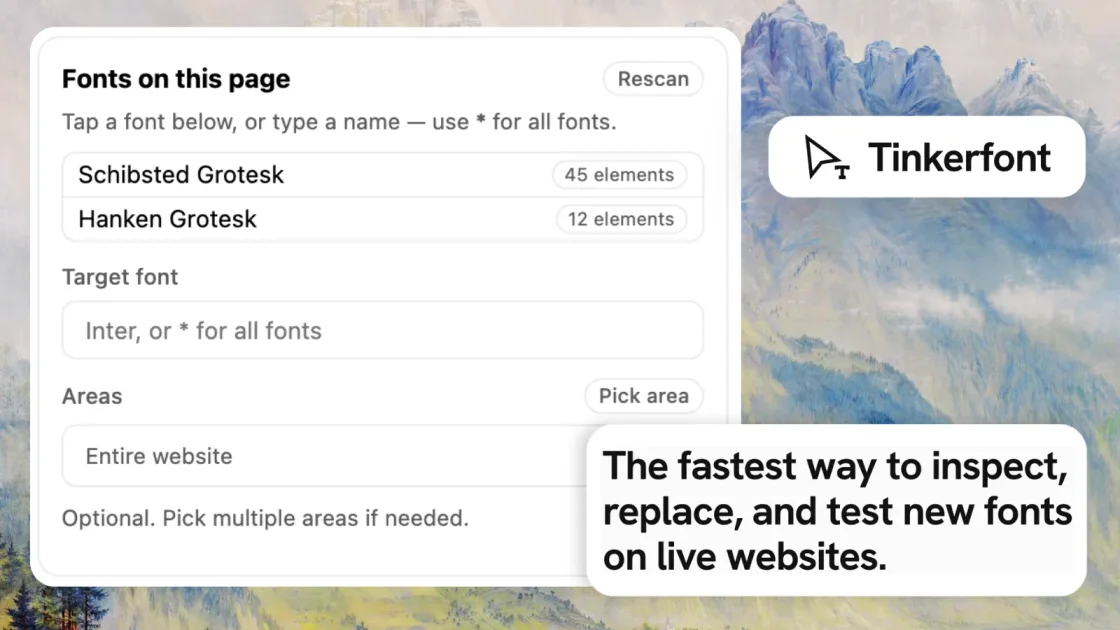
Tinkerfont is a browser extension and add-on for testing typography on live websites. It is built for inspecting fonts, replacing them with alternatives, and checking how they behave on real content, layouts, and breakpoints before changing a stylesheet or design system.
The product works in Chrome and Firefox and is aimed at people who want to evaluate font choices in context. It supports right-click font inspection, DOM scanning, Bunny Fonts search, custom font uploads, element scoping, and per-hostname persistence so a testing setup can be revisited later.
Open the extension from the page context menu to inspect live typography details such as family, weight, size, color, contrast, and available font file information.
Scan the live DOM to see which families are actually in use on the page, including counts, then target one family or replace all fonts with a wildcard.
Search Bunny Fonts or upload custom font files, then preview replacements on the current page without editing CSS or deploying code.
Pick specific elements to limit a font change to part of a page, such as a nav, table, or hero section, instead of affecting the whole site.
Store replacement rules and scopes per hostname so a site keeps the same preview setup across refreshes and later visits.
Back up rules as JSON and restore them on another browser; custom fonts must be uploaded again after import.
Compare a replacement font against an actual article, landing page, or interface rather than a mockup, so spacing, hierarchy, and readability are tested in context.
Preview a shortlist of candidate typefaces on a staging or production page before making changes in CSS, reducing the need to jump between design tools and code.
Limit a font experiment to a nav, hero, table, or other page section when you only want to assess one area at a time.
Inspect page fonts, copy values from the context menu, and use the live results to understand what a site is currently using before making adjustments.
Move an established set of font rules to another browser or device by exporting the configuration and importing it elsewhere.
Tinkerfont is a browser extension for typography prototyping on live websites. It lets you inspect fonts on a page, swap them with alternatives from Bunny Fonts or your own uploads, and review the result on real content before changing CSS.
Yes. The page says Tinkerfont is free to install and use, and that optional supporter contributions help fund development. The available source does not mention paid plans or usage limits.
Tinkerfont is available for Google Chrome and Mozilla Firefox. The site also notes that Chromium-based browsers that support Chrome extensions may work with the Chrome build, but Chrome and Firefox are the supported browsers it tests and ships for.
You can upload .woff2, .woff, .ttf, or .otf files in the Custom tab. The extension also supports searching Bunny Fonts and applying replacements directly on the page.
Yes. Replacement rules and area scopes are saved per hostname in local storage, and the extension includes Export and Import actions in the panel header so you can move a setup to another browser.

ByteAsk is a terminal-first AI coding agent for C and C++ that edits repositories and verifies changes with the real compiler, debugger, sanitizers, and tests before showing a diff. It offers a free tier plus paid plans, with editor connectors and zero-retention handling described in the source.

Manta AI is an autonomous web app testing tool for teams that want to map application behavior, catch regressions, and generate tests without writing scripts or maintaining selectors. It works from a URL and supports plain-English test flows, run results with screenshots, and scheduled or deployment-triggered checks.

EAS Observe is a production performance monitoring tool for Expo and React Native apps. It shows startup metrics, session timelines, release markers, and errors inside the Expo dashboard.

Traccia is an agent observability and governance platform that adds OpenTelemetry-native tracing, policy enforcement, prompt evaluation, and compliance evidence for AI workflows. It supports frameworks including LangChain, CrewAI, OpenAI Agents SDK, AutoGen, and LlamaIndex.

Hoplite is a cloud coding agent platform for teams that want to run software tasks in isolated sandboxes with repository context and imported local setup. It offers published Pro, Scale, and Enterprise plans.

LoupeKit is a browser panel that inspects live web pages for stack details, layout, SEO, accessibility, and AI-generated code smells. It works as an over-the-page extension with a free tier and Pro options for exports, reports, advisories, and server-side readings.