Unprompt icon

Unprompt

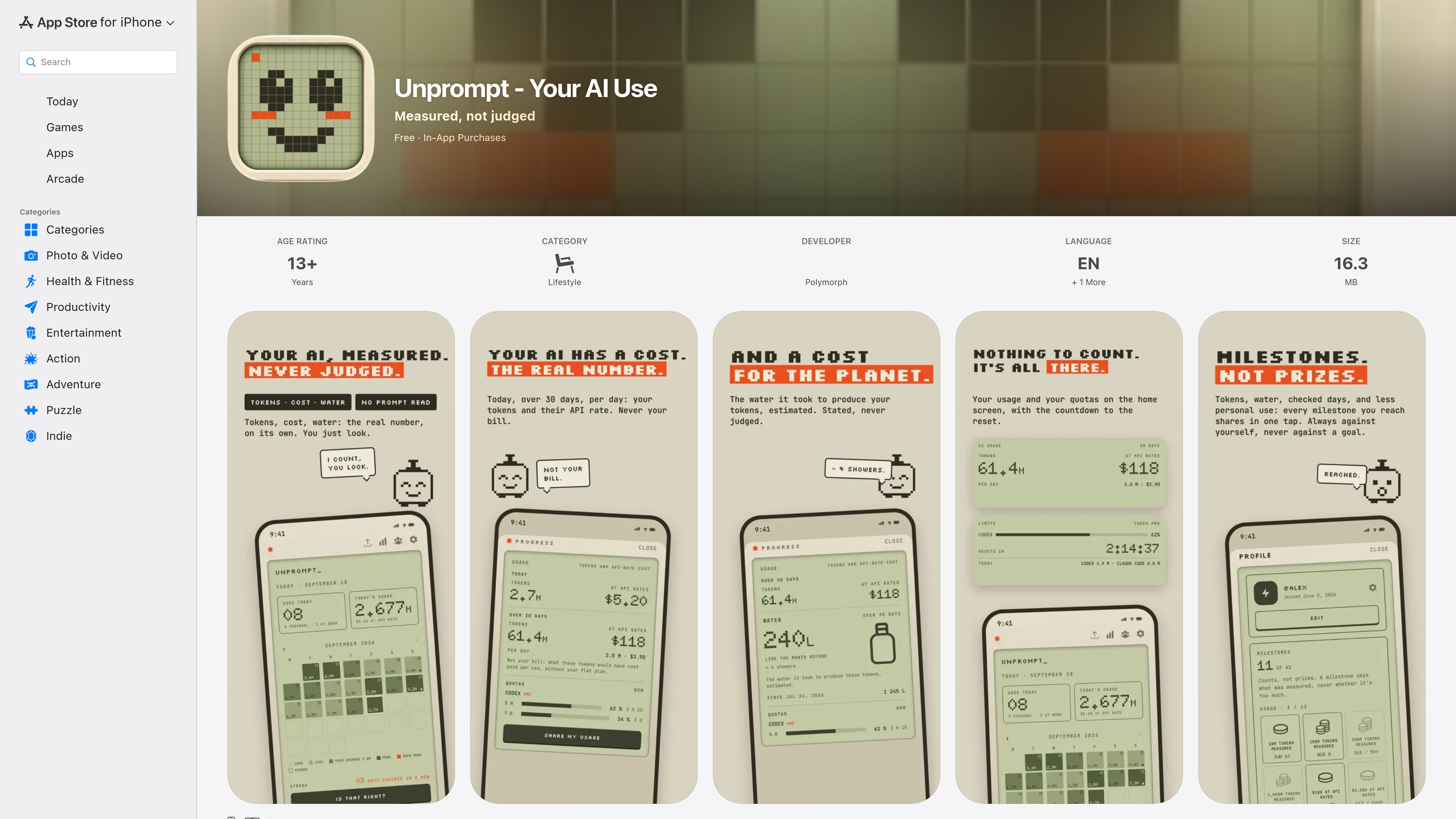
Unprompt is an iPhone and Mac app that measures AI usage through Screen Time and Mac-local data, then presents check-ins, trends, and optional sharing. Premium adds longer history and detailed token, cost, water, quota, and widget views for supported measurements.

Unprompt

AI usage measurement for iPhone and Mac

Unprompt is an iPhone and Mac app from Polymorph that measures how often you use AI and, where Mac data is available, reports token totals and related estimates. It is designed as an observation and reflection tool rather than a blocker: the app shows usage, asks for an evening check-in, and lets you decide what to do with the information.

On iPhone, usage is supplied through Screen Time after a one-time check of AI apps. The Mac companion reads local logs from AI coding tools and monitors desktop AI apps. Unprompt’s listing says it does not read conversations, store prompts, or request credentials for ChatGPT, Claude, or Gemini accounts; it focuses on when AI was used rather than the content of requests.

Key features

iPhone and Mac measurement

On iPhone, a Screen Time check counts AI-app usage; on Mac, the companion reads local logs from AI coding tools and monitors desktop AI apps. Recent version notes list support for Gemini CLI, OpenCode, Cline, Roo, Kilo, Qwen, Amp, Goose, and the ChatGPT app, while noting that Claude Code is counted once per request.

Daily check-in and work split

An evening prompt asks you to confirm personal and work usage, with options to adjust the day or add a note. Work-hour usage is displayed but excluded from the personal count.

Calendar and progress views

The calendar presents each day as a pixel with a usage number, compares the day with your own average, and tracks checked-in streaks. Premium usage views can show tokens as soon as the Mac measures them.

Token, cost, water, and quota details

Premium estimates token totals, what those tokens would have cost at API rates, and the water associated with producing them. It also shows Codex quotas and reset countdowns, with USAGE and LIMITS widgets.

Milestones without goals

The app includes 62 milestones across seven families, including measurement, usage, water, tools, setup, and social activity. Milestones describe what was measured rather than setting targets.

Optional social comparison

Friends can be added by QR code, link, or username. Shared views show trends, and rankings can use progress or tokens when users choose to share them.

Practical use cases

  • Reflect on personal AI habits

    Use the evening check-in to see how many personal AI uses occurred, confirm or adjust the day, and review changes against your own average without a preset target.

  • Separate work and personal usage

    Set work hours once so usage during those hours is shown separately rather than included in the personal calendar. This helps distinguish professional AI use from personal use.

  • Monitor developer-tool usage

    If you use AI coding tools or desktop AI apps on a Mac, let the companion read local logs and review token totals, API-rate cost estimates, quotas, and reset countdowns where supported.

  • Track longer-term trends

    Review the month as a pixel calendar, follow checked-day streaks, and use the 30-day average and yearly pixel band to understand longer-term patterns.

  • Share progress socially

    Add friends through a QR code, link, or username to compare trends or optionally shared token information without exposing exact usage numbers by default.

Pros and Cons

Pros

  • Measures AI use without requiring users to manually count sessions.
  • Combines personal-use tracking with a work-hours split and editable evening confirmation.
  • Provides calendar, trend, streak, and optional friend-sharing views without imposing a usage target.
  • Premium adds token, API-rate cost, water, quota, and widget details for supported Mac measurements.
  • The product description emphasizes local iPhone/private iCloud storage and no AI-account credentials.

Cons

  • The listing does not provide subscription or one-time-purchase amounts, and detailed usage features are limited to Premium.
  • Measurement depends on the available iPhone Screen Time data and Mac local logs; the listing does not fully document coverage or setup for every AI app.
  • Apple’s privacy disclosure says the developer may handle user content and identifiers for app functionality, although the product description says prompts and conversations are not read or stored.

FAQ

What devices does Unprompt support, and how is usage measured?

Unprompt is available for iPhone and Mac. On iPhone, you check your AI apps once and Screen Time supplies the usage count. On Mac, the companion reads local logs from supported AI coding tools and monitors desktop AI apps.

Does Unprompt read my prompts or connect to AI accounts?

No. The listing says Unprompt does not read conversations, store prompts, or request credentials for ChatGPT, Claude, or Gemini accounts. It states that the app records that AI was used and when, rather than what was asked or which app was used. Apple’s listing also says the developer may collect user content and identifiers for app functionality, and notes that these disclosures are not verified by Apple.

What is included for free, and what requires Premium?

The free version includes a seven-day calendar, today’s usage, the evening check, progress views, Mac measurement and work hours, friends, and sharing. Premium adds history beyond seven days and detailed usage information such as 30-day tokens, API-rate cost estimates, water estimates, quotas, and widgets. The listing says there is a free trial followed by either a subscription or a one-time purchase, but it does not provide amounts.

How does the daily check-in work?

Each evening, Unprompt asks you to confirm or adjust the day’s personal and work usage. Today and yesterday can be edited; older entries become fixed. You can also optionally add a note about the day.

Can I compare usage with other people?

Friends can be added by QR code, link, or username without creating an account. The social view shows trends rather than exact numbers, with rankings based on progress or tokens when those are shared. The listing does not describe team administration or workplace collaboration features.

Quick Facts

Product type
AI usage measurement and reflection app
Developer
Polymorph
Platforms
iPhone and Mac
App Store category
Lifestyle
Availability
Free download with in-app purchases; free trial, then subscription or one-time purchase
Data approach stated by product
Usage timing and counts; no prompts, conversations, or AI-account credentials requested