
Local book workspace
Open local TXT, Markdown, and EPUB files and keep reading position, bookmarks, notes, and review history associated with the correct title.

WhaleRead is a local-first macOS app for translating and reading local TXT, Markdown, and EPUB books in source, translated, or bilingual views. It suits readers and language learners who want on-device translation, reviewable AI suggestions, and passage-based questions without moving their library into a consumer cloud.
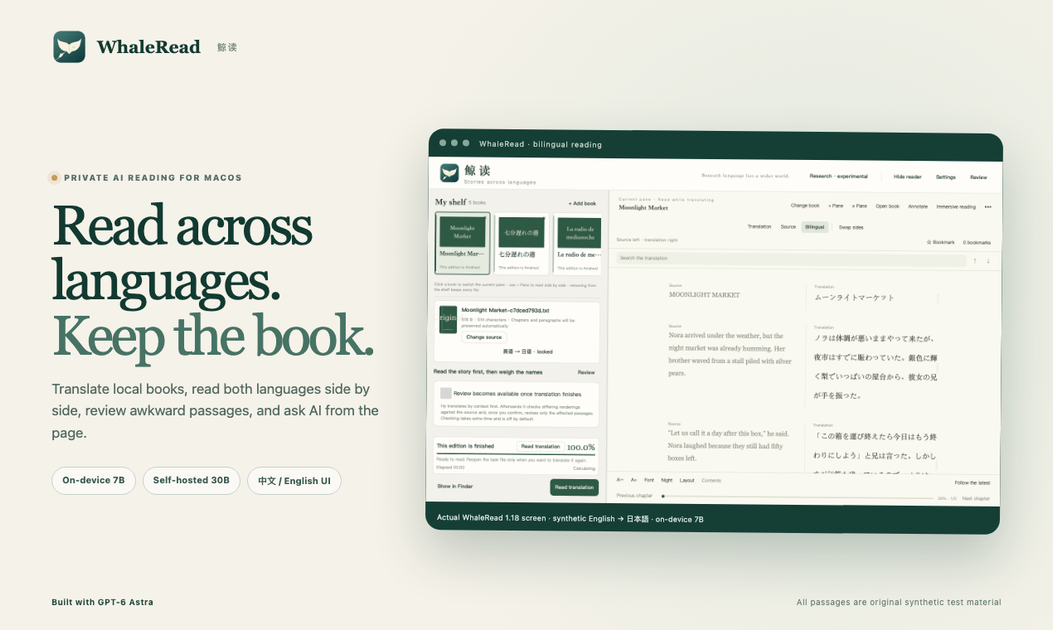
WhaleRead is a local-first macOS workspace for translating and reading books across languages. It opens local TXT, Markdown, and EPUB files, lets readers view source and translation together, and keeps reading position, notes, bookmarks, and review history with the title.
The product is designed around human-confirmed translation rather than automatic replacement. Translation suggestions remain separate from the book until they are inspected and explicitly applied, while Ask AI provides passage-aware explanations for questions about idioms, cultural references, and characters. The public preview includes on-device Hy-MT2 7B translation; a self-hosted 30B route is described as a private evaluation path, not part of the current download.
Open local TXT, Markdown, and EPUB files and keep reading position, bookmarks, notes, and review history associated with the correct title.
Run book translation with the on-device Hy-MT2 7B model in the public preview, with a separately downloaded model.
Switch between the original, translated, and bilingual views while retaining chapter position, search, bookmarks, notes, typography, images, and EPUB styling.
Highlight a questionable passage, inspect exact source evidence and model reasoning, then edit, keep, discard, or apply the suggested revision.
Ask questions about an idiom, cultural reference, or character from the reading page, choose the answer language, and save useful answers with reading notes.
Change the interface language between English and Chinese without changing the language identity of the saved reading task.
Import an EPUB, preserve its chapter structure and styling, and read the original beside a working translation while moving through the book at your own pace.
Use the bilingual view and saved position, notes, and bookmarks to study vocabulary, phrasing, and passages across two languages without switching apps.
Highlight an idiom or awkward sentence, compare the source with the model’s explanation, and save a confirmed revision only after reviewing the evidence.
Ask about a cultural reference, character, or phrase directly from the passage, preview the context being sent, and retain a useful answer with reading notes.
Keep book translation on a local Mac with the on-device model, or evaluate a separately controlled private 30B workflow when greater nuance is needed, while recognizing that the 30B route is not in the public download.
WhaleRead 1.18.1 is available for Apple silicon Macs running macOS 13 or later. The public preview is ad-hoc signed and not yet notarised by Apple; the release page provides first-open instructions and a SHA-256 checksum.
The public preview exposes on-device Hy-MT2 7B for book translation. The 7B model is downloaded separately. The source also describes a private, self-hosted 30B route used in evaluation, but that route is not included in the public download.
WhaleRead can translate local TXT, Markdown, and EPUB files, and supports source, translation, and bilingual reading modes. EPUB chapters, images, and in-book styling are preserved according to the product description.
Translation suggestions remain drafts until the reader reviews and explicitly applies them. Review records can keep the source evidence, current wording, model reasoning, and revision together.
Core reading and editing work remains on the Mac. On-device 7B translation keeps book text on the device, while Ask AI sends only to the compatible endpoint and credential configured by the user. The prepared passage is shown before sending.

Microsoft Translator is a Bing translation web app for translating short text between English and more than 100 languages. It also supports image capture translation and basic output actions like listen and copy.

Google Translate is a free translation service from Google for text, speech, images, documents, and web pages. It helps people translate and understand content across more than 100 languages in the browser or app.

LangPanda is a browser extension for learning languages from streaming video and other supported sites. It combines instant subtitle lookup, flashcard creation, vocabulary tracking, and spaced-repetition review for 36 languages.

Asụsụ Ọma is a free guided Igbo learning app for beginners, with short lessons, native-speaker audio, memory practice, games, and speaking rehearsal. It is designed for adult and young-adult learners, diaspora learners, children, and families studying Igbo at home or abroad.

Talkpal is an AI-powered language learning web and mobile app for practicing speaking, listening, writing, and pronunciation. It offers guided courses, roleplays, and call-style conversation practice across 130+ languages.

MagicSlides is an AI presentation generator that turns text, topics, documents, URLs, and videos into slide decks. It creates presentations in Google Slides by default and supports PowerPoint export, with multilingual output and AI-assisted editing.