

Lunagraph
Lunagraph es un lienzo de diseño que escribe código real en HTML, CSS y React, con ayuda de Claude Code para alinear diseño e implementación.
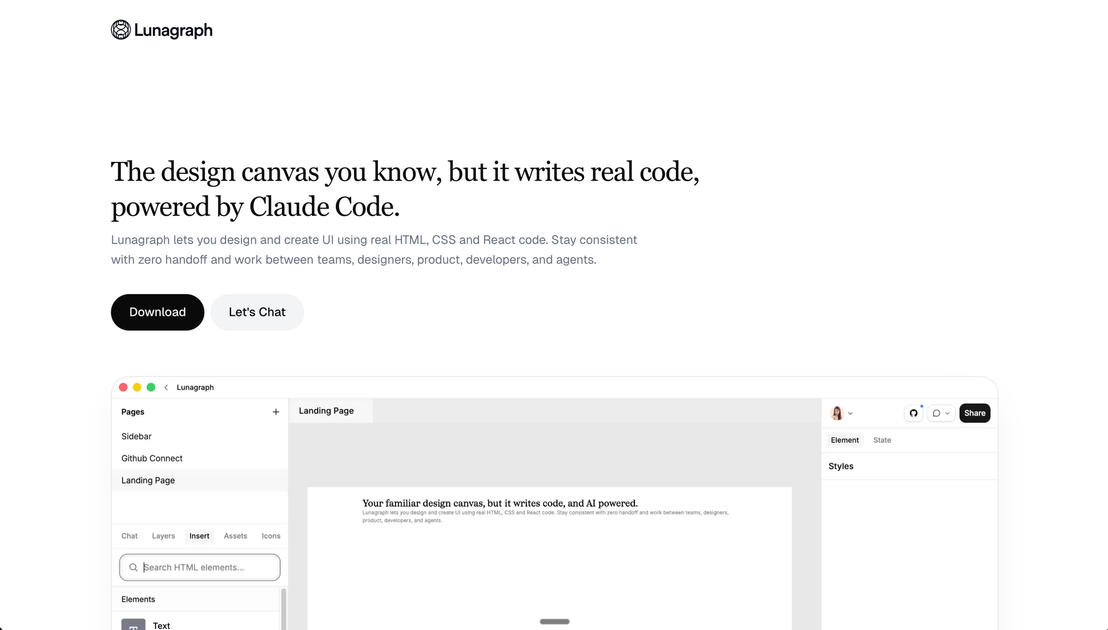
¿Qué es Lunagraph?
Lunagraph es un lienzo de diseño para crear interfaces de usuario con código real en HTML, CSS y React. Su propósito principal es ayudar a los equipos a diseñar e implementar UI manteniendo el diseño alineado con el código entregado, reduciendo las brechas de “handoff”.
En lugar de tratar el diseño como un entregable separado que alguien más debe traducir en componentes, Lunagraph posiciona el entregable como el código en sí, con asistencia de IA proporcionada por Claude Code.
Características clave
- Diseña directamente en código real (HTML, CSS, React): El trabajo en el lienzo se refleja en markup y componentes reales, por lo que la salida corresponde a lo que se ejecutará.
- Flujo de trabajo sin handoff para equipos de UI: La plataforma está diseñada para mantener consistencia entre diseñadores, producto, desarrolladores y agentes sin necesidad de un paso de traducción del diseño a la implementación.
- Asistencia contextual impulsada por Claude Code: El compañero de IA puede trabajar con el panorama completo, incluyendo el lienzo y el codebase existente.
- Round trip de lienzo + chat + repo local: El chat accede al lienzo y al codebase local, e incluye implementar cambios directamente en un repositorio y previsualizar resultados.
- Vista previa en vivo y comparación de capturas: El flujo descrito previsualiza en un iframe en vivo y usa capturas del diseño y la salida para comparar.
- Actualizaciones de componentes en repo desde cambios de diseño: Los ejemplos incluyen generar componentes como
PricingCardy actualizar archivos como un componente de tabla de comparación de funciones.
Cómo usar Lunagraph
- Comienza desde un lienzo de diseño: Inicia diseñando elementos de UI en el lienzo.
- Usa el chat integrado para ayuda en implementación: Pide cambios refiriendo al lienzo y el contexto del repositorio.
- Deja que la IA implemente en tu repo: El flujo descrito incluye escribir directamente en tu codebase local.
- Previsualiza y verifica: Usa la previsualización en iframe en vivo y captura tanto el lienzo/diseño como la salida de UI resultante para comparar.
- Itera en componentes: Aplica más actualizaciones solicitando refactorizaciones o ajustes de funciones (por ejemplo, dividir una barra lateral en componentes más pequeños).
Casos de uso
- Creación de UI de diseñador a implementación: Un diseñador crea layouts de UI en el lienzo y asegura que el código resultante use HTML/CSS/React real en lugar de un archivo de diseño separado.
- Flujo de equipo sin fricciones de handoff: Un equipo mixto (diseño, producto, desarrollo y agentes) trabaja en el mismo flujo para reducir pasos de traducción entre roles.
- Refactorización de componentes complejos con asistencia de IA: Cuando un componente se vuelve demasiado complejo (p. ej., una barra lateral), el chat ayuda a reestructurarlo en componentes más pequeños y agregar comportamientos como un toggle de colapso.
- Actualización de páginas existentes desde intención de diseño: Usa una captura o referencia de paleta para actualizar secciones de UI y que la salida coincida con el layout y estilo esperado.
- Construir UI de precios/funciones desde diseños de lienzo: Genera componentes para tarjetas de precios y tablas de funciones, luego intégralos en layouts de página y actualiza markup de tablas existentes.
Preguntas frecuentes
-
¿Qué código genera o usa Lunagraph? Lunagraph genera y trabaja con código real en HTML, CSS y React.
-
¿Lunagraph depende de un handoff de archivo de diseño separado? El sitio enfatiza un flujo de “zero handoff”, donde el entregable es el código en sí, no un archivo de diseño que deba traducirse.
-
¿Qué significa “impulsado por Claude Code” en este flujo? El contenido indica que Claude Code actúa como un compañero de diseño creativo que considera el lienzo y el codebase local, apoyando tareas de implementación a través del chat.
-
¿Cómo verifican los usuarios que el diseño coincide con la salida? El flujo descrito incluye previsualizar en un iframe en vivo y capturar el lienzo y el resultado renderizado para comparar.
-
¿Puede la IA leer y escribir en un repositorio local? La página incluye un ejemplo de “AI File Access” con rutas de filesystem para lectura/escritura fuera del proyecto, sugiriendo integración con repo local, pero no se proporcionan detalles adicionales.
Alternativas
- Herramientas de diseño de propósito general (estilo Figma) + implementación separada por desarrolladores: Esto mantiene el diseño y el código en herramientas y flujos de trabajo diferentes, lo que requiere traducir archivos de diseño a componentes.
- Constructores de UI centrados en código (editores de componentes React) sin lienzo de diseño: Estos se centran en construir directamente en código de UI, pero pueden no ofrecer un lienzo diseñado para capturar y comunicar la intención de diseño de la misma manera.
- Asistentes de codificación con IA integrados en un IDE: Estos pueden ayudar a generar o refactorizar código, pero típicamente no combinan un lienzo de diseño, comparación en vista previa de iframe en vivo y el bucle “lienzo + chat + repositorio” descrito aquí.
- Herramientas de prototipado de UI que exportan componentes o estilos: Estas buscan unir diseño e implementación, pero el enfoque puede seguir implicando exportación o conversión en lugar de producir código como entregable principal.
Alternativas

ClawTick
ClawTick es una plataforma de automatización de agentes con IA por CLI para programar tareas con webhooks en cron: monitoreo, alertas, reintentos y logs.

Falconer
Falconer es una plataforma de conocimiento autoactualizable para equipos ágiles: escribe, comparte y encuentra documentación interna y contexto de código en un solo lugar.

OpenFlags
OpenFlags es un sistema de feature flags open source y autohospedado con control plane y SDKs para evaluaciones locales y rollouts progresivos.

skills-janitor
skills-janitor audita y registra el uso de tus habilidades de Claude Code, comparándolas con 9 acciones de slash y sin dependencias.

Devin
Devin es un agente de IA para programar que ayuda a equipos a completar migraciones y refactorizaciones grandes en paralelo, con aprobación humana.

MakerLoft
MakerLoft es un generador de apps con IA para no desarrolladores: se conecta a tu GitHub y crea apps con auth, pagos y panel admin.