

Radar
Radar es una UI open-source de Kubernetes para inspeccionar topología, eventos, lanzamientos de Helm y estado GitOps en uno o varios clústeres.
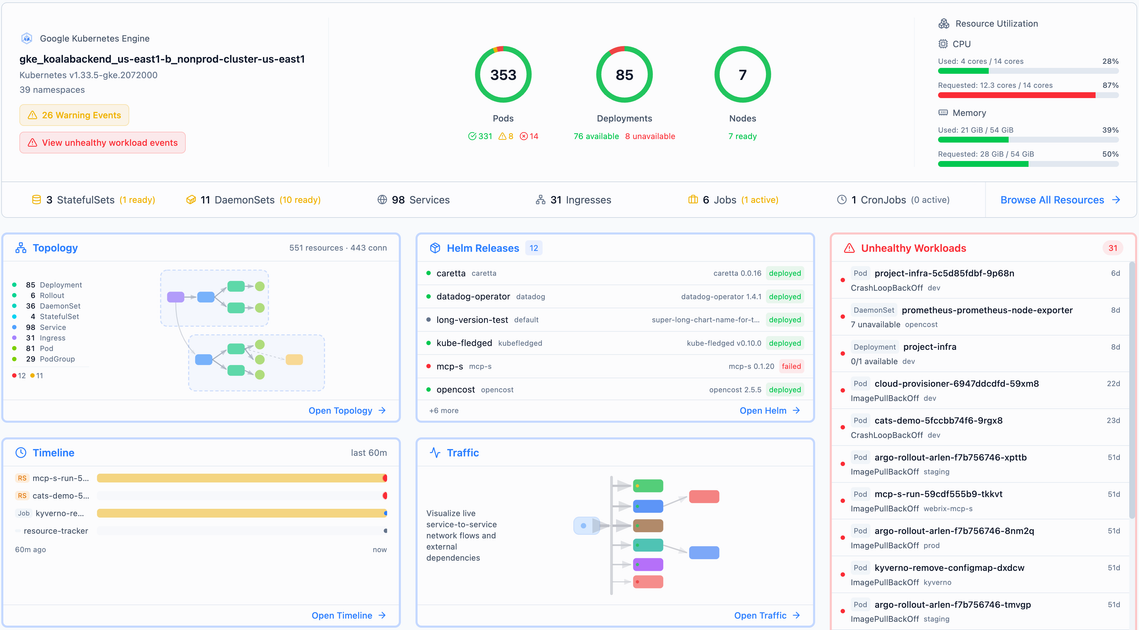
¿Qué es Radar?
Radar es una UI open-source de Kubernetes diseñada para facilitar la comprensión y depuración de operaciones multi-clúster en comparación con usar solo kubectl. Proporciona una interfaz gráfica para inspeccionar la topología del clúster, eventos, cargas de trabajo y señales operativas relacionadas en clústeres conectados.
El proyecto se puede ejecutar como un único binario Go localmente o autoalojado en un clúster de Kubernetes, con licencia Apache 2.0 y sin necesidad de cuenta para la versión OSS. Radar Cloud es una oferta separada que añade capacidades no destinadas a un binario único, como agregación de flotas, retención persistente, alertas enrutadas, SSO y registros de auditoría.
Características principales
- Vistas de topología y dependencias: Visualiza relaciones de servicios en vivo (incluyendo tráfico este-oeste y flujos de ingress) para entender cómo se conectan los componentes.
- Línea de tiempo y exploración de eventos: Inspecciona eventos de Kubernetes y retrocede en la línea de tiempo para rastrear lo que ocurrió durante un incidente.
- Visibilidad de cargas de trabajo y versiones: Busca en clústeres y compara versiones de cargas de trabajo lado a lado.
- Inspección de charts/lanzamientos de Helm: Ve el historial de lanzamientos de Helm como revisiones y archivos de valores, y audita qué cambió entre revisiones.
- Visibilidad GitOps con Argo CD y Flux: Ve el estado de sincronización de aplicaciones junto con los recursos que produjeron, con soporte nativo para Argo CD y Flux.
- Inspección de imágenes (visor de sistema de archivos de imágenes): Inspecciona imágenes de contenedores, incluyendo un visor de sistema de archivos, para examinar contenidos durante la depuración.
- Auditorías de clúster y acciones relevantes para seguridad: Usa vistas de auditoría (incluyendo el concepto de “registros de auditoría” en Radar Cloud) para revisar cambios y acciones privilegiadas.
- MCP para agentes de IA: Expone funcionalidad mediante “MCP for AI agents”, permitiendo que agentes de IA interactúen con Radar.
Cómo usar Radar
- Elige el modo de instalación: Ejecuta Radar como una herramienta local o autoalójalo en tu clúster. El sitio lista opciones de instalación como un script de shell de una línea (vía
curl+sh), Homebrew, una app de escritorio e instalación en clúster. - Conecta a Kubernetes: Para el camino autoalojado/en clúster, instala Radar y úsalo desde tu entorno; para uso local, ejecútalo con acceso a tu contexto de Kubernetes.
- Comienza con búsqueda y navegación: Usa la búsqueda de la UI para encontrar recursos por nombre, etiqueta o tipo en clústeres conectados, luego abre la carga de trabajo o recurso relevante para ver línea de tiempo, contexto de topología y detalles relacionados.
Casos de uso
- Resolución de incidentes sin SSH y exploración de logs: Cuando salta una alerta (por ejemplo, un pod que falla en un namespace desconocido), busca en tus clústeres, salta a logs y sigue la línea de tiempo de eventos desde la misma UI.
- Visión general “¿qué está fallando?” a nivel de flota: Obtén una vista única de pods fallando, certificados expirando, paquetes desviados o verificaciones de salud fallidas en múltiples clústeres en lugar de revisar cada clúster por separado.
- Depuración de sincronización GitOps: Si una aplicación no alcanza el estado esperado, usa el soporte de Argo CD/Flux para inspeccionar el estado de sincronización junto con los recursos producidos.
- Auditoría de cambios de Helm y preparación para rollback: Cuando los lanzamientos cambian inesperadamente, revisa revisiones de Helm y archivos de valores, compara qué cambió entre revisiones e identifica la revisión anterior para hacer rollback.
- Análisis de tráfico y topología para dependencias de servicios: Inspecciona gráficos de tráfico en vivo (tráfico este-oeste, flujos de ingress y salud de certificados TLS) para entender qué servicios dependen de otros.
Preguntas frecuentes
¿Es Radar open-source?
Sí. La página indica que Radar es de código abierto y está licenciado bajo Apache 2.0.
¿Necesito una cuenta para usar la versión OSS?
No. El sitio indica que la experiencia OSS de binario único no requiere cuenta.
¿Puede Radar ejecutarse localmente o en clúster?
Sí. Se puede ejecutar localmente como un binario único o autoalojado en tu clúster.
¿Qué añade Radar Cloud comparado con el binario OSS?
La página describe que Radar Cloud añade agregación de flotas, retención persistente, alertas enrutadas, SSO y registros de auditoría: funciones más allá de lo que un binario único puede hacer razonablemente.
¿Se integra Radar con herramientas GitOps?
Sí. Lista soporte nativo para Argo CD y Flux para ver el estado de sincronización y los recursos producidos.
Alternativas
kubectl(y complementos de kubectl): Ideal cuando necesitas inspección directa desde la línea de comandos para un solo clúster o una consulta puntual rápida; carece de la navegación consolidada en UI multi-clúster descrita para Radar.- Otras UI de paneles/monitoreo de Kubernetes: Otras UI alternativas pueden ofrecer vistas similares a topología e inspección de eventos/cargas de trabajo, pero la página de Radar destaca su alcance combinado (topología, Helm, GitOps, auditorías, inspección de imágenes) y enfoque OSS de binario único.
- Herramientas de agregación de flotas: Para organizaciones enfocadas en gestionar múltiples clústeres con vistas centralizadas, estas herramientas pueden superponerse con el flujo de trabajo orientado a flotas de Radar, aunque Radar Cloud se centra específicamente en agregación de flotas y retención.
- Paneles centrados en GitOps: Si tu necesidad principal es el estado de aplicaciones GitOps, los paneles nativos de GitOps pueden enfocarse en sincronización/estado, mientras que el posicionamiento de Radar también incluye visibilidad de lanzamientos de Helm, topología y contexto más amplio de depuración de incidentes.
Alternativas

FounderStackHub
FounderStackHub usa un agente de IA siempre activo para escanear la web, verificar y encontrar ventajas para startups según tu etapa y stack de herramientas.

Elvixs
Elvixs es una herramienta de outreach laboral con IA para recién graduados y estudiantes: encuentra contactos de RR. HH., genera emails fríos y rastrea aperturas.

Gossipic
Gossipic rastrea con qué frecuencia tu marca aparece en respuestas de AI, analiza el sentimiento, compara competidores y crea planes diarios. Prueba 7 días.

SnapSub: Subscriptions Hub
SnapSub: Subscriptions Hub centraliza tus suscripciones recurrentes, te muestra cuándo facturan y ofrece informes para revisar tu gasto.

Abakada
Abakada es el directorio curado de herramientas gratis y de código abierto en Filipinas: 1.000+ listados verificados en 45+ categorías para estudiantes y educadores.

Been There Global
Been There Global comparte historias reales de viajeros para que sepas antes de ir y planifiques tus viajes con más confianza.