

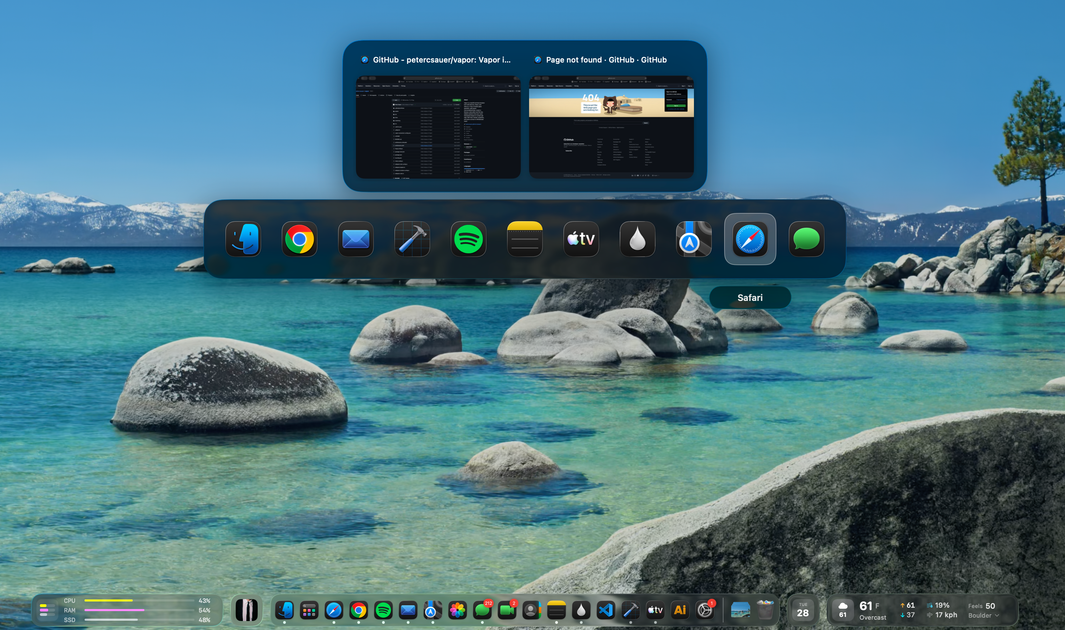
Live Dock previews
Hover an app in the Dock to see live window thumbnails before switching. The previews use ScreenCaptureKit and include minimized and off-screen windows, not just visible ones.
docktor is a macOS utility that turns the Dock into a control surface for app switching and at-a-glance information. It adds live window previews, a thumbnail-based Cmd+Tab switcher, and glass-style widgets for music, calendar, weather, and system stats.
The product is described as a free public pre-release for macOS 26.0 (Tahoe) or later, delivered as a universal build with no account required. The homepage also emphasizes a local-first design and scoped permissions so each feature only asks for the access it needs.
Hover an app in the Dock to see live window thumbnails before switching. The previews use ScreenCaptureKit and include minimized and off-screen windows, not just visible ones.
Replace the standard Cmd+Tab picker with window thumbnails so you can identify the right app window before activating it.
Show current playback next to the Dock and use the drawer for transport controls, queue and playlists. The music widget works with Spotify and Apple Music, and can display synced lyrics when available.
Display the next Apple Calendar event with a countdown in the Dock area, then show the rest of the day in the drawer. The widget reads calendar data through EventKit and can open the meeting link when the countdown ends.
Surface current weather in the bar and a 12-hour forecast in the drawer using Open-Meteo data, including temperature, condition, precipitation chance, humidity, wind, UV index, and sunrise/sunset details.
Monitor CPU, memory, and disk usage beside the Dock, with drawer pages for deeper charts, top processes, and sparklines based on local system counters.
Use the Dock hover previews when you keep many windows open and want to identify the right one before switching, especially if the frontmost app icon alone is not enough.
Use the music widget when you want playback controls close at hand while working, without opening a separate media app or switching context.
Use the calendar and weather widgets when you want a quick glance at the next meeting and current conditions before starting the day or stepping into a call.
Use the system stats widget when you want to watch CPU, memory, or disk pressure without opening Activity Monitor or another monitoring tool.
Use the Dock-centered widgets when you prefer a lighter-weight workflow that keeps common controls and status information in one place instead of spreading them across multiple windows.
docktor is designed to run on macOS 26.0 (Tahoe) or later. The homepage presents it as a universal build and a public pre-release.
The source describes docktor as free and a public pre-release, with no account required for core features.
docktor uses ScreenCaptureKit for live window thumbnails, EventKit for Apple Calendar events, Open-Meteo for weather, and Apple Events for Apple Music playback. Spotify support is mentioned through the Web API.
The homepage says docktor is local-first and that optional prompts stay scoped to the feature you turn on. It also says there is no Google OAuth and no account required.
docktor adds Dock previews, a Cmd+Tab switcher with live window thumbnails, and floating widgets for music, calendar, weather, and system stats. It is meant to make the Dock a control surface rather than replace macOS.

Malyatko is a baby tracker for logging feeding, sleep, growth, teething, and milestones in one app. It works on iPhone, Apple Watch, and widgets, with no sign-up, offline use, and family sharing through iCloud.

Yattayo: Slider To-Do Board is a productivity app that turns tasks into a physical-style slider board with sticky notes, widgets, reminders, and iCloud sync. It helps people who want a more tactile way to manage to-dos and, in Premium, recurring habits.

ConscioussAI is an AI assistant for macOS, Windows, iOS, and Android that helps execute tasks across apps, files, the browser, and messages. It is aimed at people who want permission-based help on both desktop and mobile.
MealTime은 레시피 저장, 정리, 식단 계획 및 스마트 식료품 목록 생성을 돕도록 설계된 개인용 오프라인 우선 레시피 동반자 앱으로, 사용자의 데이터를 비공개로 유지합니다.

Goldfish is an AI memory app for macOS that helps you reply, write, summarize, and continue using the context already on your Mac. It stores memory locally and writes in your tone.

ArtDeck is a visual reference board app for iPhone, iPad, and Mac that lets artists collect mixed reference material on one canvas and study it with ToolBox lenses. It works offline, supports optional iCloud sync, and is sold as a one-time purchase with no account required.