
AI demand forecasting
Use historical sales, inventory levels, and supplier behavior to forecast future demand from patterns such as sales velocity and seasonality.

flowSMB is an AI-powered inventory management tool for small and medium businesses. It analyzes uploaded sales, inventory, and purchase order CSVs to generate forecasts, alerts, and recommended actions.
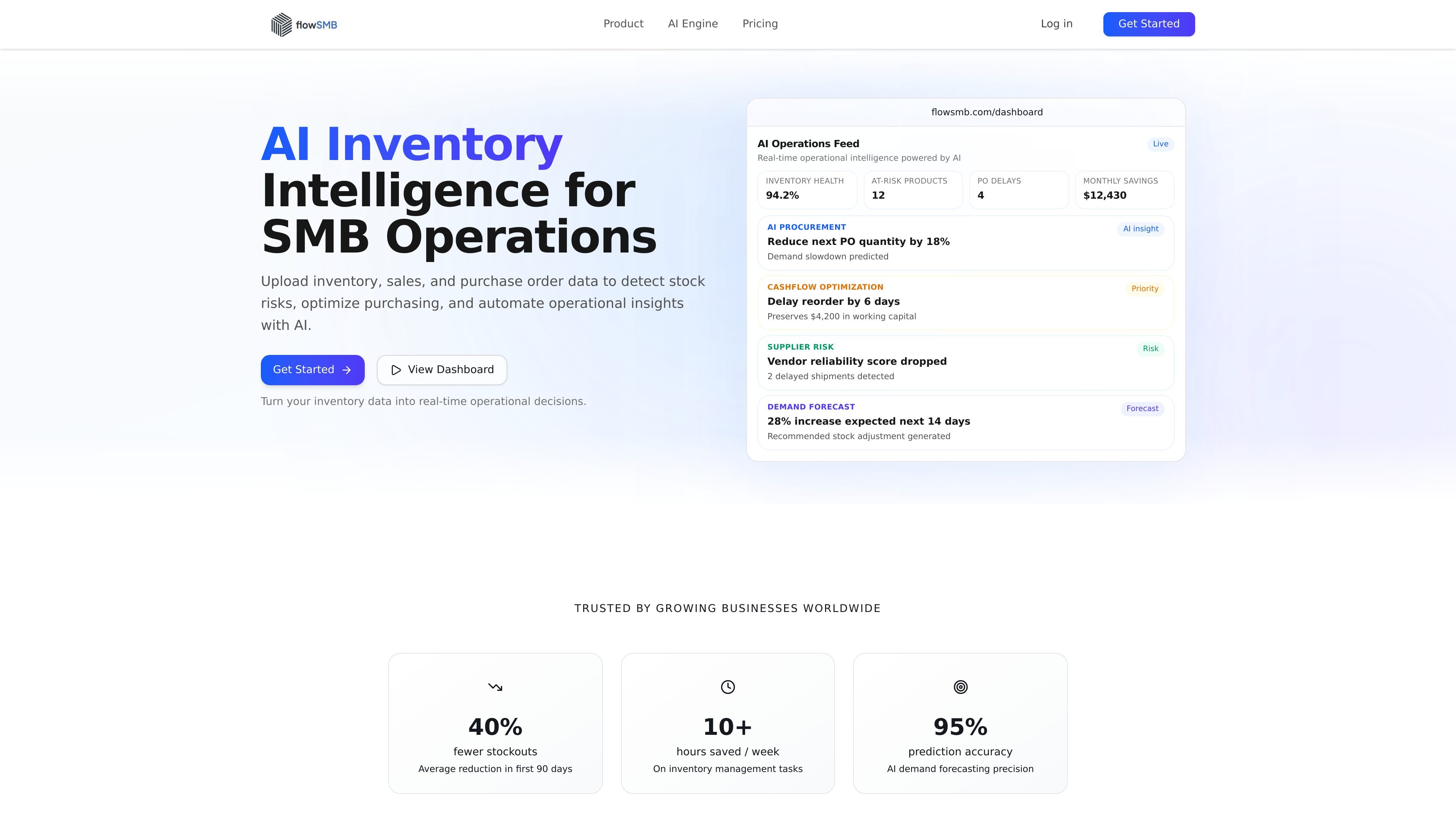
flowSMB is an AI-powered inventory management tool for small and medium businesses. It is designed to turn uploaded sales, inventory, and purchase order data into forecasts, alerts, and recommended actions.
The product positions itself as an alternative to manual spreadsheets for teams that need faster inventory decisions. Its core workflow is simple: upload CSV data, let the AI analyze patterns, and then review daily operational actions in a dashboard or feed.
Use historical sales, inventory levels, and supplier behavior to forecast future demand from patterns such as sales velocity and seasonality.
Turn uploaded data into recommended purchase orders using lead times, minimum order quantities, and predicted demand.
Get alerts for stockouts, overstocks, slow-moving items, purchase-order delays, and supplier reliability changes before issues become costly.
Review live dashboards for inventory health, turnover, financial impact, open purchase orders, and AI savings estimates.
Receive prioritized actions such as reorder, discount, bundle, or discontinue, instead of only charts and summaries.
Upload CSV files directly, with the site stating that no integrations, APIs, or developer work are required for the basic workflow.
Teams that manage inventory in spreadsheets can upload CSVs and use the resulting forecasts and alerts to reduce manual tracking.
Operators who need to avoid stockouts can review demand forecasts and reorder suggestions before inventory runs out.
Businesses that tie up too much cash in excess stock can use overstock alerts and discount or bundle recommendations to reduce dead inventory.
Procurement or operations staff can use supplier reliability signals, lead-time awareness, and purchase-order suggestions to manage replenishment decisions.
Leaders who want a quick view of operational risk can monitor dashboard metrics such as inventory health, open purchase orders, and AI savings estimates.
flowSMB lets users sign up for a 7-day free trial. The site also shows sign-in and password reset flows, which suggests account access is required to use the product.
The homepage says flowSMB works by uploading sales and inventory CSV files. It explicitly states there are no integrations, no APIs, and no developer setup needed for that workflow.
The source describes flowSMB as producing prioritized daily actions, live dashboards, AI demand forecasts, purchase order suggestions, and risk alerts for stockouts, overstocks, suppliers, and cash flow.
The source does not list any supported accounting, ERP, or ecommerce integrations. The homepage explicitly says 'No integrations, no APIs' for its core upload workflow.

EchoTik은 판매자와 전자상거래 제작자가 제품 선택 및 시장 분석을 위한 데이터 기반 결정을 내리는 데 도움을 주기 위해 설계된 TikTok 전자상거래 데이터 분석 플랫폼입니다.

PromptScout tracks how ChatGPT, Gemini, Google AI Overviews, and Perplexity mention your brand or competitors, then pairs those results with source analysis and website audits. It helps teams decide what to fix in content, positioning, or site readiness next.

Lasso is an ecommerce product data platform for enriching catalog records, processing supplier files, generating product content, and monitoring competitors. It combines a web app with a REST API, SDK, and MCP server for teams and developers.

SaveMRR is a Stripe retention tool for SaaS teams that scans billing data for churn and MRR leaks, then automates recovery through dunning, cancel-save offers, win-back emails, and onboarding nudges. It is built for founders and bootstrapped teams using Stripe.

Hype is a web tool for finding trending YouTube topics by category, time range, and scoring mode. It helps creators spot emerging ideas, inspect source videos, and decide what to cover next.

DailyPlay.ai is a behavioral growth platform that uses AI site scanning and micro-games to help brands improve engagement and conversion. It supports web, mobile, and other digital touchpoints, with a one-line script setup and a free engagement scan.