

Card-based knowledge storage
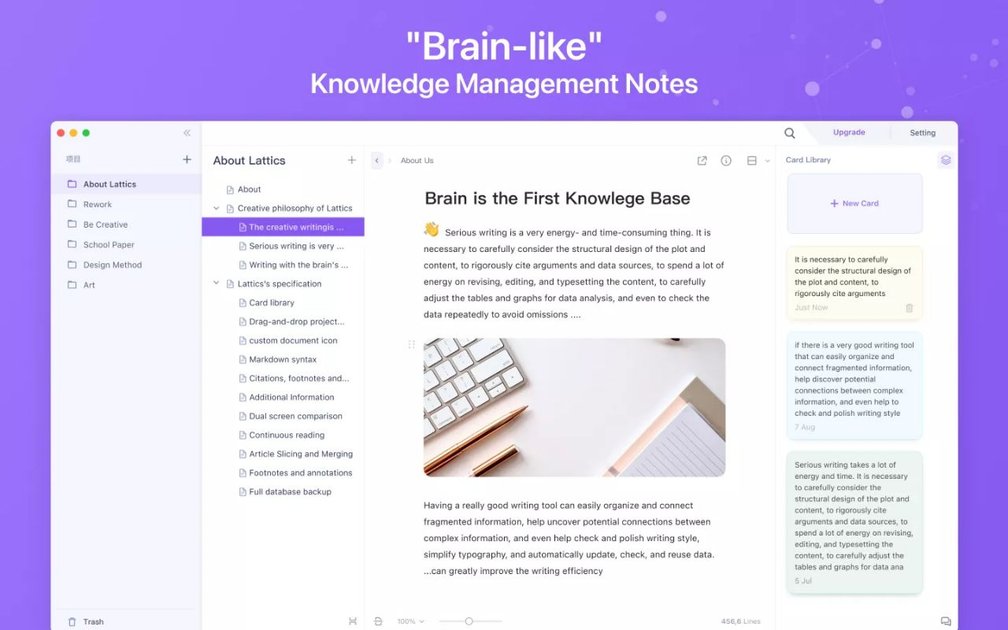
Store ideas as small cards instead of forcing them into rigid files. Cards can hold quotes, notes, data points, character details, and other fragments, then be dragged into articles when you are ready to write.
Lattics is a knowledge management and writing app for macOS and Windows that organizes work around cards, links, and project outlines rather than traditional folders. It is presented as a “brain-like” tool for researchers, students, writers, professors, and other knowledge workers who need to collect material, connect ideas, and turn notes into finished documents.
The site positions Lattics for academic research, thesis writing, analytical reports, novel writing, and related long-form work. Its workflow combines local storage, optional encrypted cloud sync, visual organization tools, citation support, and AI-assisted editing so users can move from fragments to drafts in one workspace.
Support on the site includes card libraries, graph and timeline views, PDF translation, OCR, bibliography generation, LaTeX formulas, and export to common formats such as PDF, Word, Markdown, and ePub. The product also emphasizes privacy and offline-first storage, with no account required to begin using it.
Store ideas as small cards instead of forcing them into rigid files. Cards can hold quotes, notes, data points, character details, and other fragments, then be dragged into articles when you are ready to write.
Connect projects, articles, and cards in a multi-level structure. The app supports inline references, backlinks, hierarchical tags, and citation-style linking so related material can be reused across different pieces of work.
Turn a project outline into a linear reading view with Sequence Reading. This mode concatenates articles into one flowing document so you can review, reorder, and edit without leaving the project structure.
Use the built-in AI tools for translation, proofreading, rewriting, creative writing, and conversation. The site also says AI responses can be edited, tracked through version control, and processed across multiple articles.
Work with academic material through automatic bibliography generation, CSL styles, PDF annotation, OCR recognition, and Zotero import via the Better BibTeX plugin. The site also mentions formula handling and layout templates for journals.
Present research or planning data with tables, charts, timelines, and graph views. The product page says charts update in real time from table data and that the graph area offers mind map, plot, and aerial views.
Collect quotes, ideas, and references as individual cards, then drag them into an article outline when you are ready to draft. This fits research-heavy work where source material needs to stay reusable across multiple documents.
Plan and write a thesis, paper, or report with citations, bibliography generation, journal layout templates, and PDF annotation. The app is designed to keep literature, notes, and drafting in the same environment.
Outline a novel or screenplay with graph views, timelines, and sequence reading. These tools help turn scattered scenes or characters into a readable structure you can reorder as the story develops.
Prepare analytical reports or presentations with tables, charts, and interactive data sheets. The chart view updates from table changes in real time, which is useful for finance, consulting, and research reporting.
Translate or revise draft text with built-in AI tools, then edit the generated output directly while changes are tracked. This supports writers who want assistance without leaving the document they are working on.
Yes. The product page states that Lattics is free to start with a basic plan and that no credit card is needed. The purchase page also presents a Basic (free) plan alongside a Pro plan.
Lattics is available for macOS and Windows. The site offers a download for macOS and also lists Windows availability.
Lattics is designed for individual writing and knowledge work, with local storage first and no registration required. The sources do not describe built-in real-time collaboration features.
The site says Lattics can export to PDF, Word/DOCX, TXT, Markdown, PNG, and ePub, and it can generate citations and bibliographies in CSL styles. These outputs are intended for academic and long-form writing workflows.
The site describes Lattics as local-storage-first with optional third-party cloud synchronization that is end-to-end encrypted. It also says you can back up the full library manually or on a schedule.

Falconer is an AI-powered company brain that keeps internal documentation accurate, searchable, and up to date by syncing with tools like GitHub, Slack, and Linear. It helps engineering and cross-functional teams centralize knowledge and answer questions from a shared source of truth.

recall is an AI flashcard app that turns reading and notes into study cards through Claude, ChatGPT, or another MCP client. It uses one-time lifetime access pricing and spaced repetition review.

Goldfish is an AI memory app for macOS that helps you reply, write, summarize, and continue using the context already on your Mac. It stores memory locally and writes in your tone.

Flunkey is a voice-first productivity layer for Windows that converts speech into text, AI-assisted outputs, and remembered context. It is built for users who want to capture ideas and actions without leaving the app they are working in.

Lasso is an ecommerce product data platform for enriching catalog records, processing supplier files, generating product content, and monitoring competitors. It combines a web app with a REST API, SDK, and MCP server for teams and developers.

ArtDeck is a visual reference board app for iPhone, iPad, and Mac that lets artists collect mixed reference material on one canvas and study it with ToolBox lenses. It works offline, supports optional iCloud sync, and is sold as a one-time purchase with no account required.