灵图 AI 辅助设计平台 icon

灵图 AI 辅助设计平台

灵图 AI 辅助设计平台是一款面向电商设计与素材生成的在线工具,支持换背景、AI 模特图、AI 试衣、抠图、擦除、放大和多种创意生图方式。它帮助设计师、电商运营和内容创作者更快完成商品展示、POD 上架和视觉素材加工。

灵图 AI 辅助设计平台

灵图 AI 辅助设计平台

Lingtu AI Design Assistance Platform is an online intelligent design tool provided by Lingtu Technology, with the page focusing on e-commerce design, asset generation, and general creative workflows. It combines product image processing, model display, virtual try-on, background replacement, cutout, and asset generation in one platform, making it easy for users to start from a single image or a short description and complete a design.

From the public page, this platform is aimed both at e-commerce launches and product presentation, and also covers POD batch design, general creative asset generation, and some visual creation scenarios. It emphasizes Chinese interaction, online tutorials, and no environment setup, making it suitable for designers and content creators who want to reduce repetitive work and improve output efficiency.

Features

Multi-scenario e-commerce design entry

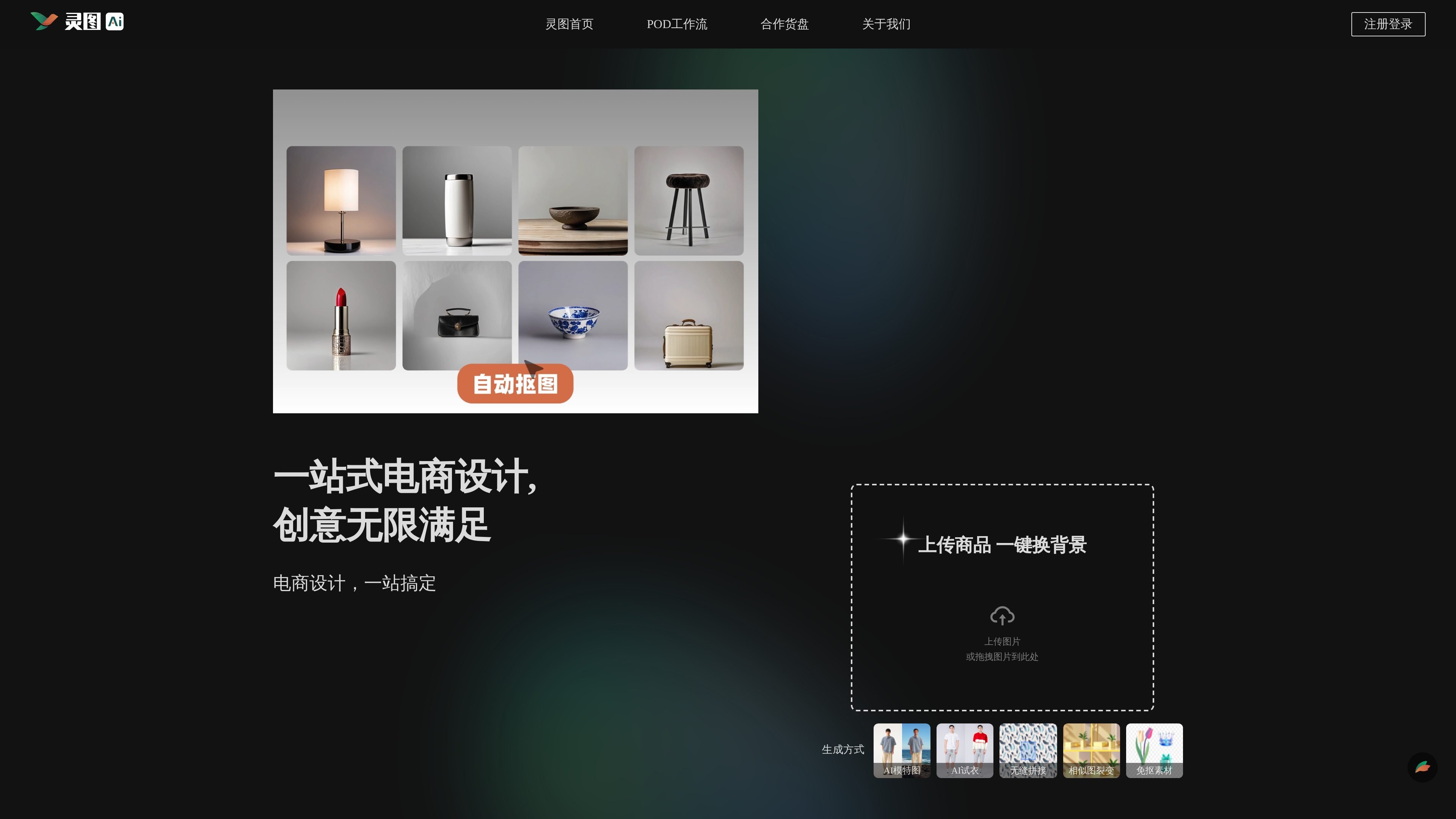
Supports uploading images or dragging images into the generation flow, with direct entry points for background change, AI model shots, AI try-on, seamless stitching, similar-image variation, and background-free assets, covering common e-commerce design tasks.

Product display and try-on processing

Provides product image background changes, one-click face/background/skin changes for real model photos, and one-click try-on for flat-laid clothing, helping users quickly produce different visual versions around product presentation.

Efficient asset editing tools

Provides one-click cutout, intelligent erasing, lossless upscaling, canvas expansion, intelligent replacement, and line-art extraction tools for removing backgrounds, removing watermarks, filling in missing areas, and improving asset usability.

Multiple creative generation methods

Supports text-to-image, image-to-style, similar-image variation, pose generation, product background generation, and human pose changes, suitable for a step-by-step workflow from inspiration to usable visuals.

Broad coverage of design assets

The page explicitly states that asset generation covers illustration, 3D, photography, e-commerce, and logo types, and that it can be used in e-commerce, graphic posters, game art, picture books, and brand design scenarios.

Use Cases

  • E-commerce product presentation

    Used for changing product image backgrounds, filling in main images, and presenting multiple versions to help e-commerce teams quickly prepare launch assets.

  • Apparel and model presentation

    Used for real model photo processing and virtual try-on, suitable for clothing, styling, and apparel presentation.

  • POD batch design

    Used for batch design, collection, print extraction, variation generation, mockup creation, and title generation workflows, aimed at POD listing and fulfillment needs.

  • Creative asset generation

    Used for text-to-image, similar-image variation, pose generation, and style conversion, helping designers quickly turn concepts into editable assets.

  • Image retouching and secondary processing

    Used for cutout, watermark removal, impurity removal, lossless upscaling, and line-art extraction, suitable for quick editing and refinement of existing images.

Pros and Cons

Pros

  • Covers e-commerce design, POD workflows, and general asset generation, with a relatively centralized entry point.
  • Provides a complete editing chain from cutout, erasing, and upscaling to replacement, background change, and line-art extraction.
  • Supports multiple creative generation methods such as text-to-image, similar-image variation, and pose generation.
  • The page emphasizes a simple Chinese interface and online tutorials, lowering the learning curve.

Cons

  • The public page does not provide clear pricing, plans, or free trial information.
  • There is limited explanation of team collaboration, external integrations, and platform connectivity.
  • Some capabilities are presented as feature entry points, and the exact output limits and parameter ranges are not fully disclosed.

FAQ

Do I need to install software to use Lingtu?

The Lingtu AI Design Assistance Platform provides a range of online design and image generation capabilities, suitable for users who need to quickly create e-commerce assets, product display images, and general creative materials. The page does not show any need for local installation, and it emphasizes "simple Chinese interaction" and online tutorial support.

Is it suitable for individuals or teams?

The page shows entry points for e-commerce design, POD workflows, general design workflows, and an AI toolbox, indicating that it can be used for one-off creation as well as a more complete design process. The public content does not explain specific collaboration permissions or team plan details.

What types of images can it generate or process?

Visible capabilities include background changes for e-commerce product images, AI model shots, AI try-on, seamless stitching, similar-image variation, one-click cutout, intelligent erasing, lossless upscaling, canvas expansion, intelligent replacement, and line-art extraction. Other pages also mention text-to-image, image-to-style, pose generation, product background generation, and human pose adjustment.

What creative scenarios is it best for?

It is suitable for starting from product images, sketches, line art, or text descriptions to generate e-commerce assets, POD listing materials, brand visuals, and creative content such as game art, picture books, and posters. If you need complex enterprise integrations, external platform connections, or a clear pricing plan, the public page does not provide enough information.

Quick Facts

Product type
AI design assistance platform
Primary scenarios
E-commerce design, asset generation, POD workflows
Core capabilities
Background change, AI model shots, AI try-on, cutout, erase, upscale, replacement
Target users
Designers, e-commerce operators, content creators
Official website domain
lingvisions.com

灵图 AI 辅助设计平台 대안

Lasso icon

Lasso

Lasso is an ecommerce product data platform for enriching catalog records, processing supplier files, generating product content, and monitoring competitors. It combines a web app with a REST API, SDK, and MCP server for teams and developers.

DailyPlay.ai icon

DailyPlay.ai

DailyPlay.ai is a behavioral growth platform that uses AI site scanning and micro-games to help brands improve engagement and conversion. It supports web, mobile, and other digital touchpoints, with a one-line script setup and a free engagement scan.

Pixelcut icon

Pixelcut

Pixelcut is an AI photo editor for creating and editing product images, social content, and video assets. It offers free and paid plans, plus mobile app and browser access for individual users and teams.

Video Effects SDK icon

Video Effects SDK

Video Effects SDK adds real-time webcam effects such as background blur, background replacement or removal, denoising, framing, beautification, and color grading. It is built for teams shipping live video experiences on web, desktop, and mobile platforms.

Wearvue AI icon

Wearvue AI

Wearvue AI generates personalized outfit previews from a photo, lets users refine the style for an occasion, and surfaces similar real products to shop. It is aimed at people who want to preview outfit ideas before buying and compare them with shoppable alternatives.

EchoTik icon

EchoTik

EchoTik은 판매자와 전자상거래 제작자가 제품 선택 및 시장 분석을 위한 데이터 기반 결정을 내리는 데 도움을 주기 위해 설계된 TikTok 전자상거래 데이터 분석 플랫폼입니다.