
M6 or M5 Pro configuration
Apple’s Mac mini page says the desktop is available with M6 or M5 Pro, giving buyers a choice between the standard chip and a higher-performance Pro option.

Mac mini is Apple’s ultracompact desktop Mac with M6 or M5 Pro chip options, front and back ports, and Wi‑Fi 7 and Bluetooth 6. It is positioned as a compact desktop for AI-focused work and general use on macOS.
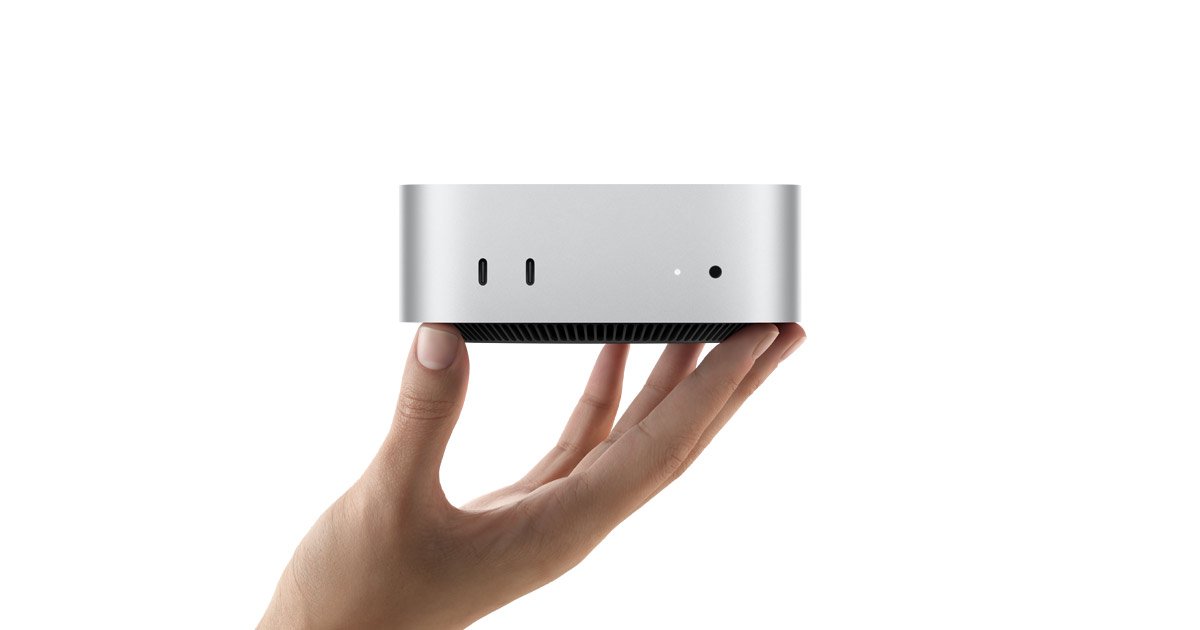
Mac mini is Apple’s ultracompact desktop Mac. The product page presents it with M6 or M5 Pro and frames it as a small system for people who want a full desktop without a large tower or all-in-one display.
Apple’s current messaging emphasizes AI capability, front and back ports, and current wireless support with Wi‑Fi 7 and Bluetooth 6. The result is a compact desktop aimed at everyday computing, creative work, and other tasks that benefit from a small footprint and flexible connectivity.
Apple’s Mac mini page says the desktop is available with M6 or M5 Pro, giving buyers a choice between the standard chip and a higher-performance Pro option.
Apple describes Mac mini as a powerful platform for AI, which positions it for workflows that rely on on-device intelligence.
The product page explicitly calls out front and back ports, which should make frequently used connections easier to reach than on a rear-only desktop.
The page highlights Wi‑Fi 7 and Bluetooth 6, indicating current wireless standards for network access and peripheral connections.
The rendered page text shows Mac mini is available to pre-order and references availability starting September 22 on the collected page view.
The hero copy presents Mac mini as ultracompact, reinforcing its small desktop footprint for desks with limited space.
Mac mini fits desks where a compact computer matters, such as small home offices or shared spaces where a full-size tower would be awkward.
The M6 and M5 Pro options make the product suitable for buyers who want to choose between a more standard desktop and a more capable configuration for heavier work.
Because Apple highlights Mac mini as a platform for AI, it is a plausible fit for workflows that depend on on-device intelligence and current macOS software support.
Front and back ports can be useful in setups where some devices stay connected full time while frequently used peripherals stay easy to reach.
Wi‑Fi 7 and Bluetooth 6 make the system relevant for wireless-first setups that rely on modern networking and Bluetooth accessories.
Mac mini is a compact desktop Mac. It comes with front and back ports, and the page highlights Wi‑Fi 7 and Bluetooth 6 for wireless connectivity.
The product page says Mac mini is available with M6 or M5 Pro and is positioned as a platform for AI. The comparison page also lists Mac mini models alongside other current Macs.
Apple says Mac mini has ports on the front and back, but the source provided here does not include a full port list or configuration details.
The available source confirms Mac mini is part of the Mac lineup and runs macOS. It does not provide a complete compatibility list for accessories or peripherals on these pages.
The collected sources show Mac mini is available to buy through Apple and that education savings are offered on the product page, but they do not provide a starting price in the evidence supplied here.

SCAPTION provides real-time captions and AI translation for conferences, ceremonies, corporate events, and hybrid productions. Attendees access captions and participation tools on their phones by QR code, while organisers can send caption graphics to NDI, HDMI, or browser-based screens.

HiredQuick is a startup-focused job-application platform for software engineers. It researches companies, guides candidates in building a relevant proof-of-concept project, and supports founder outreach and application tracking.

Arazio is a Mac utility for converting and processing files directly from Finder, with 283 tested conversions and 14 file tools. It processes files locally and writes new files beside the originals rather than uploading or modifying them.

MARVIS is a music-rights intelligence workspace for artists, managers, publishers, distributors, and rights teams. It monitors publishing, royalty, copyright, DSP, sync, neighboring-rights, and AI-music policy changes while helping organize catalog ownership, splits, registrations, and collection tasks.

MonoDuty routes operational incidents to on-call responders through schedules, escalation policies, and email, SMS, or voice alerts. It accepts transformed alerts over a universal HTTPS Webhook and supports HTTP/HTTPS monitors, heartbeats, and team-channel updates.

Cue is a hand-curated UI component library with references to high-quality web and product interactions. It gives designers, developers, agencies, and solo builders AI prompts they can use in Bolt, v0, Cursor, Framer AI, ChatGPT, or Claude.