
Music history connections
View listening history and the surrounding memories for songs playing in Apple Music, or connect Last.fm and import Spotify or Apple Music history exports.

Nostaliga is a personal memory timeline for iPhone and iPad that connects music history with photos, places, workouts, viewing history, posts, and calendar events. It helps users revisit the context around a song or compare the same date across previous years using connected services and imported archives.
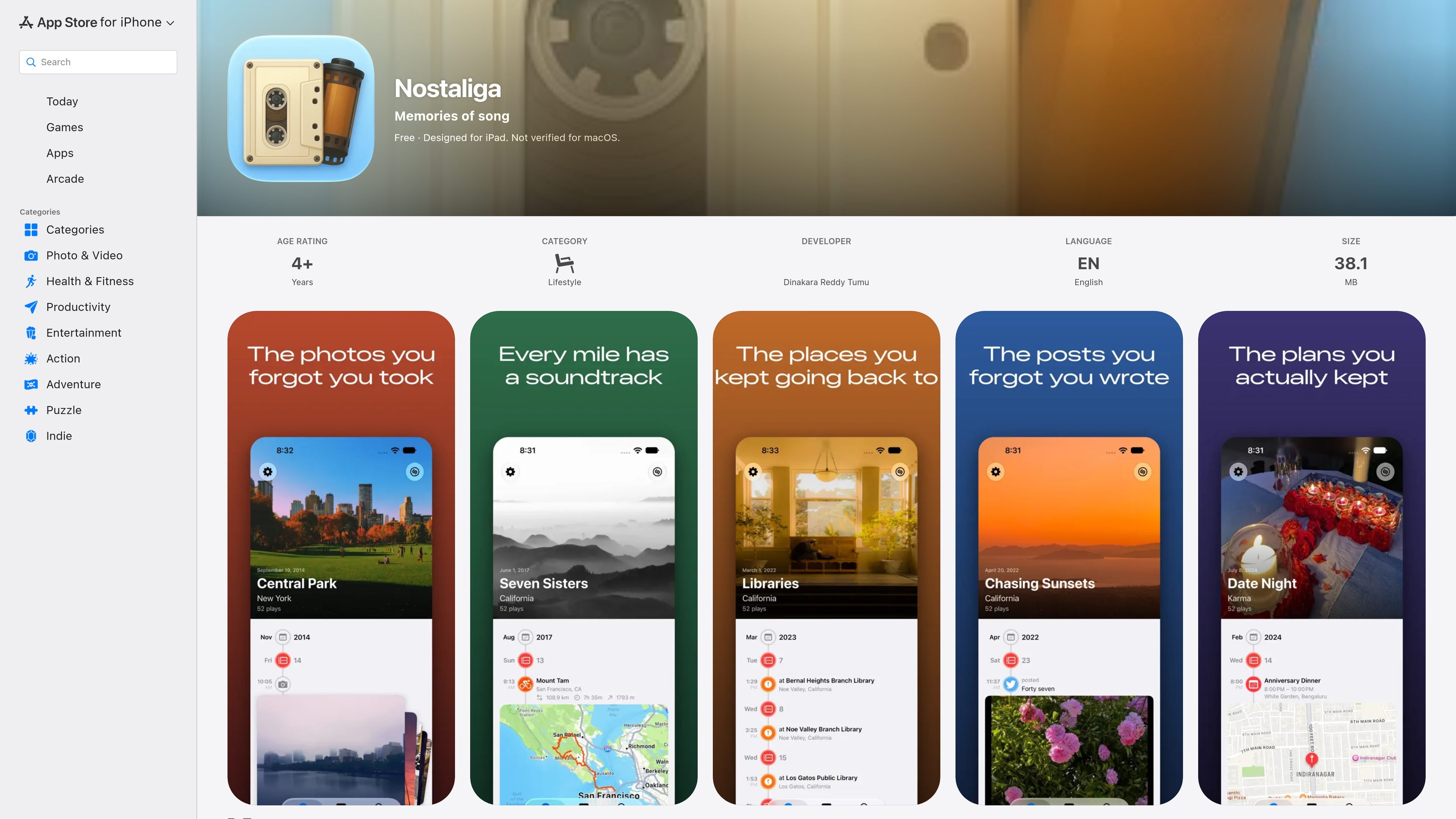
Nostaliga is a Lifestyle app for iPhone and iPad that connects listening history with personal records such as photos, places, workouts, viewing history, posts, and calendar events. Its central view is a personal timeline that helps users examine what surrounded a song or revisit activity from a particular day.
The app supports optional service connections and archive imports, so users can begin with one source and add others when needed. It also includes an On This Day view for comparing the same date across previous years. The listing states that timeline data is stored and assembled on the device, while photos from the library are not uploaded. Some sign-in exchanges and artwork requests pass through Nostaliga's servers.
View listening history and the surrounding memories for songs playing in Apple Music, or connect Last.fm and import Spotify or Apple Music history exports.
Browse photos and videos from your own library alongside other events in the timeline. The latest listed version also includes full-screen photo viewing and preserves your position when swiping.
Map Foursquare/Swarm check-ins, Strava routes, activities, and workouts from Apple Health with other timeline entries.
Review films and shows from Trakt, imported posts from Twitter, Instagram, or Facebook archives, and selected calendar events on the dates they occurred.
Use On This Day to compare the same date across previous years, based on the history available from connected and imported sources. Sources can be selected or hidden.
Drag the date scrubber through days, months, and years, including in Search. Paused music keeps the song and its timeline visible for up to 30 minutes while browsing.
Use a song as the starting point for recalling a road trip, then review related photos, stops, and walking or workout activity when that history is available.
Browse the same calendar date across previous years to revisit past activities, images, media consumption, and events from the sources connected to the app.
Import listening, social, or other archives and combine them with current device and service data to explore older periods that are not represented by a live connection.
Limit the timeline to selected sources or hide dates that should not appear, creating a more focused personal browsing view.
Nostaliga is available for iPhone and iPad. The App Store listing states that it requires iOS 26.0 or later on iPhone and iPadOS 26.0 or later on iPad.
You can start with one source and add more later. Connections are optional, and the timeline depends on the history and permissions you provide. The listing also says that connections and imported history can be managed in Settings.
Nostaliga can use Apple Music playback context, Last.fm listening history, and imported Spotify or Apple Music history exports. It can also bring together selected photos and videos, Foursquare/Swarm check-ins, Strava routes and activities, Apple Health workouts and routes, Trakt viewing history, social archives from Twitter, Instagram, or Facebook, and chosen calendar events.
The listing says there is no Nostaliga account to create. The timeline is stored and assembled on the device, photos from the library are not uploaded, and the developer indicates that the app does not collect data. Some service sign-in exchanges and artwork requests pass through Nostaliga's servers, while connection credentials are stored in the iOS Keychain.
Nostaliga is designed for personal timelines on iPhone and iPad. The source does not describe collaboration, shared timelines, or team features.

Goldfish is an AI memory app for macOS that helps you reply, write, summarize, and continue using the context already on your Mac. It stores memory locally and writes in your tone.

Lasso is an ecommerce product data platform for enriching catalog records, processing supplier files, generating product content, and monitoring competitors. It combines a web app with a REST API, SDK, and MCP server for teams and developers.

ArtDeck is a visual reference board app for iPhone, iPad, and Mac that lets artists collect mixed reference material on one canvas and study it with ToolBox lenses. It works offline, supports optional iCloud sync, and is sold as a one-time purchase with no account required.

Struere is an AI-native platform for turning spreadsheet data into structured operational software with dashboards, alerts, and automations. It is aimed at teams that want to replace manual spreadsheet workflows without building custom tools from scratch.

garden-md is an open-source Node.js CLI that turns meeting transcripts into a local company wiki. It links entities across transcripts, keeps the original text intact, and renders the result as a browsable wiki.

Falconer is an AI-powered company brain that keeps internal documentation accurate, searchable, and up to date by syncing with tools like GitHub, Slack, and Linear. It helps engineering and cross-functional teams centralize knowledge and answer questions from a shared source of truth.