
58-format auto-detection
Paste or open data in the browser and let PasteKit detect among 58 listed formats, including structured data, code, configuration files, logs, and query languages.

PasteKit is a browser-based toolkit for formatting, validating, converting, and inspecting JSON, YAML, XML, SQL, CSV, code, and other text formats. It helps developers work with pasted data locally through automatic format detection, JSON-specific utilities, and client-side processing without sign-up.
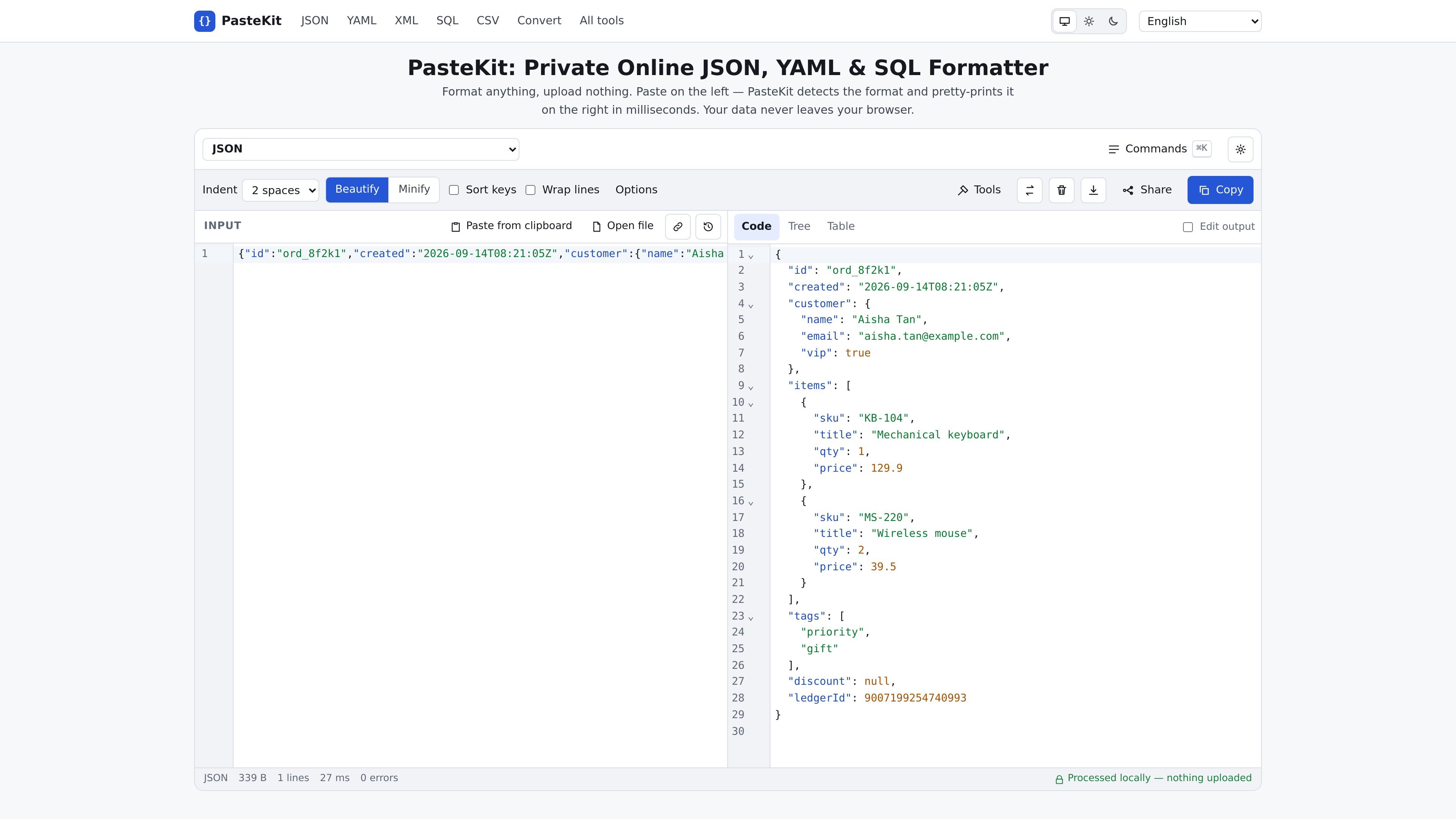
PasteKit is a browser-based formatter, validator, converter, and inspection toolkit for JSON, YAML, XML, SQL, CSV, code, configuration files, logs, and other text formats. Users paste content into an input pane or open a local file; the tool detects supported formats and produces formatted output in the browser.
Its broader toolset includes JSON comparison, schema validation, repair, path inspection, size and token analysis, table and tree views, spreadsheet conversion, and format conversion. PasteKit states that processing happens in a Web Worker on the user's device and that pasted data is not uploaded to a server, making the tool suited to handling development payloads locally when a browser workflow is appropriate.
Paste or open data in the browser and let PasteKit detect among 58 listed formats, including structured data, code, configuration files, logs, and query languages.
Beautify, minify, sort keys, wrap lines, choose indentation, copy results, and edit output across the formatter workspace.
Convert between supported representations, including JSON, YAML, XML, CSV, TOML, SQL, TypeScript, and several programming-language outputs. The site lists 48 conversion pairs.
Validate JSON and JSON Schema-related data, compare JSON documents, apply or generate JSON Patch and merge patches, and inspect parser errors with source locations.
Explore JSON in a collapsible tree, inspect arrays in sortable tables, find JSONPath and related paths, analyze payload size, count tokens, repair common malformed input, and export selected table data.
Run parsing and formatting in a browser Web Worker. PasteKit states that data is not sent to a server, and its security page documents a Content Security Policy that limits network connections.
Turn compact or difficult-to-read API responses, webhook payloads, and structured logs into indented JSON. Source-located errors and large-number preservation help when inspecting production-like data without changing identifier digits.
Compare two JSON documents by structure, sort object keys for more readable diffs, or generate and apply JSON Patch and merge patches when reviewing changes between payloads.
Validate JSON or YAML against JSON Schema drafts from 04 through 2020-12 or an OpenAPI file, and generate a schema from example data when defining or checking an interface.
Convert structured data between formats such as JSON, YAML, XML, CSV, TOML, SQL, or programming-language representations when preparing configuration, documentation, or code snippets.
Use Tree, Table, JSONPath, size, token, repair, and spreadsheet tools to explore large or imperfect JSON, identify costly fields, recover common syntax problems, or export records for further work.
Yes. PasteKit states that all 58 formatters, 48 converters, and 16 JSON tools are free to use, with no sign-up and no usage limits beyond what the browser can hold in memory.
No. PasteKit says parsing, formatting, validation, and conversion run in a Web Worker in the browser. Its published Content Security Policy restricts network connections, and share content placed after the URL hash is not sent to a server.
Paste text into the left pane or open a supported local file, then format it with the interface or the Ctrl/Cmd+Enter shortcut. The tool detects supported formats automatically and displays the result on the right.
The site lists 58 supported formats, including JSON, JSON5/JSONC, YAML, XML, CSV, TOML, SQL, programming languages, configuration files, logs, queries, and specialist formats such as JWT and regular expressions.
The JSON formatter reports syntax problems with line and column locations, supports beautify and minify modes, preserves large integer digits, and provides Tree and Table views for inspecting JSON.

ByteAsk is a terminal-first AI coding agent for C and C++ that edits repositories and verifies changes with the real compiler, debugger, sanitizers, and tests before showing a diff. It offers a free tier plus paid plans, with editor connectors and zero-retention handling described in the source.

Epherem is a static security scanner for web apps built with AI coding tools such as Lovable, Bolt, v0, Replit, Cursor, and Claude Code. It checks source files and dependencies for common security mistakes, then provides categorized findings and suggested fixes without running the app.

CreateOS Sandbox is an isolated compute environment for running code and agent workloads inside Firecracker micro-VMs. It is designed for workflows that need machine-level isolation, private networking between sandboxes, and programmatic control through SDK, CLI, or MCP.

GitBot is a local browser-based workspace for creating reusable coding bots powered by Claude Code, Codex, or OpenCode. It helps developers run those agents across repository folders with persistent threads and configurable permissions.

hob is an independent workspace for coding agents that keeps agent sessions, terminals, history, and follow-up work organized around the tools and providers you already use. It is aimed at developers who want local control over routing, history, and workspace structure rather than a bundled model stack.

Ably Chat is a chat API platform for building custom realtime chat applications. It supports room-based messaging, typing indicators, presence, reactions, and message updates, with usage-based pricing options for different deployment stages.