
Destructible page capture
RageLayer captures or rasterizes the page and provides operations for punching, burning, cutting, charring, and restoring content, turning the captured surface into the destruction target.

RageLayer is a framework-neutral JavaScript package that turns a captured web page into a destructible canvas with 15 procedural tools, rigid-body debris, and browser effects. It is intended for developers building interactive website experiences, creative coding projects, and custom browser tools.
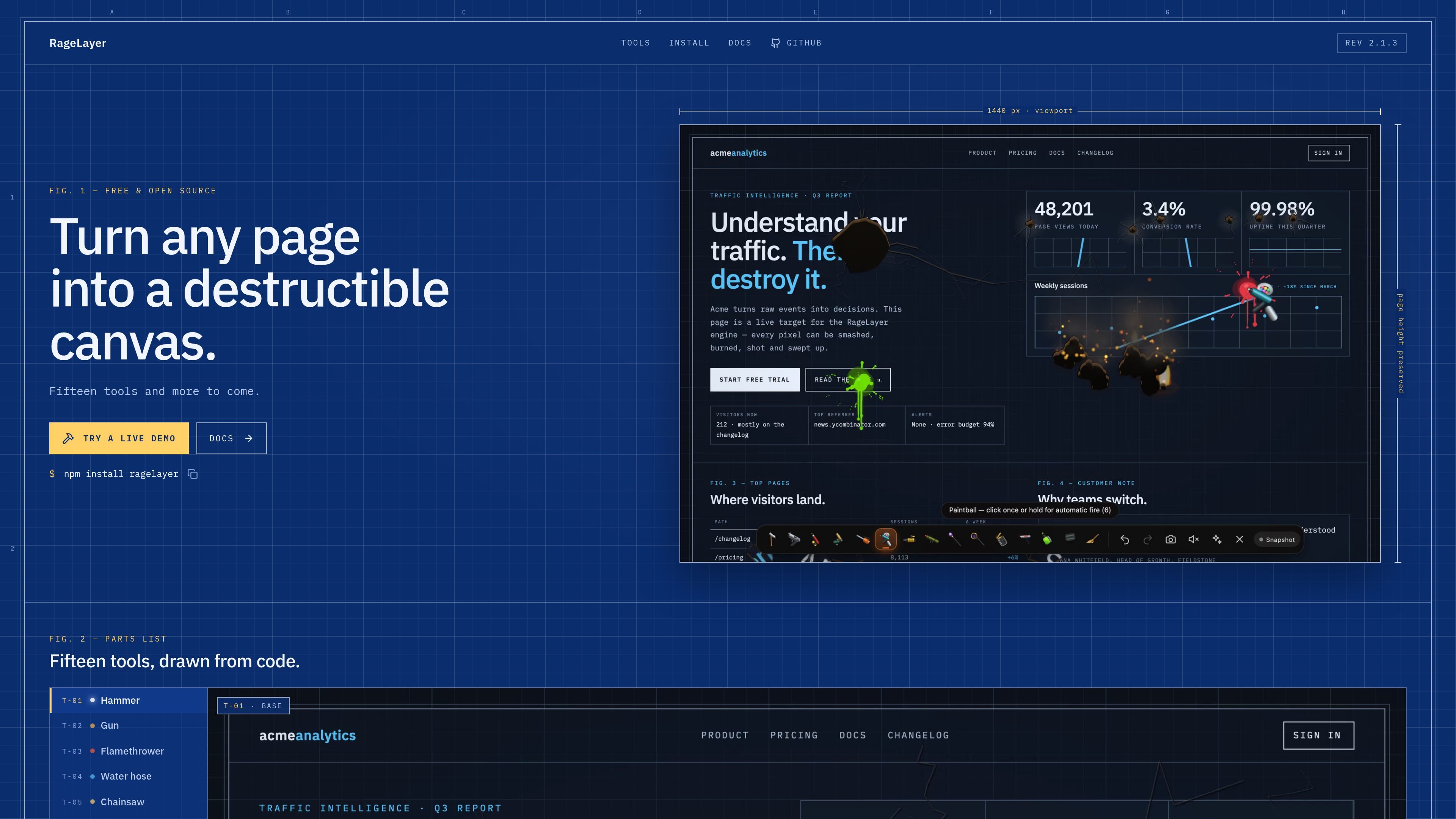
RageLayer is a framework-neutral web toy and JavaScript package that turns a captured web page into a destructible canvas. Its engine can punch holes through content, damage measured page elements, detach them as physical debris, and render effects such as fire, smoke, cracks, splats, and explosions over the page.
It is designed for interactive browser experiences rather than conventional page editing. Developers can add a ready-made integration or use the framework-neutral controller, select from 15 procedural tools, clear the damage to restore the page, and use the typed engine API for custom tools and advanced control.
RageLayer captures or rasterizes the page and provides operations for punching, burning, cutting, charring, and restoring content, turning the captured surface into the destruction target.
The package includes 15 built-in tools across base, heavy, and advanced groups, including Hammer, Gun, Flamethrower, Water Hose, Chainsaw, Paintball, Broom, Demolition, Rocket Launcher, Lightning, Black Hole, Bugs, Laser Cutter, Acid Jar, and Sticky Bombs.
Destroyed regions can become rigid-body debris that tumbles and piles up. The engine exposes fracture and explosion operations and uses a consistent wood-like physical response across tools.
Framework-specific entry points include React, Vue, and Svelte integrations, while a controller, custom element, and toolbar model support plain JavaScript and other stacks.
The engine supports custom tool registration through typed APIs, lifecycle helpers, low-level drawing and effects primitives, and SDK factories for stateful tools.
Adaptive quality settings, bounded particle and flame budgets, dirty-region rendering, telemetry, pause-on-hidden-tab behavior, and WebGL fallback behavior provide controls for different runtime conditions.
Add a temporary destruction mode to a landing page, portfolio, demo, or promotional interaction without rebuilding the page as a separate game scene.
Use the built-in tools and rigid-body response to create browser-based experiments that demonstrate capture, rendering, effects, and physics on ordinary page content.
Embed a toolbar or headless controller in a React, Vue, Svelte, or plain JavaScript project when the experience needs framework lifecycle handling rather than a standalone demo.
Register project-specific tools with the typed engine API when the built-in Hammer, Gun, fire, water, cutting, and explosive behaviors do not match the intended interaction.
Generate a PNG of the wreckage or use clear, undo, redo, and checkpoint controls when an interactive session needs reversible states or a captured result.
RageLayer can be used through a framework-neutral controller, React and Next.js imports, a Vue composable, a Svelte action, or the <rage-layer> custom element. It also documents integrations for Astro, Angular, Solid, and plain JavaScript through the framework-neutral controller.
Install the package with npm, pnpm, or Bun. The package is distributed as modern ESM with TypeScript declarations; React and react-dom are optional peer dependencies.
The engine captures or rasterizes the real page into a destructible surface, while the original page can be restored with the clear operation. A PNG snapshot of the wreckage can also be generated through the API.
Yes. The documentation describes a typed custom-tool API, including tool registration, lifecycle hooks, drawing access, particles, flames, physics operations, and cross-tool interaction support.
The API documents snapshot capture by default and an experimental live-capture mode when the browser exposes the required capability. It also documents adaptive quality tiers, bounded particle and flame budgets, dirty-region rendering, telemetry, and WebGL fallbacks.

GameGrad turns PDF study material into quiz questions that appear inside arcade games, so users can practice active recall while they play. It offers a free tier with one PDF and a Pro plan with more uploads, more questions, and answer explanations.

DailyPlay.ai is a behavioral growth platform that uses AI site scanning and micro-games to help brands improve engagement and conversion. It supports web, mobile, and other digital touchpoints, with a one-line script setup and a free engagement scan.

ChessWoodie is a chess tactics training app based on the Woodpecker Method. It helps players build pattern recognition through repeated puzzle cycles, track speed and accuracy, and review missed tactics from their own games.

PixelForge turns a single photo into a game-ready 2D character sprite pack, including a 4×4 sheet, transparent frames, direction strips, and looping walk GIFs. It is designed for engine-ready use in Godot, Unity, Phaser, GameMaker, and web games.

Loniva is a mobile puzzle app that offers a calm daily mix of games across memory, attention, language, speed, logic, and focus. It runs on iPhone, iPad, and Android, with a free 7-day trial and a free daily workout after the trial.

Our Silly Games is a browser-based platform where people can play free games without installing software and explore a catalog made by anyone. It also offers creator-oriented hosting with realtime multiplayer and built-in leaderboards, while individual game features vary by title.