

AgentPeek
AgentPeek for Mac notch: view live Claude Code & Codex agent sessions, permission requests, token usage, and manage local dev servers. 2-day free trial.
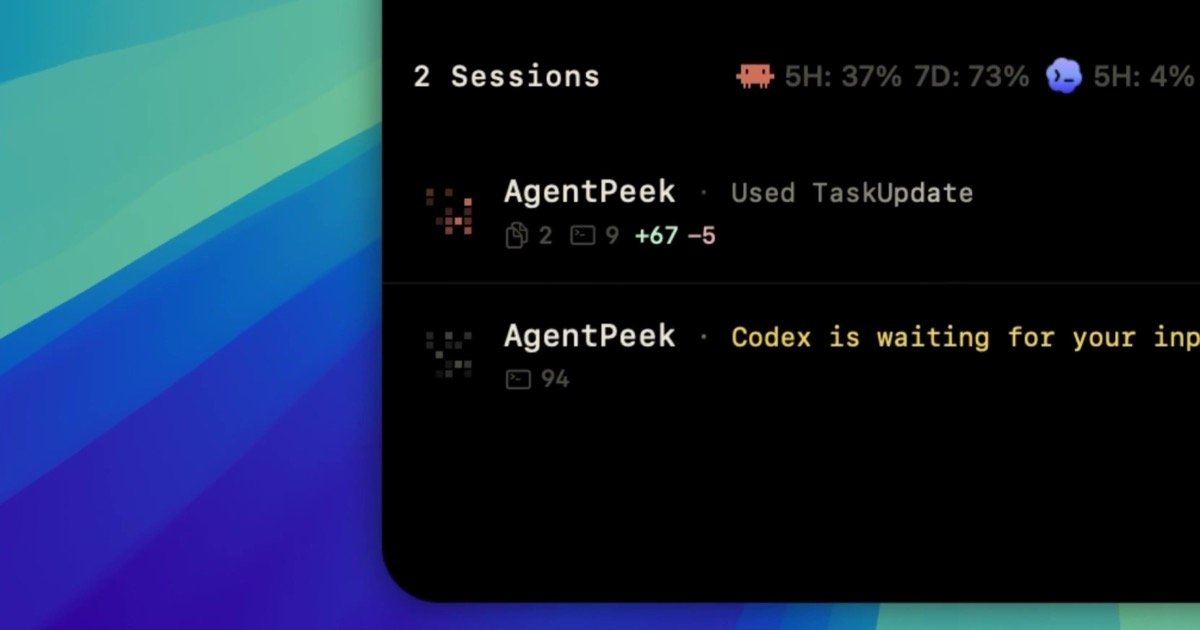
What is AgentPeek?
AgentPeek is a macOS “notch” app for monitoring and managing Claude Code and Claude Codex workflows on Apple silicon Macs. It surfaces live agent sessions from your terminal/editor, lets you approve permissions, and provides at-a-glance token usage for both Claude Code and Codex—without requiring you to leave your current work.
It also includes local dev server management by detecting servers running on common ports and letting you open, copy their URLs, or stop them directly from the notch. The app is described as local-first, with a 2-day free trial and a $9 lifetime (one-time) license.
Key Features
- Notch-based access to Claude Code and Codex sessions: jump to any running session from the notch so you can quickly focus the corresponding terminal/editor.
- One-keystroke folder navigation (“Pin the folders you live in”): use Quick Routes to jump to an agent folder you use often.
- Permission approval alerts: alerts you when an agent needs permission so you can handle required actions promptly.
- Token usage monitoring (5-hour and 7-day windows): view token usage side by side for Claude Code and Codex to understand recent and weekly activity.
- Local dev server detection and controls: detects local servers on ports 3000–9999 and provides notch controls to open, copy the server URL, or stop the server.
- Quick access to local server details: the app surfaces example server entries such as localhost:5173 (often dev servers), localhost:3000, localhost:8787, and others shown in the UI.
How to Use AgentPeek
- Download and try AgentPeek for the 2-day free trial.
- Pin the folders you frequently use for Claude Code and Codex (via Quick Routes), then open them quickly from the notch.
- Start or run Claude Code / Claude Codex as you normally would in your terminal/editor.
- When sessions are running, use the notch session list to focus the specific terminal/editor tied to that agent.
- Monitor token usage in the app’s windows (5-hour and 7-day) and respond to any permission requests prompted by the agent.
- For local development, rely on AgentPeek’s port scanning (3000–9999) to find running servers; then open, copy the URL, or stop them from the notch.
Use Cases
- You’re running multiple Claude Code tasks: switch between sessions quickly from the notch instead of searching across terminal windows.
- Your agent requires user authorization: get notified when permission is needed and approve the required action without losing context.
- You want to track prompt/compute consumption: review Claude Code and Codex token usage together using the 5-hour and 7-day views to spot changes over time.
- You frequently start local dev servers while iterating: let AgentPeek detect servers on ports 3000–9999 and then open/copy/stop the right server directly from the notch.
- You work across different project folders: pin agent folders and use Quick Routes so your notch workflow brings you back to the right place with minimal navigation.
FAQ
-
Does AgentPeek send my code or prompts anywhere? The page states the app is “local-first,” and it includes a general FAQ item (“Is AgentPeek safe? Does it send my code or prompts anywhere?”), but the provided content does not include the detailed answer. Check the FAQ on the site for the specific statement.
-
Which agents does AgentPeek support? The page specifies support for Claude Code and Claude Codex.
-
What macOS and hardware requirements does AgentPeek have? The page lists “Apple silicon Mac” and “macOS 14+.”
-
How much does AgentPeek cost? It offers a 2-day free trial, then a $9 one-time lifetime license (with future updates included, per the page).
-
How does AgentPeek handle local dev servers? It detects local dev servers on ports 3000–9999 and lets you open, copy the URL, or stop the server from the notch.
Alternatives
- Terminal multiplexer/workspace tools: tools that manage multiple terminals/workspaces can help you switch contexts, but they typically don’t provide notch-based Claude session monitoring, permission alerts, or token usage windows.
- Menu bar apps for local monitoring: menu bar utilities can surface running processes or server statuses, but they usually don’t integrate the Claude Code/Codex session and permission workflow described for AgentPeek.
- Local server dashboards (port/process monitors): general “local dev server” dashboards can help locate and control localhost services, but may not tie into Claude agent sessions or provide Claude Code/Codex token usage views.
Alternatives

AakarDev AI
AakarDev AI is a powerful platform that simplifies the development of AI applications with seamless vector database integration, enabling rapid deployment and scalability.

skills-janitor
Audit, track usage, and compare your Claude Code skills with skills-janitor—nine focused slash commands and zero dependencies.

BenchSpan
BenchSpan runs AI agent benchmarks in parallel, captures scores and failures in run history, and uses commit-tagged executions to improve reproducibility.

Codex Plugins
Use Codex Plugins to bundle skills, app integrations, and MCP servers into reusable workflows—extending Codex access to tools like Gmail, Drive, and Slack.

ClawTick
ClawTick is a CLI-first AI agent automation platform for scheduling webhook tasks on cron with monitoring, alerts, retries, and execution logs.

Falconer
Falconer is a self-updating knowledge platform for high-speed teams to write, share, and find reliable internal documentation and code context in one place.