

AppStoreStatistics
AppStoreStatistics helps track App Store rankings, new releases, top charts and competitor analytics across 100+ countries with live feeds.
What is AppStoreStatistics?
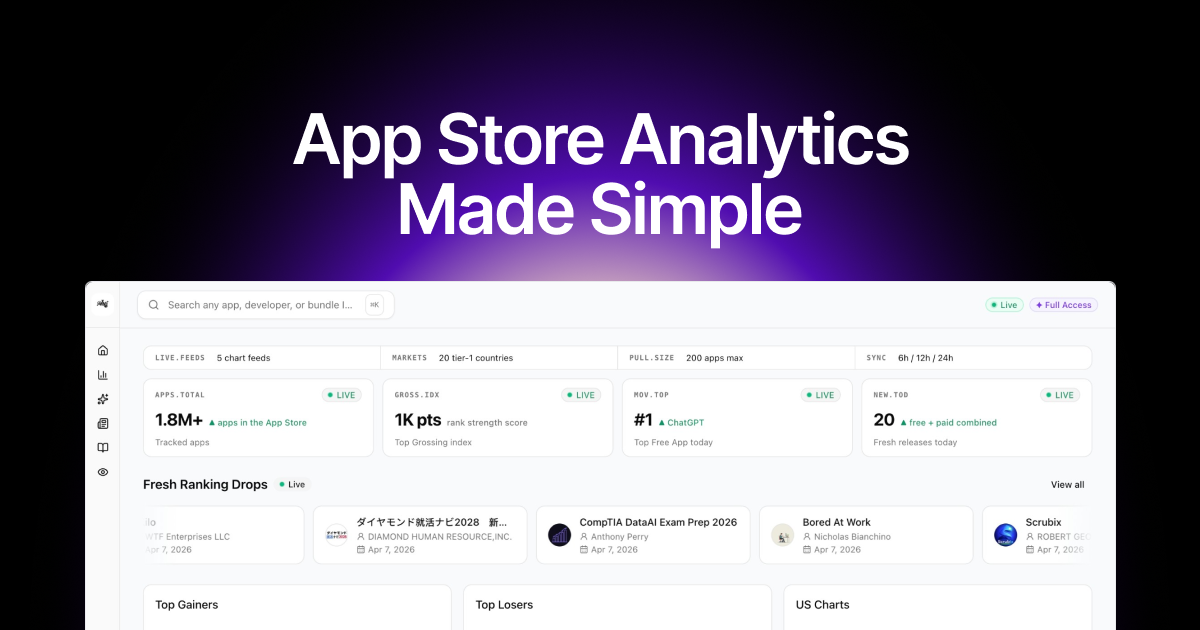
AppStoreStatistics is an App Store intelligence platform that helps you monitor rankings, new releases, top charts, and competitor performance across multiple countries. Its core purpose is to give App Store data you can track over time—so you can see what’s rising, what’s changing, and what competitors are doing.
The interface centers on live feeds for chart activity, category performance indicators (including rank strength), and tracking for large numbers of apps. It also surfaces a “Top Grossing” view and “Top Free” results for the current day, alongside a watchlist concept for following specific apps.
Key Features
- Live chart feeds: Provides “live feed” chart views so you can observe changes in rankings as they happen.
- Tracked apps at scale (up to 200): The product lists a max “PULL.SIZE” of 200 apps for tracking, supporting watchlists rather than one-off lookups.
- App Store coverage across 100+ countries: The platform is designed for multi-country monitoring (stated as 100+ countries) rather than a single storefront.
- Rank strength scoring & indices: Shows a “rank strength score” and a “Top Grossing index,” which can help you compare relative performance.
- New releases and ranking drops: Includes views for “Fresh releases today” and “Fresh Ranking Drops,” focused on day-to-day movement.
- Official update feed: Includes an “Apple Developer News” section with an update timeline and links to official platform/developer updates.
How to Use AppStoreStatistics
- Access the dashboard after signing in (the page indicates sign-in is required to continue).
- Set up your tracking/watchlist by adding up to 200 apps to your personal tracking queue.
- Select a market/country and chart view to review live activity such as top charts, ranking changes, and fresh releases.
- Review daily and live signals (e.g., top free app, top grossing index, ranking drops) and watch the feeds for movement over time.
Use Cases
- Competitive monitoring for an app publisher: Track your direct competitors’ rank movement and ranking drops across selected countries to understand how promotions or updates affect chart positions.
- Category performance review: Use “Category Performance” with rank-strength scoring to compare category-level momentum in a specific market (e.g., US categories by chart score).
- Product release validation: Check “Fresh releases today” and observe whether a newly released app appears in top/free or top/grossing views.
- Curating a daily KPI routine: Use live feeds to run a repeatable daily check of top movers (top free, top grossing, ranking drops) and decide which apps need deeper attention.
- Developer ops research: Follow the “Apple Developer News” timeline to stay informed about tax/price updates and platform availability notes that may affect how apps perform or are distributed.
FAQ
-
How many apps can I track? The page shows a tracking limit of up to 200 apps (“PULL.SIZE 200 apps max”).
-
Which countries are supported? The site description states coverage across 100+ countries.
-
Does the product provide real-time updates? The page references live feeds and a sync cadence shown as 6h / 12h / 24h, indicating periodic updates rather than a single static snapshot.
-
What kinds of chart views are included? It lists views for Top Free, Top Grossing (including an index), fresh releases, and ranking drops, plus a “watchlist” concept.
-
Is there information for developers in addition to chart data? Yes. The page includes Apple Developer News with an update timeline.
Alternatives
- App Store analytics dashboards: Use analytics tools focused on one app or a small number of apps to monitor rank and performance; these typically emphasize per-app metrics rather than broad competitor tracking.
- Mobile market intelligence platforms: Broader market-intelligence tools that aggregate App Store/app metrics across regions; they may focus more on research workflows than on live chart feeds.
- General competitive research tools: Services that support competitor discovery and tracking but may not provide the same chart-specific live feeds and rank-strength indicators.
- Developer-focused update trackers: If your primary need is staying current with platform changes, specialized developer news or release-notification services can complement or replace parts of the intelligence workflow.
Alternatives

PromptScout
PromptScout tracks how your brand is mentioned, which competitors are recommended, and what sources are cited in AI answers—plus website audits.

SaveMRR
SaveMRR scans Stripe billing data to find SaaS MRR leaks and help recover failed payments, save cancellations, and win back churn—60-sec Free Revenue Scan.

Sleek Analytics
Lightweight, privacy-friendly analytics with real-time visitor tracking—see where visitors come from, what they view, and how long they stay.

Struere
Struere is an AI-native operational system that replaces spreadsheet workflows with structured software—dashboards, alerts, and automations.

ClayHog
ClayHog tracks AI Search Visibility & GEO—see what ChatGPT, Gemini, Perplexity, Claude, and Google AI Overviews say about your brand, incl. citations and sentiment.

beehiiv
beehiiv is an all-in-one newsletter and website platform with publishing, growth, analytics, and monetization tools for creators and brands.