

Gretl
Gretl is a free, open-source localhost control panel to name local ports, start services with one command, and share your dev stack.
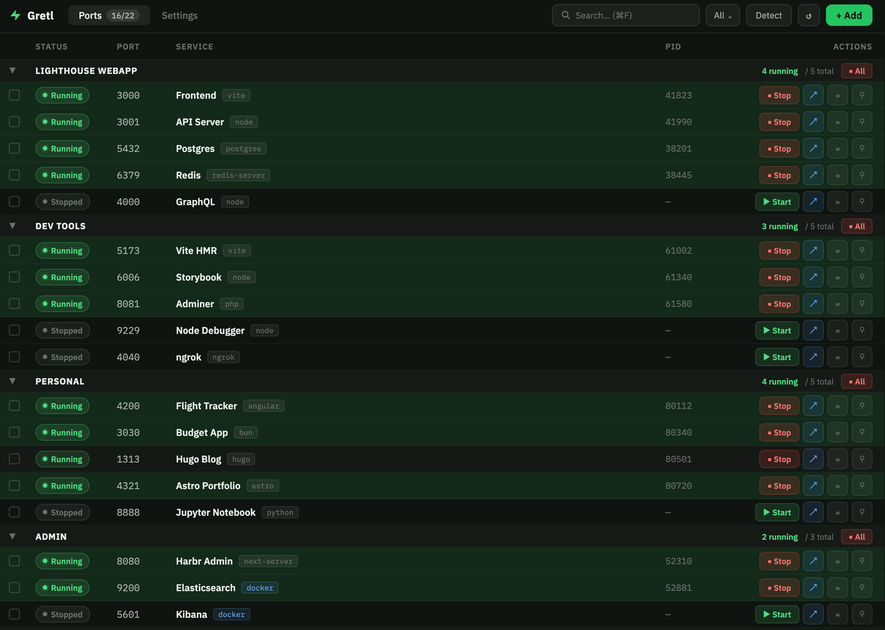
What is Gretl?
Gretl is a control panel for your localhost that helps you manage local development services. It lets you name local ports and start services with one command, with the goal of making a development stack easier to run and share.
Because it runs entirely on your machine, Gretl is intended for local workflows where you want a consistent, team-friendly way to bring up the same set of services during development.
Key Features
- Name your local ports: assign readable names to ports to reduce confusion when working with multiple services.
- Start services with one command: run your local stack from a single entry point instead of starting each service manually.
- Share your dev stack with your team: package your local setup so teammates can use the same service definition/workflow.
- Free and open-source: available as free software with source code accessible under an open model.
- Runs entirely on your machine: keeps the workflow local, without requiring a hosted service to manage your stack.
How to Use Gretl
- Install Gretl and run it on your machine.
- Configure your local services in Gretl and assign names to the ports you use.
- Use Gretl’s one-command start workflow to bring up the services in your local development stack.
- Share your configured stack definition with teammates so they can start the same services in the same way.
Use Cases
- Starting a multi-service development environment: bring up backend services, databases, and other local components quickly using a single command.
- Reducing port confusion across a team: use named ports so developers don’t need to memorize which numeric ports correspond to which services.
- Sharing a repeatable local setup: send the same Gretl stack configuration to teammates so they can run your project’s local dependencies consistently.
- Streamlining day-to-day local workflows: avoid manual, service-by-service startup each time you need to restart your environment.
- Keeping local operations self-contained: manage and run services entirely on your machine for privacy and simplicity during development.
FAQ
-
Does Gretl run on a server or in the cloud? Gretl runs entirely on your machine, according to the provided description.
-
Can Gretl help me manage multiple services at once? Yes. The product is described as a control panel that can start services with one command.
-
What does “naming local ports” mean? It refers to assigning names to the ports used by your local services so they’re easier to identify than raw port numbers.
-
Is Gretl free to use? The page description states that Gretl is free and open-source.
-
How do teams use Gretl together? Gretl is described as a tool that lets you share your dev stack with your team.
Alternatives
- Process managers for local services: tools that start/stop local processes (e.g., via scripts or task runners) can also centralize startup, but may not focus on port naming and stack sharing as a dedicated control panel.
- Container orchestration for development (local container stacks): options that define and run services (commonly using local container tooling) can be shared as configurations; however, they are typically centered on container runtime workflows rather than a localhost control-panel UX.
- Local environment/task runners: script-based approaches (for example, running commands through a task runner) can provide “one command” startup, but may require more manual setup to keep port usage clear and consistent across teammates.
- Dedicated dev environments platforms (cloud or hosted): hosted alternatives can standardize environments, but they differ from Gretl’s “runs entirely on your machine” model.
Alternatives

ClawTick
ClawTick is a CLI-first AI agent automation platform for scheduling webhook tasks on cron with monitoring, alerts, retries, and execution logs.

OpenFlags
OpenFlags is an open source, self-hosted feature flag system with a control plane and typed SDKs for progressive delivery and safe rollouts.

Rectify
Rectify is an all-in-one operations platform for SaaS, combining monitoring, analytics, support, roadmaps, changelogs, and agent management—via conversation.

PingPulse
PingPulse monitors AI agent workflows with real-time handoff tracking, workflow visualization, and configurable alerts for failures, stalls, and out-of-order execution.

PromptScout
PromptScout tracks how your brand is mentioned, which competitors are recommended, and what sources are cited in AI answers—plus website audits.

Biji
Biji is a versatile platform designed to enhance productivity through innovative tools and features.