

Kanwas
Kanwas gives teams and AI agents a shared workspace to create product context, keep strategy docs connected to agent workflows, and deliver ready output.
What is Kanwas?
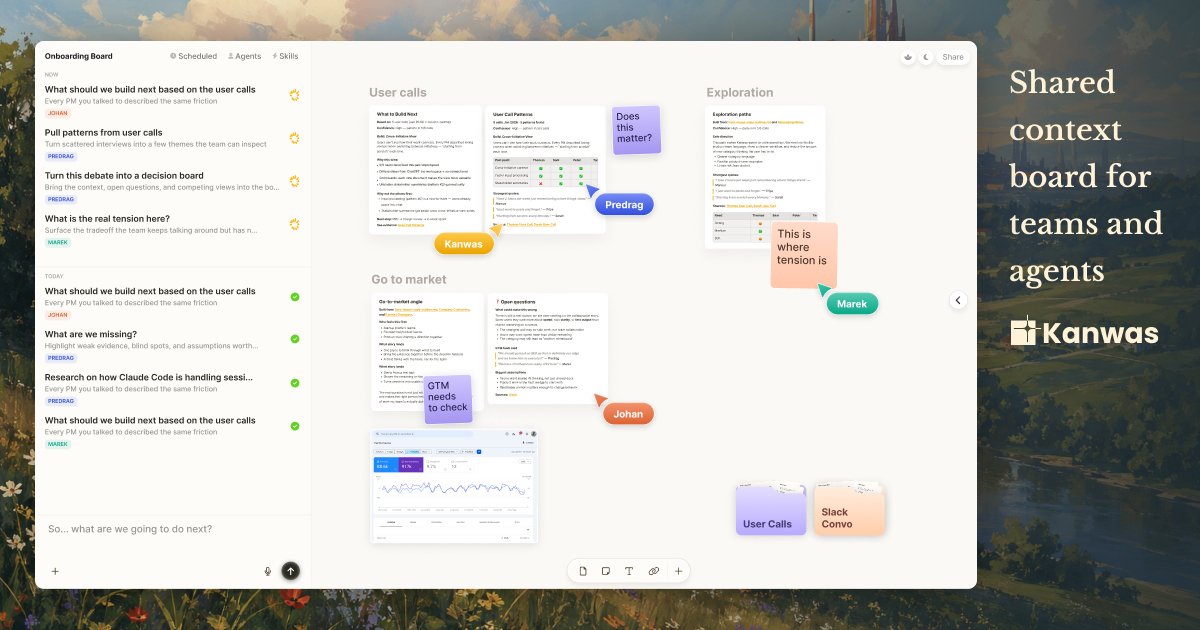
Kanwas is a shared context board for teams and AI agents to create, edit, share, and compound product context. It aims to connect strategy documents, market signals, and agent workflows in one place so work and reasoning stay grounded in the same underlying material.
Rather than treating content as isolated chats or scattered files, Kanwas provides a canvas for structured work plus a shared context layer that accumulates decisions, ideas, and trade-offs over time.
Key Features
- Canvas for shared work: Put code, docs, tasks, embeds, and iframes into a single space so teams can work across different content types without switching tools.
- Context graph that compounds: Boards, notes, tasks, and decisions build a shared knowledge base intended to make later thinking and deliverables better.
- Agent with your instructions: Provide rules, workflows, and skills so an agent can operate in the way your team expects.
- Run different model providers: The product describes support for running a model stack that fits the team (e.g., Claude, GPT, Gemini) rather than forcing one model.
- Git-backed documents: Documents are plain .md files with version history handled behind the scenes.
- Real-time collaboration and permissions: Work live with teammates, share boards quickly, and control access with permissions.
- Tool-context connections and CLI: Bring in context from tools the team already uses, with an additional CLI tool mentioned.
- No lock-in via a transparent filesystem: The product states that your files are yours, with a transparent filesystem under the hood.
How to Use Kanwas
- Start a new board in Kanwas (the site describes starting in seconds with no download and no terminal).
- Create or import content into the canvas using .md-based documents, along with tasks and other embedded materials (docs, embeds, iframes).
- Collaborate with your team in real time and set permissions so the right people can access the same working context.
- Connect an agent to your workflow by giving it instructions (rules, workflows, skills) so outputs are generated against the shared context.
- Iterate over time so decisions and outcomes accumulate in the shared context layer, improving follow-on drafts and deliverables.
Use Cases
- Product strategy workshops: Capture decisions, trade-offs, and supporting evidence during team sessions in a living board so the strategy stays updated beyond a one-off meeting.
- Investor and customer materials: Consolidate user call notes, positioning, and supporting documents into one place, then use the same board to draft and iterate a pitch deck.
- Agent-assisted implementation planning: Keep requirements, tasks, and background notes aligned so an agent can generate execution-ready deliverables that match the team’s current context.
- Cross-tool research and synthesis: Bring in relevant context from tools your team uses and link it to working documents, notes, and decisions in the same canvas.
- Team knowledge compounding: Use the context graph to turn recurring decisions and outcomes into a shared base that subsequent work builds upon.
FAQ
-
Is Kanwas just a chat tool? No. The site positions Kanwas as a shared context board and workspace for teams and agents, aimed at keeping reasoning and deliverables grounded in shared material rather than isolated chats.
-
Does Kanwas require installing software? The site says you can start without download and without using a terminal.
-
What happens to my documents—are they stored as files? Kanwas describes a Git-backed system of plain .md files with version history handled behind the scenes, and states that your files are yours via a transparent filesystem under the hood.
-
Can teams run different AI models? The site indicates you can run a model stack that fits your team (it gives examples such as Claude, GPT, and Gemini).
-
How does collaboration work? Kanwas describes real-time collaboration, sharing boards fast, and controlling access with permissions.
Alternatives
- Wikis/knowledge bases (e.g., team wikis): Useful for storing information, but typically don’t provide the same canvas + agent-oriented shared reasoning workflow described for Kanwas.
- Document collaboration tools (shared docs + version history): Help teams co-edit text and track changes, but may require separate systems to connect strategy artifacts to agent workflows and tasks.
- Chat-based research and drafting tools: Often good for generating answers, but the Kanwas positioning emphasizes shared context and living boards rather than chat logs.
- Repo-based documentation with Git workflows: Supports versioned writing via .md files, but may lack Kanwas’s canvas for embedding tasks and other artifacts into a shared, agent-ready context space.
Alternatives

Struere
Struere is an AI-native operational system that replaces spreadsheet workflows with structured software—dashboards, alerts, and automations.

GitBoard
GitBoard is a native macOS menu bar app for GitHub Projects to view your kanban board, filter by status, search issues, and create or assign.

Studio CLI
Control WordPress Studio features from the terminal with Studio CLI—manage local sites, create/update/delete WordPress.com preview sites, and authenticate.

Lasso
Lasso is an AI-first PIM for ecommerce teams that enriches product attributes and descriptions, processes supplier data, and monitors competitors via app or API.

Biji
Biji is a versatile platform designed to enhance productivity through innovative tools and features.

Codex Plugins
Use Codex Plugins to bundle skills, app integrations, and MCP servers into reusable workflows—extending Codex access to tools like Gmail, Drive, and Slack.