

Long Horizon
Long Horizon is an agentic frontend testing tool that plans, writes, and runs real browser tests, generating shareable reports with logs and screenshots.
What is Long Horizon?
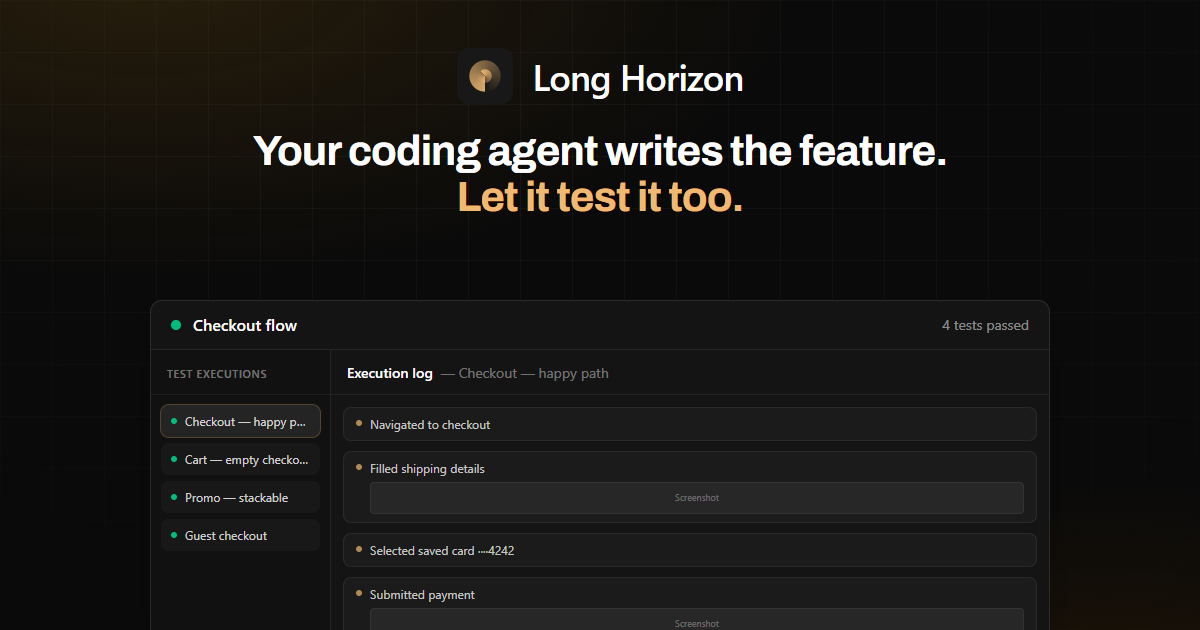
Long Horizon is an agentic frontend testing tool that lets a coding agent plan, author, and run browser-based tests for a web application. Its core purpose is to help teams verify features in a real browser and surface issues with reviewable evidence.
Instead of only generating tests, Long Horizon runs them in a real browser session and produces shareable execution reports. Those reports include execution logs and attachments such as screenshots and network details, supporting debugging and reproducible test runs.
Key Features
- Agent-driven test planning from your feature and repository context
- The agent drafts what to test (core paths, edge cases, and failure scenarios) based on the feature and repo inputs.
- Automated browser-based test execution
- Tests are run in a real browser, so assertions reflect actual UI behavior and network interactions.
- Shareable execution reports with logs and attachments
- Outputs are designed for review, including execution logs and artifacts such as screenshots.
- Reliable, reproducible runs
- The workflow emphasizes repeatable sessions so that failures can be revisited and understood.
- Test authoring written into project test files
- The agent writes tests in your project (examples shown include multiple checkout-related test files).
- Debugging workflow for failing tests
- When a run fails, the agent can identify what broke and propose changes; developers can review logs and assist with tricky scenarios.
- Slow mode / step mode for manual inspection
- Runs can be executed in modes intended to help developers observe behavior during failures or complex flows.
- UI feedback to guide agent changes
- Users can leave feedback directly on the UI with element-level comments; the agent incorporates context like screenshots and element HTML.
How to Use Long Horizon
- Start from a feature under development and provide the relevant repo context to the agent.
- Ask the agent to draft a test plan for the feature (including happy paths, edge cases, and error scenarios).
- Have the agent write the tests in your project, then run the tests in a real browser.
- Review the generated execution report, including logs and attached screenshots.
- If a test fails, use the debugging workflow—review the failure output and let the agent propose fixes, then re-run.
In the provided examples, the workflow includes planning scenarios for checkout (e.g., “checkout — happy path,” “cart — empty checkout blocked,” and “payment — decline and retry”), running those in a browser session, and validating assertions such as confirmation IDs and DOM visibility.
Use Cases
- Checkout happy-path regression for signed-in users
- Run an agent-planned scenario where a signed-in user completes a purchase and verify that the confirmation route renders expected identifiers (e.g., order id and email in the DOM).
- Preventing checkout when the cart is empty
- Validate that the checkout call-to-action remains disabled when the cart is empty and that payment-related network calls are not triggered.
- Handling card decline and retry flows
- Simulate a declined card, confirm that an inline error is surfaced, and verify that users can change the payment method and successfully complete the order.
- Testing guest checkout and email-only payment flows
- Check a checkout scenario where a user proceeds without an account and ensure pre-payment checks (such as fraud checks mentioned in the source) occur before payment.
- Debugging and fixing failures in complex flows
- When a browser test fails due to an unexpected blocking condition (e.g., inventory gating checkout), use logs to identify the issue, update mocks/stubs (such as stock availability), and re-run.
FAQ
Does Long Horizon generate tests or only run them?
Both. The agent drafts a test plan, authors tests in the project, and then executes those tests in a real browser.
What kind of output does Long Horizon produce after a test run?
Execution reports are shareable and include complete execution logs and attachments such as screenshots, with additional details like network information.
Can developers review failures and step through scenarios?
Yes. The workflow includes developer review of execution logs and options like slow mode and step mode for manual inspection.
How does agent debugging work?
When a test fails, the agent can spot what broke and suggest fixes; developers can also assist, for example by adjusting mocks (such as inventory) and re-running the same test.
How can team members provide guidance to the agent during fixes?
A UI feedback interface lets users leave comments on UI elements. The agent uses the screenshot, comments, and element HTML.
Alternatives
- Conventional frontend end-to-end testing frameworks
- Tools in the E2E category can run browser tests, but they typically require more manual test planning and authoring rather than agent-driven planning, authoring, and execution.
- Scripted QA test suites with manual triage
- Teams can write and run scripted tests and then debug using logs; the difference is that Long Horizon emphasizes an agent-assisted workflow for planning, writing, and debugging.
- Agentic workflow tools that generate tests without real-browser runs
- Some approaches focus on generating test code or reports; Long Horizon’s positioning is specifically around real browser execution with reviewable execution reports.
- CI-based browser testing pipelines
- Continuous integration setups can run browser tests repeatedly; Long Horizon centers on agentic test creation and shareable execution reports to support feature delivery and debugging.
Alternatives

PromptLayer
PromptLayer helps teams version and test prompts and AI agents with evals, tracing, and regression sets, plus a visual editor for collaboration.

Evidently AI
Evidently AI is an AI evaluation and LLM observability platform for testing and monitoring production AI systems after every update.

Crikket
Crikket: Open-source bug reporting platform for instant issue capture & faster resolution. Streamline your team's workflow today!

Roo Code
Roo Code delivers an AI software engineering team inside your editor and via cloud agents, with role-specific Modes and GitHub-connected workflows.

Logic
Logic is a spec-driven agent platform that turns written agent specs into production APIs, with testing, versioning, model routing, and logging built in.
TestLaunch Pro
TestLaunch Pro is a paid app testing marketplace for Google Play closed testing—developers find opted-in testers; testers download, share feedback, and cash out via PayPal.