

Radar
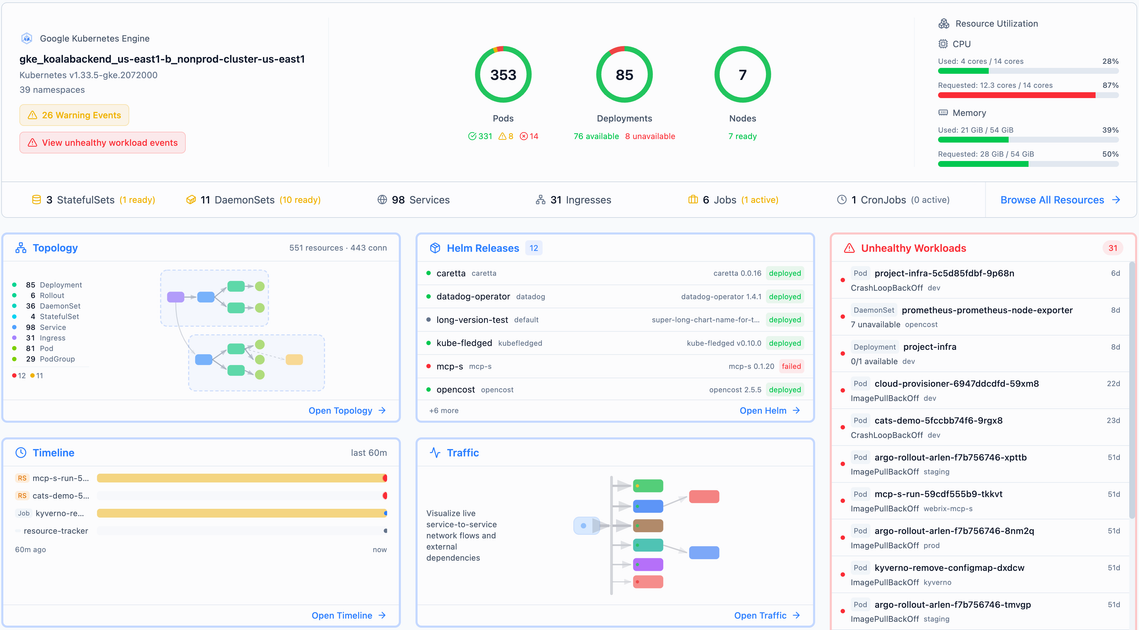
Radar is an open-source Kubernetes UI for multi-cluster inspection—topology, events, Helm releases, and GitOps app state—run as a single binary or self-hosted.
What is Radar?
Radar is an open-source Kubernetes UI designed to make multi-cluster operations easier to understand and debug than using kubectl alone. It provides a graphical interface for inspecting cluster topology, events, workloads, and related operational signals across connected clusters.
The project can be run as a single Go binary locally or self-hosted in a Kubernetes cluster, with an Apache 2.0 license and no account required for the OSS version. A separate Radar Cloud offering is described as adding capabilities that aren’t intended for a single binary, such as fleet aggregation, persistent retention, routed alerts, SSO, and audit logs.
Key Features
- Topology and dependency views: Visualize live service relationships (including east-west traffic and ingress flows) to help you understand how components connect.
- Event timeline and browsing: Inspect Kubernetes events and rewind the event timeline to track what happened during an incident.
- Workload and version visibility: Search across clusters and compare workload versions side by side.
- Helm chart/release inspection: View Helm release history such as revisions and value files, and audit what changed between revisions.
- GitOps visibility with Argo CD and Flux: See sync state of applications alongside the resources they produced, using native support for Argo CD and Flux.
- Image inspection (image filesystem viewer): Inspect container images, including a filesystem viewer, to examine contents during debugging.
- Cluster audits and security-relevant actions: Use auditing views (including an “audit logs” concept in Radar Cloud) to review changes and privileged actions.
- MCP for AI agents: Expose functionality via “MCP for AI agents,” enabling AI agents to interact with Radar.
How to Use Radar
- Choose install mode: Run Radar as a local tool or self-host it in your cluster. The site lists install options including a one-line shell script (via
curl+sh), Homebrew, a desktop app, and in-cluster installation. - Connect to Kubernetes: For the self-hosted/in-cluster path, install Radar and use it from within your environment; for local usage, run it with access to your Kubernetes context.
- Start with search and navigation: Use the UI’s search to find resources by name, label, or kind across connected clusters, then open the relevant workload or resource to view timeline, topology context, and related details.
Use Cases
- Incident troubleshooting without SSH and log spelunking: When an alert fires (for example, a crashing pod in a namespace you don’t recognize), search across your clusters, jump to logs, and follow the event timeline from the same UI.
- Fleet-wide “what’s failing?” overview: Get one view of failing pods, expiring certificates, drifted packages, or failed health checks across multiple clusters rather than checking each cluster separately.
- GitOps sync debugging: If an application doesn’t reach the expected state, use Argo CD/Flux support to inspect sync state alongside the resources that were produced.
- Helm change auditing and rollback readiness: When releases change unexpectedly, review Helm revisions and value files, compare what changed between revisions, and identify the prior revision to roll back.
- Traffic and topology analysis for service dependencies: Inspect live traffic graphs (east-west traffic, ingress flows, and TLS certificate health) to understand which services depend on others.
FAQ
Is Radar open-source? Yes. The page states Radar is open source and licensed under Apache 2.0.
Do I need an account to use the OSS version? No. The site states that the single-binary OSS experience requires no account.
Can Radar run locally or in-cluster? Yes. It can be run locally as a single binary or self-hosted in your cluster.
What does Radar Cloud add compared to the OSS binary? The page describes Radar Cloud as adding fleet aggregation, persistent retention, routed alerts, SSO, and audit logs—features framed as beyond what a single binary can reasonably do.
Does Radar integrate with GitOps tools? Yes. It lists native Argo CD and Flux support for viewing sync state and the resources produced.
Alternatives
kubectl(and kubectl plugins): Best when you need direct command-line inspection for a single cluster or a quick point-in-time query; it lacks the consolidated, UI-based multi-cluster navigation described for Radar.- Other Kubernetes dashboard/monitoring UIs: Alternative UIs can provide topology-like views and event/workload inspection, but the Radar page emphasizes its combined scope (topology, Helm, GitOps, audits, image inspection) and OSS single-binary approach.
- Fleet aggregation tools: For organizations focused on managing multiple clusters with centralized views, these tools may overlap with Radar’s fleet-oriented workflow, though Radar Cloud specifically targets fleet aggregation and retention.
- GitOps-centric dashboards: If your primary need is GitOps application state, GitOps-native dashboards can focus on sync/state, while Radar’s positioning also includes Helm release visibility, topology, and broader incident debugging context.
Alternatives

FounderStackHub
FounderStackHub uses an always-on AI agent to scan, verify, and match startup perks like cloud credits, AI-tool credits, and SaaS discounts to your stack.

Elvixs
Elvixs is an AI job outreach tool for freshers and students—find HR contacts, generate AI cold emails, send from Gmail, and track opens.

Gossipic
Gossipic tracks how often your brand is mentioned in AI answers, analyzes sentiment, benchmarks competitors, and creates daily action plans. Start 7-day free trial.

SnapSub: Subscriptions Hub
SnapSub: Subscriptions Hub centralizes recurring services so you can track what you pay, upcoming billing dates, and get reports to review spending.

Abakada
Abakada is the Philippines’ curated directory of free, open-source tools—1,000+ verified listings across 45+ categories for students & educators.

Been There Global
Been There Global shares real stories from real travellers to help you “know before you go” and plan trips with more confidence.