

reMarkable Paper Pure
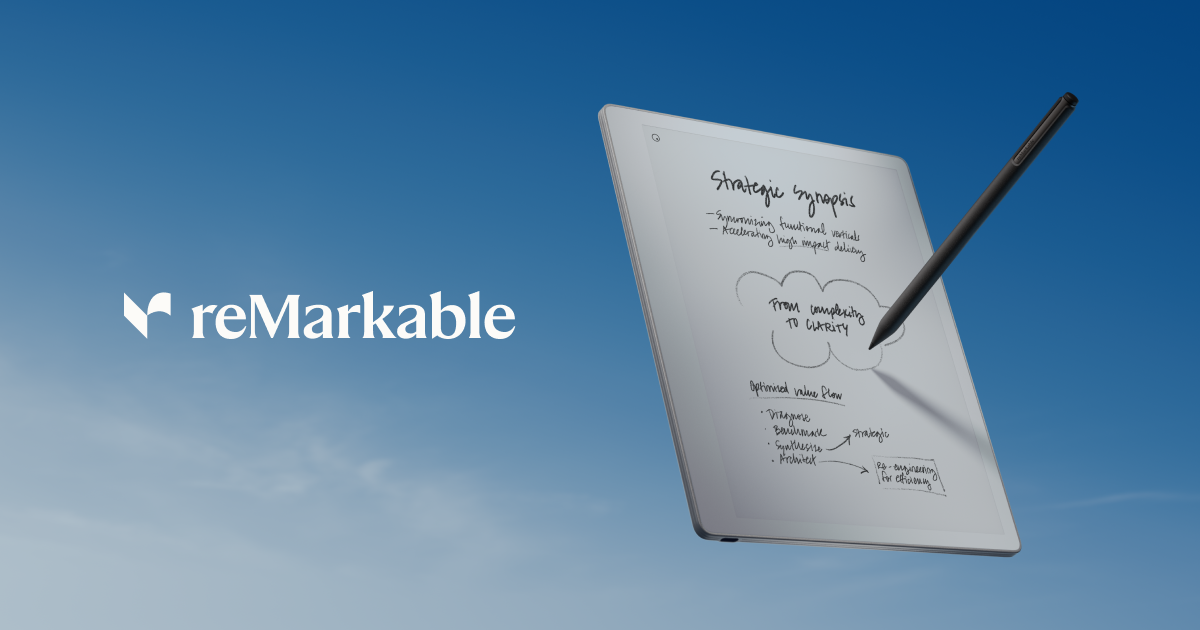
reMarkable Paper Pure is a black-and-white paper tablet for writing and drawing with a pen, moving ideas between pen notes and laptop workflows.
What is reMarkable Paper Pure?
reMarkable Paper Pure is a black-and-white “paper tablet” designed for writing and drawing directly with a pen, with a paper-like, matte glass surface. Its core purpose is to help you capture ideas in handwriting and then continue working digitally—moving notes between the paper tablet and a laptop.
The device is built around a focused writing experience: an uncluttered screen and straightforward navigation, designed to avoid interruptions like buzzes or notifications while you write.
Key Features
- Black-and-white paper tablet display: Lets you write and edit with an uncluttered screen while keeping attention on your notes.
- Pen-on-paper feel with matte glass texture: Provides a tactile writing surface intended to resemble real paper.
- Up to ~3 weeks of battery life (estimated): Runs for extended periods based on “one hour of daily note-taking” (as stated on the page).
- Focus-friendly interaction: Designed to not buzz, notify, or nudge during work.
- Digital editing tools for handwriting: Supports erasing, moving, improving content, and using layers or shapes and highlight/circle style markup.
- On-device data protection and access control: Includes on-device data encryption and multifactor authentication, with support for a 4–8 digit PIN.
- Repair-ready construction: Held together with screws and snaps rather than glue, with components intended to be replaceable by a repair specialist.
- Sustainability focus: Made with 38% recycled materials, with a stated total carbon footprint of 28.7 kg CO²e (as presented on the page).
- Conversion and send workflows (some require Connect subscription): Can convert handwriting for typed text outputs and features like handwriting search, calendar meeting notes, and unlimited cloud storage are described as Connect tools; the page also notes that some features need a Connect subscription.
How to Use reMarkable Paper Pure
- Start writing immediately: Put the Marker (included with the purchase, per the page) to the tablet’s paper-like surface and write your notes.
- Edit your notes on the device: Use erase, move, and improvement tools to refine ideas; use layers or shapes and highlight/circle markings when needed.
- Continue on your laptop: After writing, pick up where you left off on a laptop—by moving work between the tablet and your computer.
- Bring in and organize documents (where supported by Connect): Add notes, documents, drafts, and PDFs from services such as Google Drive, OneDrive, and Microsoft Word (as listed on the page).
- Share outputs when enabled (Connect-dependent): Write or sketch by hand and convert to typed text for destinations like email, Slack, or Miro (noting that features may require a Connect subscription).
Use Cases
- Meeting note-taking with quick iteration: Capture meeting details by hand, then refine your notes using tools like layers, shapes, and highlight/circle markup.
- Study and revision: Write summaries and annotations in handwriting, then use digital search (handwriting search is listed as a Connect feature) to find specific parts of notes.
- Drafting and planning across devices: Write on the paper tablet, then transfer the work to a laptop to keep developing your notes and drafts.
- Turning handwritten work into typed text: Convert handwritten notes into typed text for sharing to tools and channels such as email, Slack, or Miro (noting AI-powered conversion; some capabilities require Connect).
- Work document review and consolidation: Combine tablet notes with documents and PDFs from cloud/file sources like Google Drive, OneDrive, and Microsoft Word (as listed).
FAQ
Does reMarkable Paper Pure require a subscription for all features?
The page states that some features need a Connect subscription, including parts of conversion and sharing workflows. Core writing on the paper tablet is described without subscription requirements.
What pen does reMarkable Paper Pure use?
The page describes reMarkable Paper Pure + Marker as included when you purchase the device, and also lists Marker Plus separately (available separately or with purchase).
How does privacy/security work on the device?
According to the page, reMarkable Paper Pure includes on-device data encryption plus multifactor authentication and supports a 4–8 digit PIN.
What is the battery life estimate?
The page lists up to 3 weeks of battery life, based on one hour of daily note-taking.
Is the device designed to be repairable?
Yes. The page says components are held together with screws and snaps (not glue), and most components can be changed by a repair specialist.
Alternatives
- Other e-paper note-taking tablets (black-and-white focused devices): Similar goal—handwriting capture with an e-ink/paper-like experience—typically differ in software features, cloud/search options, and handwriting-to-text workflows.
- Stylus-based tablets or 2-in-1s (e.g., tablet computers with handwriting apps): Offer broader app ecosystems and richer digital editing, but usually do not replicate the “no notifications/buzzing” distraction-free workflow described for a dedicated paper tablet.
- Dedicated digital whiteboards or annotation tools for documents: Useful when the primary need is markup and collaboration, but they may not emphasize paper-like handwriting capture and the pen-on-paper feel highlighted here.
- Paper + scanning/digitization workflows: If you only need to digitize handwritten notes occasionally, a scan-and-organize setup can replace a dedicated paper tablet, but it won’t provide on-device handwriting editing and the direct pen-to-digital workflow described on this page.
Alternatives
dumppp
dumppp delivers fast mobile capture to Notion with quick launch, context switching, and offline-first sync. Type instantly, review via timeline.

Lasso
Lasso is an AI-first PIM for ecommerce teams that enriches product attributes and descriptions, processes supplier data, and monitors competitors via app or API.

Struere
Struere is an AI-native operational system that replaces spreadsheet workflows with structured software—dashboards, alerts, and automations.

garden-md
Turn meeting transcripts into a structured, linked company wiki with local markdown and an HTML browser view. Sync from supported sources.

Falconer
Falconer is a self-updating knowledge platform for high-speed teams to write, share, and find reliable internal documentation and code context in one place.

BookAI.chat
BookAI allows you to chat with your books using AI by simply providing the title and author.