

tapcut
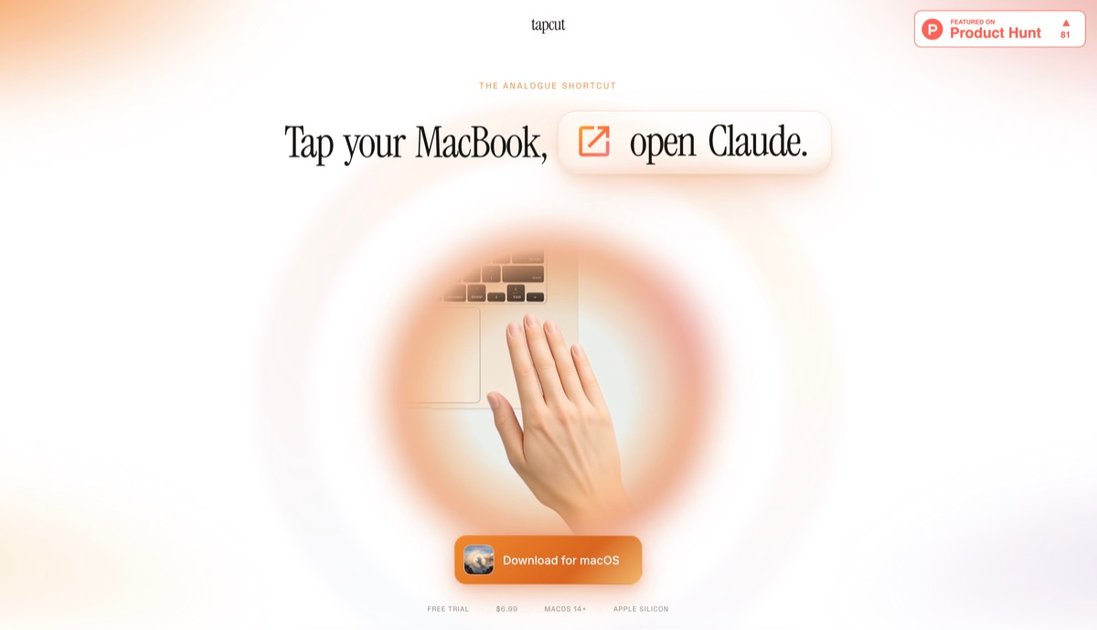
tapcut is a macOS 14+ app for Apple silicon that turns MacBook chassis taps into programmable shortcut rhythms—2, 3, or 4 taps.
What is tapcut?
tapcut is a macOS app for Apple silicon that turns taps on your MacBook chassis into programmable shortcuts. You assign different actions to tap rhythms—two, three, or four taps—so each pattern triggers a bound command you choose.
The core purpose is fast, physical-trigger input without using the keyboard or mouse for every action. tapcut can fire macOS Shortcuts, launch apps, send keyboard combinations, insert text snippets, or show a fullscreen calm overlay—working even while you’re typing or on a call.
Key Features
- Tap-rhythm shortcuts (2, 3, or 4 taps): map a distinct rhythm to a specific action so you can trigger multiple behaviors without remembering different gestures.
- Custom action types: bind each tap pattern to a macOS Shortcut, an app launch, a keyboard combo, a text snippet, or a fullscreen calm overlay.
- Quick configuration in-app: build bindings by selecting from your Shortcuts library, choosing keyboard modifiers and up to three keys, or entering the exact text/shortcut you want to insert.
- Fires from anywhere: taps can trigger actions even when you’re typing or in an active call, since the app is designed to respond to a rhythm rather than a single bump.
- Shortcut-aware setup: the app reads every Shortcut already on your Mac, so you can pick what to run from your existing Shortcuts.
How to Use tapcut
- Install tapcut for macOS 14+ on an Apple silicon MacBook.
- Open tapcut and assign actions to each rhythm (2 taps, 3 taps, 4 taps).
- For Shortcuts: choose a Shortcut from the library.
- For keyboard combos: select modifiers (⌘ Cmd, ⌥ Opt, ^ Ctrl, ⇧ Shift) and up to three keys.
- For text snippets: enter the phrase to type when triggered.
- Optionally configure the fullscreen calm overlay action.
- When you need an action, tap your laptop in the pattern you bound (two, three, or four taps). The bound action fires.
Use Cases
- Run a personal automation (two taps): double-tap to execute a macOS Shortcut from your Shortcuts library—for example, running a multi-step workflow while you’re focused on another task.
- Send a keyboard command even when keys are inconvenient (two taps): bind two taps to a keyboard combo such as ⌘⇧V, useful when you want to trigger a command without switching to the keyboard.
- Open an app without Cmd-Tab (three taps): configure three taps to launch a specific app (e.g., Claude), keeping your workflow stable without changing windows.
- Insert a standard message while staying in the current field (three taps): bind three taps to a text snippet like “NO MISTAKES!” so the phrase types into the active cursor position without moving focus.
- Use a calming overlay on demand (three taps): bind a three-tap rhythm to a fullscreen calm message/timer overlay (e.g., a “Take a breath” session) to create a short pause.
FAQ
What Macs does tapcut support?
tapcut requires macOS 14 or later on Apple silicon MacBook models. Desktop Macs are not supported because they don’t have the accelerometer used for tap detection.
How does tapcut detect taps?
tapcut listens for tap rhythms on your MacBook chassis using the built-in accelerometer. It triggers based on the rhythm (two, three, or four taps), not a single bump.
Can tapcut see or capture audio/video of what I’m doing?
No. tapcut uses motion only and does not use the microphone, camera, or network for detection. It’s described as having no mic/camera access for tap recognition.
Will tapping accidentally while I’m typing trigger actions?
tapcut is designed to respond to a rhythm rather than a single motion, and typing is not expected to resemble a deliberate double-tap. If misfires occur, the settings include a way to tighten the tap threshold.
What does tapcut cost and is there a free trial?
The site states a free trial with a $6.99 one-time purchase. It also notes lifetime updates and no subscription, with no credit card required to start the trial.
Alternatives
- macOS Shortcuts + keyboard shortcuts: If your workflow already relies on macOS Shortcuts, you can assign keyboard shortcuts to run them. This keeps everything in software, but it doesn’t offer tap-rhythm input.
- Accessibility features for custom triggers: macOS Accessibility can remap input or trigger actions using alternative control methods. Compared with tapcut, it may require different hardware/input paths rather than chassis tap rhythms.
- Macro tools or general automation apps: These can launch apps, run commands, or insert text based on hotkeys. They typically rely on keyboard/mouse triggers, whereas tapcut uses physical tap rhythms.
- App launchers/hotkey managers: Tools that provide quick app switching and launching can reduce reliance on Cmd-Tab. They don’t include tap-rhythm bindings or the text/overlay behaviors described for tapcut.
Alternatives
MealTime
MealTime is your personal, offline-first recipe companion designed to help you save, organize, plan meals, and generate smart grocery lists, all while keeping your data private.
Side Reminder
Side Reminder brings Apple Reminders to your screen edge with keyboard/voice capture, focus timer, inline link previews, and optional Claude Code AI execution.

Biji
Biji is a versatile platform designed to enhance productivity through innovative tools and features.

Gemma AI
Gemma AI is a smart application that calls you directly with personalized, intelligent voice reminders to ensure you never miss important tasks, appointments, or deadlines.

Spotit
Spotit is a macOS app that reads your screen and highlights exactly where to click, using voice questions and on-screen guidance.

Decision Jar
Create virtual jars of options with Decision Jar—shake your phone to pick instantly, use AI suggestions, and view decision logs over time.