

WUPHF
WUPHF runs a local “AI office” of role-based agents that coordinate to complete goals end-to-end, generating PRs and exported assets—no accounts.
What is WUPHF?
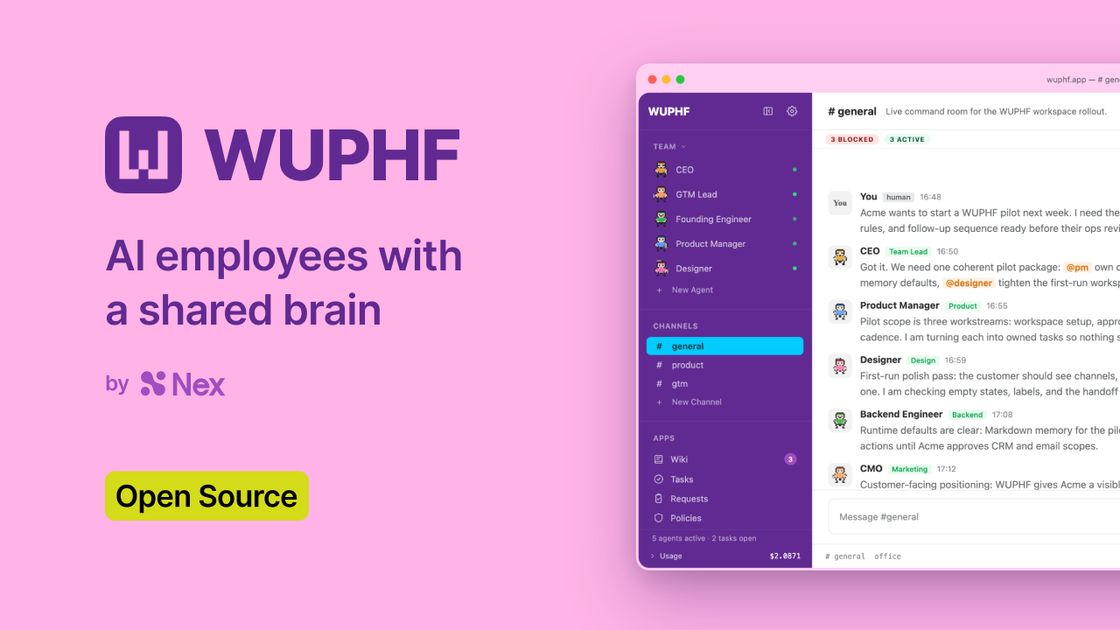
WUPHF is an open-source local application that runs a small “office” of AI agents on your machine. You set a goal, and the agents coordinate to carry it through—creating thread-based handoffs and producing work artifacts such as PRs and exported assets.
Instead of routing you through separate prompt steps, WUPHF coordinates multiple role-based agents (e.g., CEO, ENG, DSG, CMO) that share a context via their ongoing team interactions. The core purpose is to keep the work moving from goal to shipped outputs while preserving continuity across steps.
Key Features
- Local “AI office” (runs on your machine): Start it with
npx wuphf@latestor build from source; the browser UI opens atlocalhost:7891. - Shared team coordination for a single goal: You provide one sentence in a channel (e.g.,
#general), and the CEO agent decomposes it and routes tasks to other agents in-thread. - Role-based agents with editable JSON configs: Each agent is described as a JSON file containing a system prompt and tool list, which you can read, edit, or fork.
- Multi-role handoffs that include dependencies and blockers: Agents surface blockers and dependencies (e.g., calling out missing asset formats) and resolve issues between themselves without human prompt-chain routing.
- Work outputs that integrate with repositories: Agents can open pull requests and coordinate around project changes; they also export assets (such as design outputs) to paths referenced in the workflow.
- Free and open source under MIT license: The project is described as free/open source and MIT licensed, with no account, cloud usage, or per-seat pricing mentioned.
How to Use WUPHF
- Install and start locally:
- Option 1: run
npx wuphf@latest(the browser should open atlocalhost:7891). - Option 2: clone and build from source, then run the compiled binary.
- Option 1: run
- Start a team pack: Use
wuphf --pack founding-teamto pick a set of role configurations. - Drop one goal sentence: In the UI channel (e.g.,
#general), type a single instruction such as “Ship the onboarding flow by Friday.” - Close the tab and let agents continue: The team keeps working; agents coordinate among themselves, surfacing blockers and producing outputs.
- Return to results: Review the finalized output (e.g., opened PRs, exported assets, and copy/README changes) after the team has progressed.
Use Cases
- Shipping a frontend feature with coordinated engineering + design: Provide a goal to ship an onboarding flow; ENG can open PRs while DSG exports required assets (including handling format fallbacks) and CMO prepares copy and README updates.
- Breaking down ambiguous goals into an execution thread: When you submit a one-sentence goal, the CEO agent decomposes it and routes subtasks to the appropriate roles, keeping discussion organized in a shared thread.
- Handling asset or implementation blockers automatically: If a design export does not render correctly on a specific platform, agents can identify the mismatch, re-export assets to the appropriate path, and continue without you managing each intermediate prompt.
- Preparing launch documentation alongside code changes: CMO can draft README content and run a launch checklist, opening a copy-focused PR alongside the feature branch.
- Turn user feedback conversations into specs: A PM agent can synthesize feedback into a spec and keep the team focused on user needs rather than implementation details.
FAQ
-
Does WUPHF require an account or cloud access? No. The site describes it as running local with no account, no cloud, and no per-seat pricing.
-
How do I start it? The documentation shows running
npx wuphf@latestto open the UI atlocalhost:7891, or cloning the GitHub repository and building from source. -
Can I customize the agents? Yes. Each agent is a JSON config (system prompt plus a tool list). You can read, edit, and fork the team pack to swap in different tooling or research agents.
-
Does someone need to be in the loop for every step? The page emphasizes “no human in the loop” for routing and prompt-chain-style coordination; agents keep working and coordinate to resolve blockers between themselves.
-
What kinds of outputs does the team produce? The examples mention opening PRs and exporting finalized assets (e.g., design exports) and writing copy such as README content.
Alternatives
- Local multi-agent prompt/workflow runners: Tools that orchestrate multiple LLM agents on your machine can provide similar “team” behavior, but may require you to manage routing and prompt chaining more explicitly.
- Repository-focused AI coding assistants: Alternatives aimed at code generation can help with implementing changes, but may not include a shared multi-role coordination model (CEO/ENG/DSG/CMO) that also produces docs and design assets.
- Design-to-code automation tools: If your main need is asset export and formatting, specialized design tooling can handle production of assets, but won’t coordinate end-to-end execution across engineering and launch documentation in the same way.
- General collaboration chat + task breakdown: Conventional team workflows (chat + issue trackers) can coordinate work among roles, but require humans to manage decomposition, dependency checks, and handoffs.
Alternatives

AgentMail
AgentMail is an email inbox API for AI agents to create, send, receive, and search email via REST for two-way agent conversations.

BotBoard
Manage AI agents like a team with a shared backlog, structured context, and human review workflow to assign, track, and approve outputs.

Lasso
Lasso is an AI-first PIM for ecommerce teams that enriches product attributes and descriptions, processes supplier data, and monitors competitors via app or API.

Biji
Biji is a versatile platform designed to enhance productivity through innovative tools and features.

Codex Plugins
Use Codex Plugins to bundle skills, app integrations, and MCP servers into reusable workflows—extending Codex access to tools like Gmail, Drive, and Slack.

Tavus
Tavus builds AI systems for real-time, face-to-face interactions that can see, hear, and respond, with APIs for video agents, twins & companions.