
Goal-based room creation
Start by typing a goal, such as pressure-testing a pitch or planning a trip, and the app casts six AI participants around that topic.
AI Group Call is a mobile app that turns a typed goal into a live voice call with six AI participants. It is aimed at people who want a structured, spoken discussion with live captions, transcripts, summaries, and follow-up rounds.
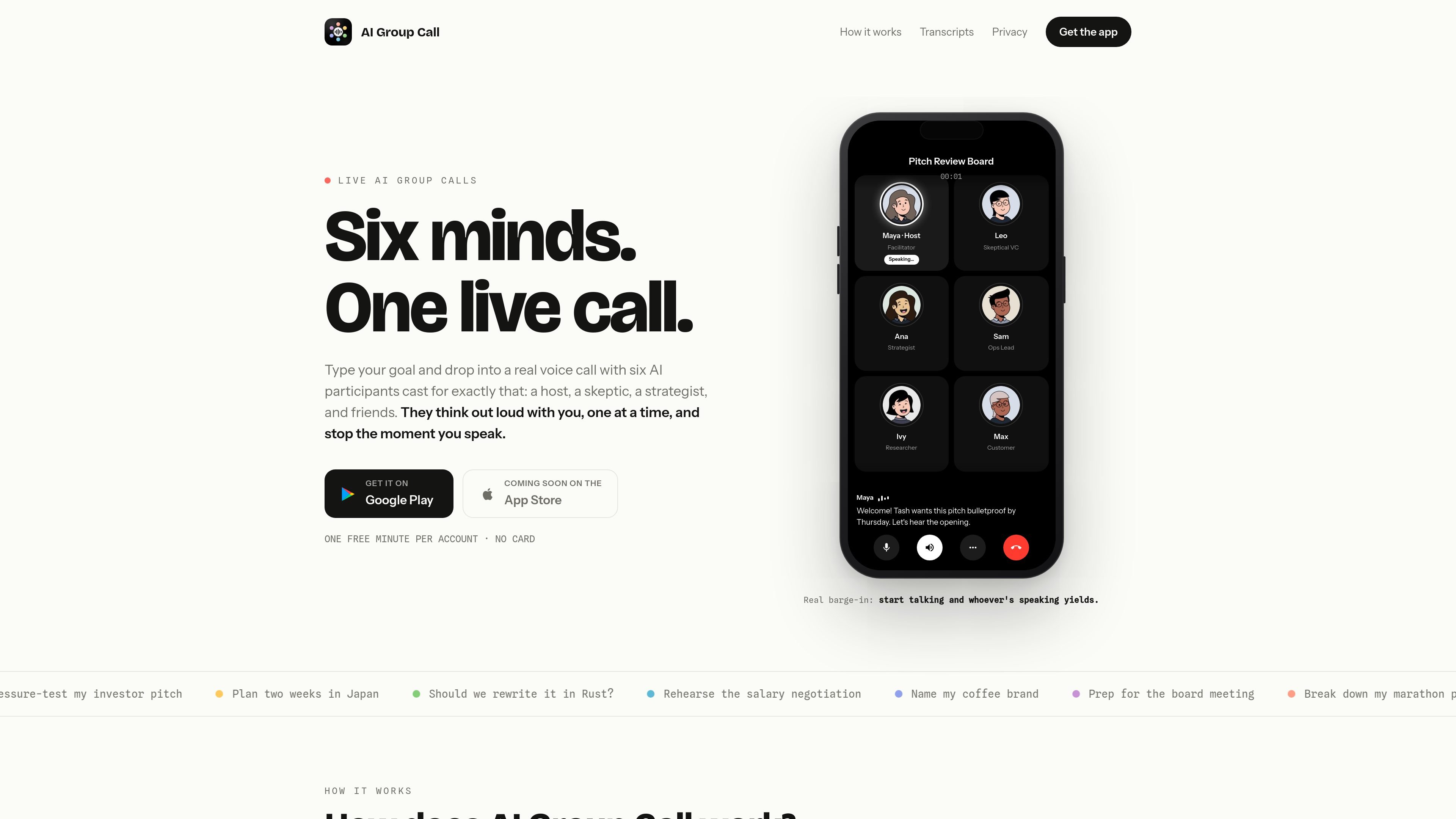
AI Group Call is a mobile app that turns a typed goal into a live voice call with six AI participants assembled around that goal. The app is designed for situations where you want a structured, spoken back-and-forth instead of a text chat: the cast includes a host, a skeptic, a strategist, and additional voices chosen to fit the prompt.
During a call, the participants speak one at a time and yield as soon as the caller starts talking, so the user keeps the floor. The app also shows live captions, saves each finished call with a transcript, summary, and action items, and supports rejoining the same cast for follow-up discussion. The support page says the app is free to try with 1 free minute per account and that additional minutes are sold through Google Play subscriptions.
The product is positioned as a mobile app from Neu Software LLC, with support handled by email. The homepage also notes Google Play availability and says the App Store version is coming soon.
Start by typing a goal, such as pressure-testing a pitch or planning a trip, and the app casts six AI participants around that topic.
The call includes a host, a skeptic, a strategist, and additional roles selected to fit the goal, giving each session a specific point of view.
The voices speak one at a time and stop when you begin talking, so the room behaves like an ordinary conference call with barge-in.
Live captions are shown during the call, and the completed call is saved with a full transcript, a one-tap summary, and action items.
You can tap an avatar to change the name, role, bio, and traits, even while the call is in progress.
The app lets you pause the clock while you think or adjust the room, and later rejoin the same cast for another round.
Use the app to pressure-test an idea, pitch, or plan with a room that includes a built-in skeptic and strategist.
Ask the cast to help compare options, surface tradeoffs, and challenge assumptions before you commit to a decision.
Use the voice call as a live rehearsal for conversations such as negotiations, presentations, or meetings you want to practice aloud.
Bring the same cast back after the first round to continue the discussion with the transcript and action items from the previous call.
Use the editable roles and bios to reframe the room for a different goal, such as travel planning, product planning, or naming work.
It is a mobile app. The homepage says it turns one typed goal into a live voice call with six AI participants, and the support page points users to app-store account settings for subscription management.
According to the support page, new accounts get 1 free minute of call time with no card required. Additional minutes are sold through Google Play subscriptions.
Calls are started by typing a goal, after which the app assembles six AI participants around it. The homepage says they join within seconds, speak one at a time, and yield when the caller starts talking.
Yes. The homepage says the same six-person cast can be reassembled for a follow-up round, and the support page says call transcripts, summaries, and action items remain in account history until the account is deleted.
The support page says subscriptions are managed in your Google Play or Apple App Store account settings, not inside the app.

MeetStream is a meeting bot API for Zoom, Google Meet, Microsoft Teams, and Webex. It helps developers record, stream, and analyze meetings programmatically, with usage-based pricing and a $5 free credit to start.
Parrot is a free, open-source AI meeting recorder and live assistant for macOS 14 or later on Apple Silicon. It records calls without a meeting bot, answers questions from locally indexed documents, and helps users review, search, and act on their meetings.

QuickQuill is a macOS dictation and transcription app that runs locally on the device. It helps users record meetings, transcribe audio, generate summaries, and export notes without using a cloud service.

Tackly is a browser-based AI notetaker that maps spoken ideas, meeting discussion, and pasted transcripts into structured boards. It supports solo voice notes, live meeting capture, transcript import, board-scoped follow-up questions, and export to PNG, SVG, or Markdown.

VoiceCap is an AI meeting notetaker that records in-person and online meetings or processes uploaded audio and video. It creates searchable transcripts, summaries, decisions, and action items for individuals and teams, with support for 100+ languages and EU data storage.

Liam is an AI copilot for managing inboxes, writing replies, prioritizing email, and scheduling meetings. It is offered free for individuals, with custom pricing for teams and enterprise.