
AI campaign generation from a URL
Enter a website URL and the AI builds campaign direction from the product, audience, category, and goal. The page shows CLEO producing angles, creators, storylines, and briefs together.

anchors is an AI-driven LinkedIn influencer marketing platform that builds campaigns from a website URL, matches creators, generates briefs, and supports approval and live tracking. It is designed for brands that want a LinkedIn-only workflow with verified data and pre-launch ROI visibility.
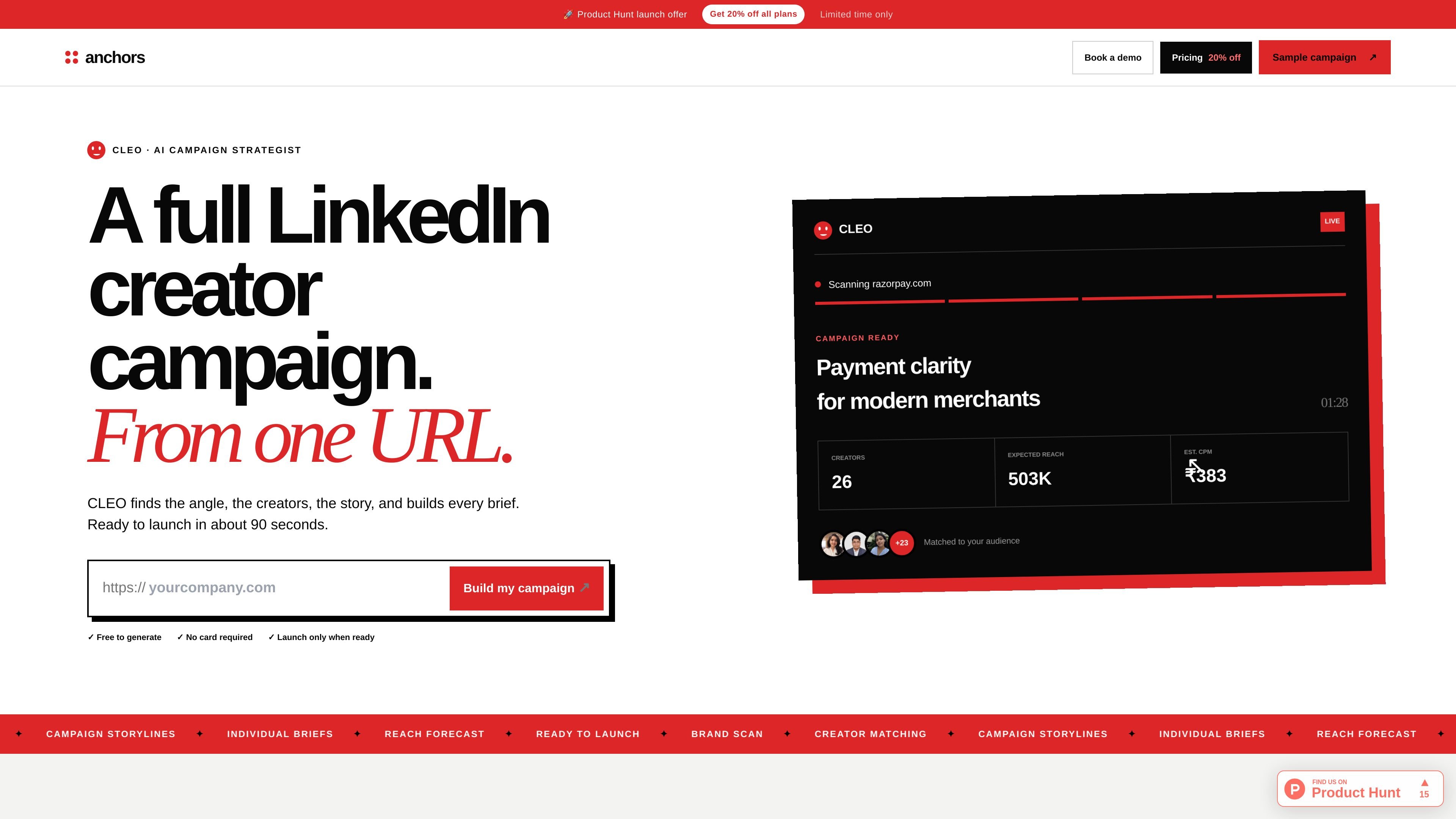
anchors is an AI-driven LinkedIn influencer marketing platform that helps brands plan, build, approve, and launch creator campaigns from a single website URL. The product centers on CLEO, an AI campaign strategist that turns a brand’s site into a campaign outline with creator matches, briefs, forecasts, and launch controls.
The site positions the product as a LinkedIn-only workflow built around verified LinkedIn data rather than screenshots or manual reporting. Brands can define a goal, budget, and audience, then review matched creators, approve drafts, set live dates, and track campaign performance in real time. The pricing page also shows a free trial and a paid model for campaign usage.
Enter a website URL and the AI builds campaign direction from the product, audience, category, and goal. The page shows CLEO producing angles, creators, storylines, and briefs together.
Creators are scored against the brand’s audience using creator content, past work, and audience fit. The site also shows matched creators with a reason for selection and an audience-match signal.
Each creator gets a tailored brief based on the campaign story and their expertise. The pricing page also lists an AI brief generator as part of the platform.
Before payment or launch, the platform previews projected reach, creator count, CPM, and expected expense. The site describes ROI preview and live data from LinkedIn API.
Drafts can be reviewed and approved before publication. The platform shows a draft review flow, linked to exact LinkedIn post previews and change requests.
Live impressions and other performance data are synced from LinkedIn, and the platform includes analytics and comment analysis after launch.
A brand can enter its product URL and quickly get a campaign outline, matched creators, and campaign briefs without starting from a blank sheet.
Marketing teams can use the audience filters and ROI preview to validate who the campaign should reach, how much it may cost, and what creators fit the brief.
Brand managers can inspect creator drafts, request changes, and approve posts before anything goes live, which keeps messaging under review.
Teams that need a fast launch window can use the live scheduling and same-day workflow described on the site to coordinate multiple creators without spreadsheets.
After launch, teams can monitor live impressions, engagement, and comment analysis through data synced from LinkedIn instead of gathering screenshots manually.
The site positions anchors as a LinkedIn-only campaign platform. You enter your website URL, define your audience and budget, and the system generates campaign direction, creator matches, briefs, and live tracking.
The pricing page says the free trial includes 500 anchors credits, one full campaign flow, five influencer collaborations, draft review and approval, real-time performance data, ROI preview, CLEO AI strategy, and LinkedIn preview drafts.
According to the site, brands can review creator drafts and approve or request changes before anything goes live. Live scheduling can also be set per creator.
anchors says the current platform is focused on LinkedIn and is built around verified LinkedIn data, creator matching, brief generation, draft review, live analytics, and AI comment analysis.
The brand-side flow is designed for marketing managers, brand managers, CMOs, founders, and growth teams that want to run creator campaigns with live data and limited manual coordination.

Topple.lol is a public pay-to-rank leaderboard where listings start at $1 and their bid balance decays over time and with clicks. It helps makers and marketers buy short-term visibility for product sites or X profiles while tracking live board stats.

Blinked is a free Chrome extension for LinkedIn outreach that helps users research leads, draft personalized messages, and manage follow-ups inside LinkedIn. It is local first, with outreach data kept in the browser rather than on Blinked’s servers.

Sumora is an autonomous outreach agent for finding, qualifying, warming, and booking leads through LinkedIn and Instagram. It helps users manage replies from one inbox while keeping final sends under review.

Podium is an AI lead generation and lead management platform for local businesses. It centralizes lead conversations, automated follow-up, reviews, payments, and booking, with a 24/7 AI Employee available as an add-on.

Wisry is an AI advertising studio for ecommerce brands that researches competitor ads, develops evidence-backed campaign concepts, and generates static and video creatives. It also supports editing and connected campaign workflows for Meta and Google.

Ninjō AI is an AI sales agent platform for creators and agencies that qualifies leads, handles sales conversations, and supports multi-channel follow-up. It can also be controlled from Claude or ChatGPT through MCP for users who want to manage agents by chat.