
Plain-language editing requests
Describe the outcome you want, such as a first cut or a set of clips, and Eva uses the transcript to structure the edit around that intent.

Flixier Eva is an AI video editing assistant that reads your transcript and turns raw footage into a first cut or clips inside the Flixier timeline. It is designed for spoken-word videos such as podcasts, webinars, interviews, lessons, and talking-head recordings.
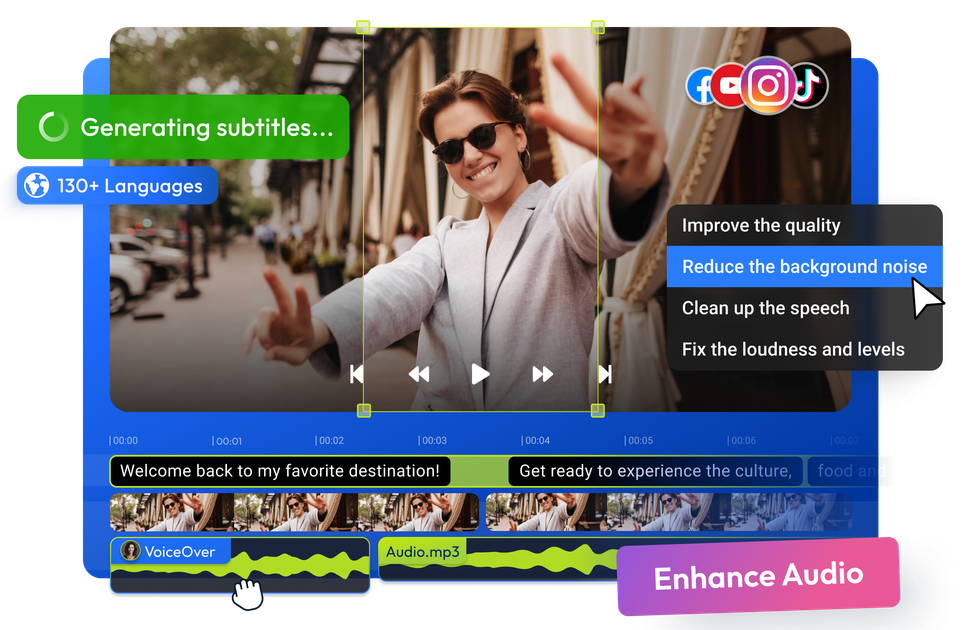
Eva is Flixier’s AI video editing assistant for turning raw footage into a first cut inside the browser-based timeline. You tell her what the video needs to be, and she reads the transcript to build a draft cut or extract clips from the material you already have.
The product is aimed at spoken-word footage such as podcasts, webinars, interviews, lessons, and talking-head videos. It can help assemble the structure of a video before you do final polishing in Flixier, which keeps the edit inside the same project and timeline.
Describe the outcome you want, such as a first cut or a set of clips, and Eva uses the transcript to structure the edit around that intent.
Eva reads spoken content from the transcript and uses it to decide what to keep, cut, and sequence when assembling the first pass.
The assistant can remove filler words and silences while sequencing the remaining material into a usable draft.
You can ask Eva to add text, captions, visuals, and brand kit elements to the cut so the draft reflects the context you asked for.
If you need repurposed content, Eva can pull moments from long recordings and turn them into short clips for later editing.
Eva works inside the Flixier timeline, where you can continue polishing audio, color, subtitles, voiceovers, or generated video without switching tools.
Draft a first cut from interviews, webinars, lessons, or podcasts by describing the outcome you want and letting Eva organize the transcript into an edit.
Ask Eva to find specific moments in a long recording and convert those segments into shorter clips for social posts or secondary edits.
Clean up a spoken video by removing filler words and silences, then continue refining the timeline with the rest of Flixier’s editing tools.
Add captions, text, visuals, or a brand kit to a draft so the project is already partly structured before manual polishing begins.
Work with a team that needs comments, shared brand assets, and a collaborative timeline while still using AI to handle the first editing pass.
Eva takes your intent in plain language, reads the transcript, and builds a first cut inside the Flixier timeline. For straightforward tasks she can act immediately; for decisions that could change the shape of the video, she shows you her plan first so you can review it.
Yes. The FAQ says you can tell Eva what moments you want pulled out, and she searches the transcript and turns them into clips. The page specifically points to repurposing podcasts, webinars, and other long-form recordings into shorter content.
Eva is built for footage with spoken content because she relies on the transcript. The page names podcasts, interviews, lessons, webinars, talking-head videos, and similar recordings as good fits.
The source says you do not need editing skills or technical knowledge to use Eva. You describe what you need in plain language, and the assistant handles the transcript-based editing inside Flixier.
Flixier’s pricing page shows a free plan and paid tiers, with AI credits included in each plan. Paid plans remove the watermark and add more export, storage, and AI capacity.

QuickQuill is a macOS dictation and transcription app that runs locally on the device. It helps users record meetings, transcribe audio, generate summaries, and export notes without using a cloud service.

CAKIE is a Mac app for recording your screen and voice for an AI agent. It adds a transcript and screenshot highlights, then lets you copy a prompt and paste or attach the context in another AI app.

SpeakoFlow is a free, open-source desktop voice-to-text app for Windows, macOS, and Linux. It supports dictation into any app, voice-driven writing with Flow, cleanup, translation, and a screen-aware assistant.

Notewarp is an AI note-taking tool that turns voice notes, uploads, or pasted text into cleaner notes, transcripts, summaries, and action items. It helps people capture rough ideas quickly and then edit, export, or share the result.
Parrot is a free, open-source AI meeting recorder and live assistant for macOS 14 or later on Apple Silicon. It records calls without a meeting bot, answers questions from locally indexed documents, and helps users review, search, and act on their meetings.

Flunkey is a voice-first productivity layer for Windows that converts speech into text, AI-assisted outputs, and remembered context. It is built for users who want to capture ideas and actions without leaving the app they are working in.