
Reads real-world documents
Upload a photo, scan or PDF and extract printed text, handwriting, checkboxes, tables, signatures, readings and marks on maps or drawings.

Formalini turns photos, scans and PDFs into structured data for operations, finance, field-service and software workflows. It supports custom or automatically generated schemas, validation, human review, JSON/CSV export, APIs and signed webhooks.
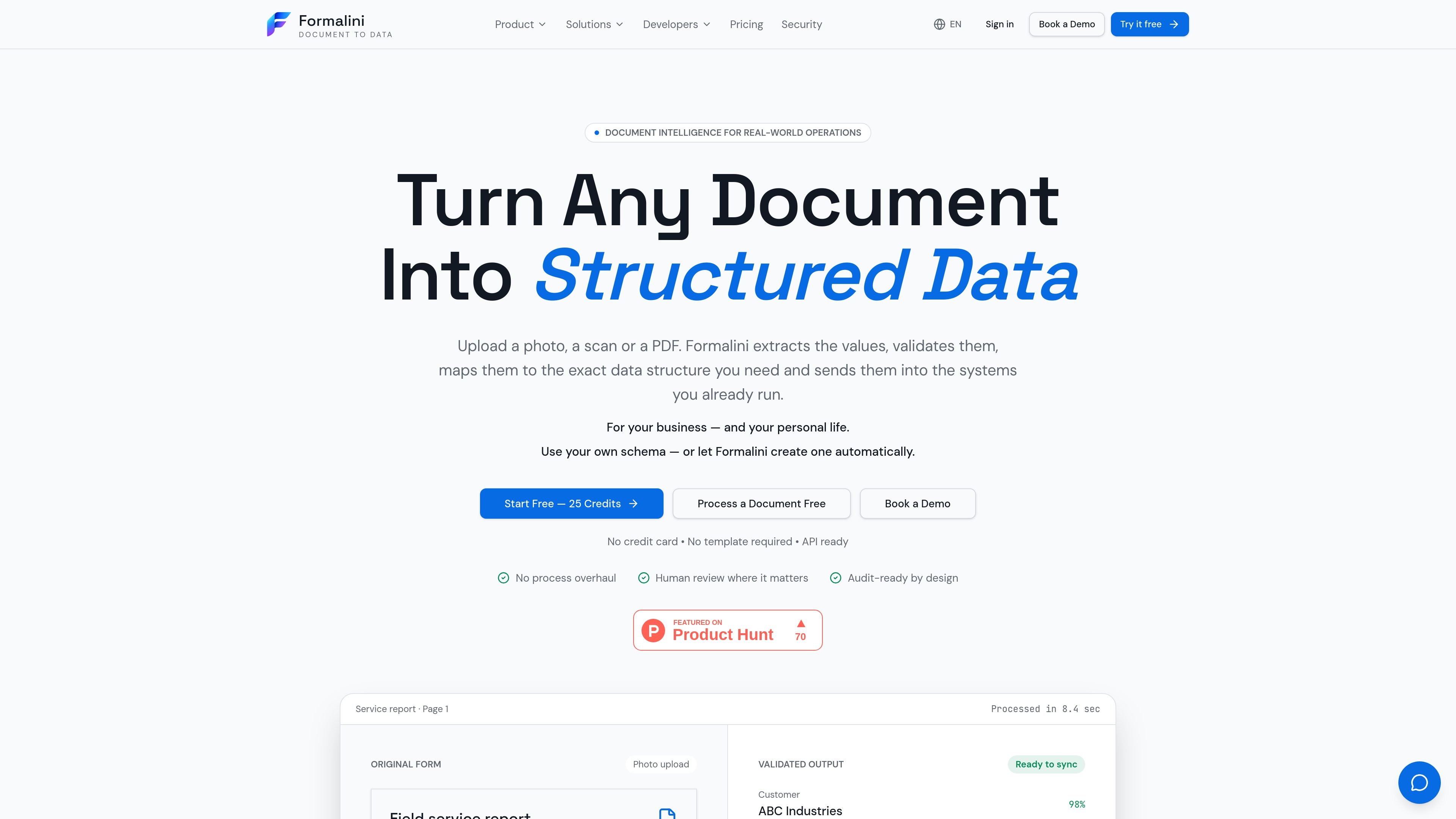
Formalini is a document-intelligence platform that turns photos, scans and PDFs into structured data. It is designed for business workflows in which people currently retype information from invoices, forms, reports, receipts or delivery documents into another system. The service can read printed and handwritten content, preserve tables and choices, and return the result in a specified data structure.
The workflow combines extraction with validation and review: values receive confidence scores, business rules can be applied, and uncertain fields can be sent to a human reviewer before release. Approved data can be exported as JSON or CSV or delivered to other systems through the REST API and signed webhooks. A free browser trial is available without an account; paid plans add higher processing volumes, storage, team seats and workflow controls.
Upload a photo, scan or PDF and extract printed text, handwriting, checkboxes, tables, signatures, readings and marks on maps or drawings.
Use a custom schema or form template to define the fields and output shape. Formalini can also generate a structure automatically when no schema is supplied.
Every field includes a confidence score, and the product preserves the source location so a reviewer can see where a value came from on the original document.
Business rules can be applied before export, while uncertain fields are routed for human review rather than silently accepted. Corrections and approvals are recorded with timestamps.
Approved records can be downloaded as JSON or CSV, accessed through the REST API, or delivered through signed webhooks.
API keys are scoped to a workspace and support document reads, document creation and field correction, plus workflow events to webhooks. The documentation shows a 60-request-per-minute limit for each key.
Extract supplier details, invoice numbers, dates, line items, quantities, tax and totals into a finance system, with uncertain values held for review before posting.
Capture job-sheet details, equipment identifiers, readings, condition checks and signatures from forms completed in the field, then route exceptions to an office reviewer.
Turn order lines, quantities and references from purchase orders into records that can be matched against procurement or inventory workflows.
Process intake and consent forms while keeping human checks in the release path for sensitive or incomplete records.
Organise personal receipts, bills, warranties and renewal documents so dates, amounts and categories can be searched and used for spending or expiry tracking.
Yes. The site offers a free, no-account document run. The homepage says uploads for this trial are JPG, PNG or PDF files up to 10 MB, limited to the first three pages and three free runs per day. Demo files are read once and not stored.
You can upload photos, scans and PDFs, including printed or handwritten documents. The feature list also describes support for filled boxes, ticks, tables, readings, signatures, and marks on maps or drawings.
You can provide your own schema or form template, and Formalini maps extracted values into that structure. If you do not have a schema, the product can generate one from the document.
Results can be exported as JSON or CSV, retrieved through the REST API, or delivered through signed webhooks. Approved results can be sent to other systems through API and automation connections; the site names SAP, ServiceNow, Salesforce, Power Automate and UiPath as examples.
Each value receives a confidence score. Low-confidence values can be routed to a reviewer, and corrections and approvals are recorded with timestamps in the document's audit trail. The site says Formalini does not currently hold ISO 27001 or SOC 2 certification.

Invited turns dates found in bills, cheques, invitations, renewals and other documents into reminders. It supports camera images, screenshots, PDFs and shared files on iPhone and Android, with review before saving and no account required.

nolainocr is an AI OCR tool that extracts structured data from PDF invoices, receipts, forms, contracts, and bank statements. It helps teams move document data into Excel, Google Sheets, JSON, or CSV without manual entry.

Letra is a menu bar OCR utility for macOS Sonoma 14 or later that copies text from screen regions, videos, PDFs, screenshots, and screen shares to the clipboard. It also supports on-device recognition, QR and barcode decoding, searchable capture history, and copied image or file input.
司马阅是一款面向企业的AI文档智能体平台,帮助团队把分散在文档中的知识转成可用于问答、检索、写作和审查的结构化能力。它适合对准确性和数据安全要求较高、且有大量文档工作流程的企业。

Capso is a native macOS screenshot and screen recording app for capturing, annotating, recording, and extracting text from screen content. It is free forever, open source, and positioned as an alternative to CleanShot X.

KlutterAI is an AI-powered expense tracker that helps people capture receipts, categorize spending, and monitor budgets from iOS or Android. The product also surfaces recurring charges, spending alerts, and exportable reports.