
Multi-protocol device control
Bring Matter, Zigbee, MQTT, Wi-Fi and Apple Home devices into an iPhone app, with support for lights, outlets, locks, climate devices, shades, sensors, switches, fans, air purifiers and energy meters.

gethome is a local smart-home platform for iPhone users who want to control Matter, Zigbee, MQTT, Wi-Fi and Apple Home devices through one app. Its hub runs on user-owned hardware and adds an AI assistant, natural-language automation creation and always-on local rules.
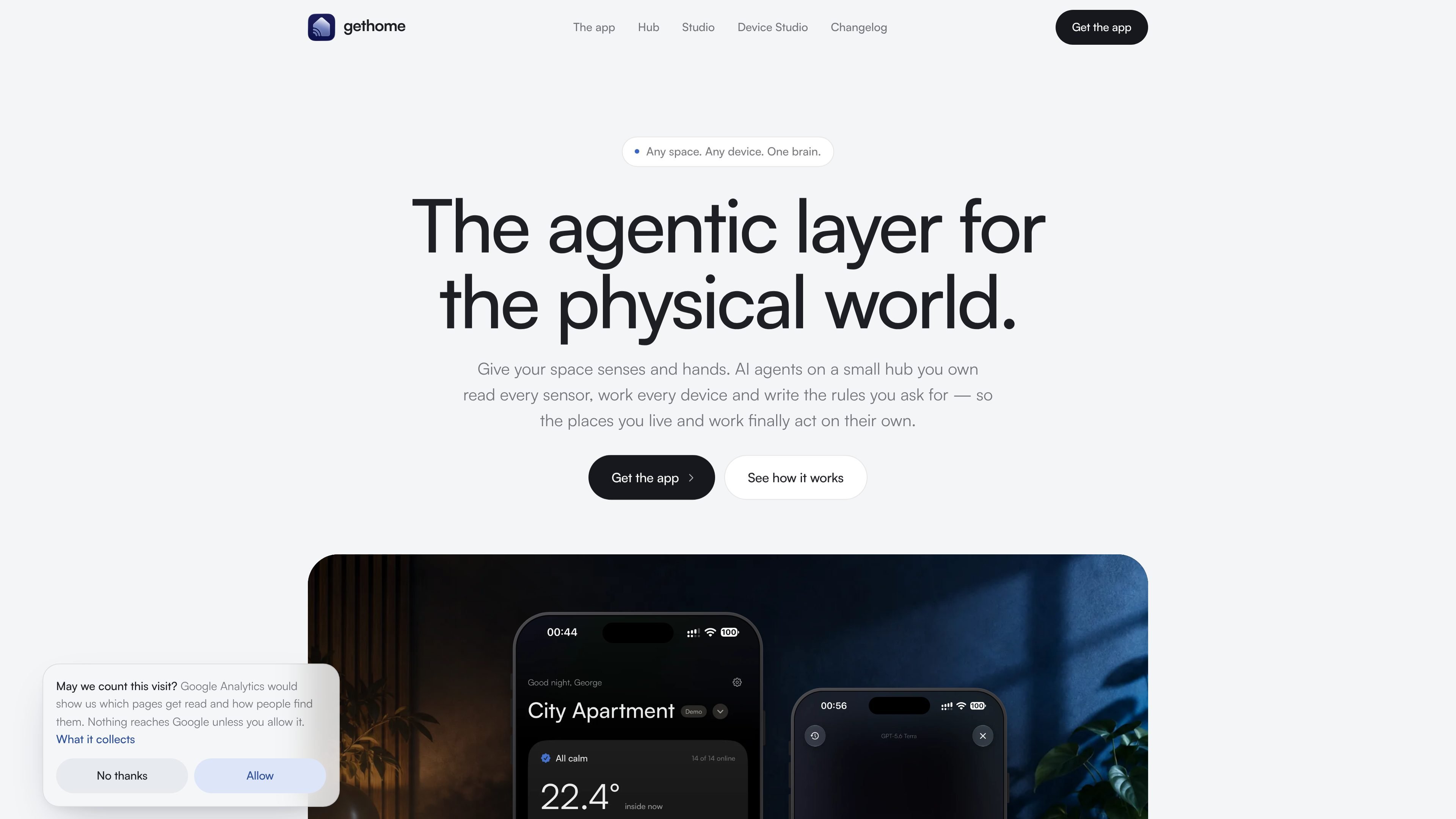
gethome is a local smart-home platform built around an iPhone app and a hub that runs on hardware you own. It brings supported devices and Apple Home accessories into one place, with Matter, Zigbee, MQTT, Wi-Fi and Apple Home integrations. The hub runs on a Raspberry Pi or another 64-bit Linux machine on the home’s own Wi-Fi, rather than routing device control through a gethome cloud service.
Its AI assistant can answer questions about the home and carry out device or scene actions. An automations agent turns natural-language instructions into rules, but saves each new rule switched off until the user reviews and enables it. Once active, rules run locally around the clock and do not require an AI key during execution. AI requests use an Anthropic or OpenAI key configured for the home, and the product states that the phone asks before requests are sent.
Bring Matter, Zigbee, MQTT, Wi-Fi and Apple Home devices into an iPhone app, with support for lights, outlets, locks, climate devices, shades, sensors, switches, fans, air purifiers and energy meters.
Ask about device states and conditions by typing or speaking, then control individual devices or groups through cards and scenes.
Describe an automation such as a schedule, sensor response or safety action. The agent saves the generated rule switched off, and the hub records what triggered and executed it.
Run rules locally on the hub, even when phones are away. Rules execute without an AI key, include safeguards against excessively rapid relay switching, and runaway rules are switched off.
Store temperature, humidity, air-quality and power readings on the hub at five-minute intervals, with up to a week of history described on the hub page.
Install and maintain a hub with gethome Studio for Mac, including SD-card preparation, network discovery, update monitoring, rollback of a build that will not start, device schemas and AI-run logs.
Create schedules and routines such as turning a lamp off at a set time, opening curtains on weekdays or locking doors at night. Review the generated rule before switching it on.
Connect sensors to actions that respond to conditions: turn on a hall light after motion, lower heating when a window stays open, or start a fan when CO₂ passes a threshold.
Use the assistant to check what is on, what is open or how warm a room is, then operate a device or scene by text or voice from the iPhone app.
Keep an always-on set of rules for a home, studio or greenhouse, including MQTT-connected boards and sensors. The same platform describes these spaces as separate environments, with offices and hotels identified as future use cases.
Use gethome Studio to install a hub on a Raspberry Pi, inspect live MQTT traffic, review device schemas and see the cost, duration and model used for AI operations.
gethome is an iPhone app and local hub system for controlling Matter, Zigbee, MQTT, Wi-Fi and Apple Home devices, while using AI for home questions and automation creation.
A hub can run on a Raspberry Pi or another 64-bit Linux machine. The documented minimum is a 64-bit system with 512 MB of memory; Zigbee devices also require a USB coordinator stick. Matter, Wi-Fi and MQTT devices do not require that stick, and Thread devices work through an existing border router.
The recommended setup uses gethome Studio on macOS 14 or later. Studio can prepare an SD card for a Raspberry Pi or install the hub on a Pi already on the network, then claim and monitor it. The hub can also be installed from the command line.
You describe a rule in natural language, and the automation agent saves it switched off for review. After you enable it, the rule runs on the hub around the clock and does not need an AI key while executing.
The hub runs locally on your own Wi-Fi, without a gethome cloud account. AI features use an Anthropic or OpenAI key supplied by the home, and the phone asks before typed or spoken requests are sent to those providers.

Malyatko is a baby tracker for logging feeding, sleep, growth, teething, and milestones in one app. It works on iPhone, Apple Watch, and widgets, with no sign-up, offline use, and family sharing through iCloud.
Gemma AI is a phone call reminder app that calls you with scheduled reminders instead of push notifications. It helps people who want a more direct way to stay on schedule, with Google Calendar sync and conversational call interactions.

Spotit é um app para macOS que lê sua tela em outro app e destaca exatamente onde clicar, com perguntas por voz e orientação na tela.

Yattayo: Slider To-Do Board is a productivity app that turns tasks into a physical-style slider board with sticky notes, widgets, reminders, and iCloud sync. It helps people who want a more tactile way to manage to-dos and, in Premium, recurring habits.

ConscioussAI is an AI assistant for macOS, Windows, iOS, and Android that helps execute tasks across apps, files, the browser, and messages. It is aimed at people who want permission-based help on both desktop and mobile.
MealTime é o seu companheiro pessoal de receitas, focado no modo offline, projetado para ajudar você a salvar, organizar, planejar refeições e gerar listas de compras inteligentes, mantendo seus dados privados.