
Live Markdown preview
Marked provides live preview for Markdown documents on macOS, helping writers see formatting and structure while they edit content in their editor of choice.

Marked 3 is a native macOS app for live Markdown preview, proofreading, and export to PDF, HTML, DOCX, EPUB, and more. It also supports DOCX round-tripping and custom processing workflows for users who need more than a basic viewer.
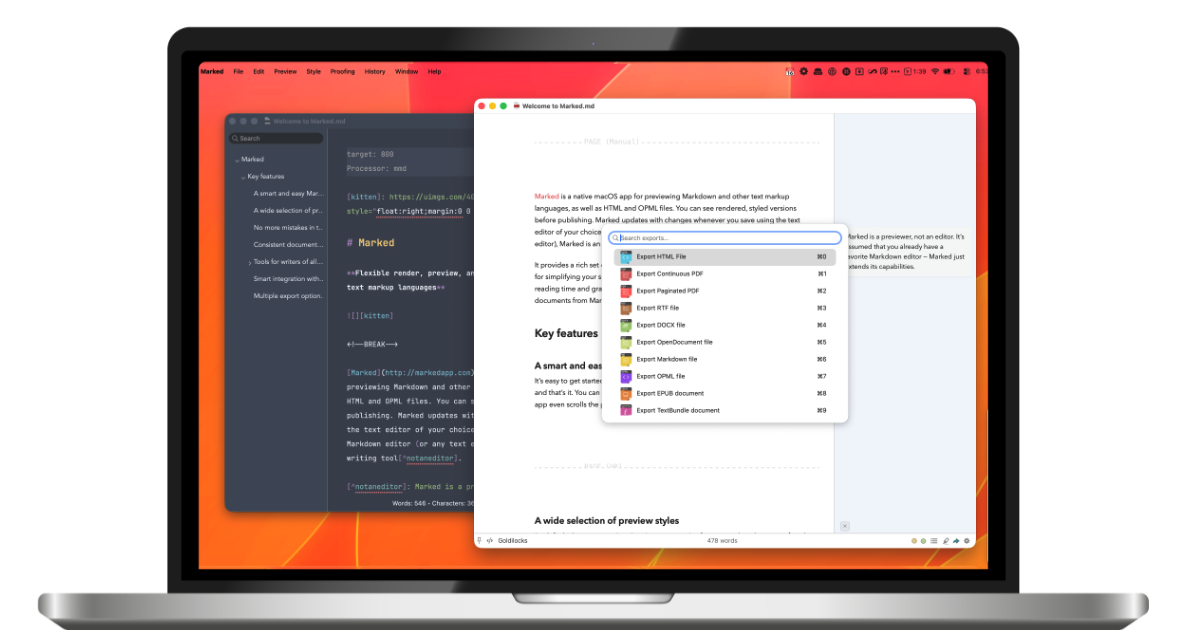
Marked 3 is a native macOS app for live Markdown preview, proofreading, and export. It is designed for people who write in Markdown and need a separate viewing, checking, and publishing layer rather than a full text editor.
The help documentation shows that Marked works with common Markdown variants such as GitHub Flavored Markdown, CommonMark, Kramdown, and MultiMarkdown, and can also be extended to other processors. That makes it useful for writing, reviewing, and preparing Markdown content for a range of outputs, including PDF, HTML, DOCX, and EPUB.
Beyond preview, Marked supports document-focused workflows such as navigation, statistics, spelling and grammar checks, annotations, custom styles, and automation. The DOCX and Custom Processor help pages show that it also handles Word files and rule-based preprocessing or processing for more tailored publishing pipelines.
Marked provides live preview for Markdown documents on macOS, helping writers see formatting and structure while they edit content in their editor of choice.
The app supports proofreading-oriented workflow features and the help site organizes tools for reading, writing, document navigation, statistics, spelling and grammar, and annotations.
Export support includes PDF, HTML, DOCX, EPUB, and other formats named on the product site, making it useful for drafting and publishing workflows.
The DOCX documentation explains that Marked can import DOCX files, convert them to Markdown, and export Markdown back to DOCX with headers, footers, change tracking, and math handling.
Custom Rules let users match files by filename, path, content, metadata, or tree context and then run preprocessors, processors, or commands based on those rules.
The app exposes workflow options such as custom styles, URL handling, AppleScript support, command line use, streaming preview, and a JavaScript API.
Write Markdown in another editor and keep Marked open as a live preview and proofreading surface so you can check structure, formatting, and readability without switching to a full editor.
Prepare content for publication by exporting finished Markdown to PDF, HTML, DOCX, or EPUB, with Word-specific handling available for styles, headers, footers, and change tracking.
Work with DOCX documents when your workflow moves between Word and Markdown, using Marked to convert DOCX into clean Markdown or export Markdown back into a DOCX file.
Build automated or conditional document workflows by matching files on name, path, content, metadata, or related files and then running preprocessors, processors, or commands.
Integrate Marked into a broader writing toolchain with supported app integrations, command line usage, AppleScript, URL handling, or streaming preview.
Marked 3 is a native macOS app for live Markdown preview, proofreading, and export. It works with Markdown variants including GitHub Flavored Markdown, CommonMark, Kramdown, and MultiMarkdown, and the help documentation notes that it can also be extended to work with other processors such as Textile, reStructuredText, and Wikitext.
Marked 3 includes export support for PDF, HTML, DOCX, EPUB, and other formats mentioned in the product description. The DOCX help page also documents Word-specific handling such as headers, footers, change tracking, and math conversion on export.
Yes. The pricing page lists a monthly subscription, a yearly subscription, and a permanent unlock option. It also notes introductory pricing for a limited time and says Marked 2 remains available as a separate one-time purchase for simpler needs.
The help site includes integrations and workflow documentation for supported apps and features such as custom processors, URL handling, AppleScript support, command line utility, and streaming preview. The documentation also references app integrations like Scrivener 3, Obsidian, iA Writer, VS Code, Ulysses, and others.
The help documentation shows that Marked can import DOCX files, convert them to clean Markdown, and export Markdown back to DOCX with custom styles and Word-compatible features. It also explains how custom export styles can be added with a template and styles.xml file.

ProWritingAid is a writing assistant for storytellers that offers grammar checking, style editing, paraphrasing, and story analysis inside popular writing apps. It includes a free plan, paid tiers, and tools for chapter critique, manuscript review, and collaborative editing.

Dictro is a private AI dictation app for Mac that turns speech into polished text in any editable app. It works on Apple Silicon Macs, processes locally by default, and can also run in an optional cloud Fast Mode.

Artifacts by Samepage is a connected writing surface for product teams that turns signals and existing work context into drafts such as PRDs, release notes, feature requests, bug tickets, and status updates. It includes built-in AI editing and can publish work into tools like Jira, GitHub, Confluence, Slack, and Linear.

Goldfish is an AI memory app for macOS that helps you reply, write, summarize, and continue using the context already on your Mac. It stores memory locally and writes in your tone.

SpeakoFlow is a free, open-source desktop voice-to-text app for Windows, macOS, and Linux. It supports dictation into any app, voice-driven writing with Flow, cleanup, translation, and a screen-aware assistant.

Paperpal 是一款面向学术写作的 AI 工具,提供文献阅读、语言润色、引用、查重、AI 检测和投稿前检查。它适合需要在英文论文和学术材料上进行写作、修改与合规自检的学生、研究人员和教师。