
Separate account profiles
Create separate profiles for different Claude accounts, with each profile keeping its own login state and chat history.

Multi-Claude lets you run multiple Claude Desktop accounts on one Mac, with each account living in its own real app, Dock icon, and chat history. It is designed for people who want to keep work and personal Claude sessions open at the same time.
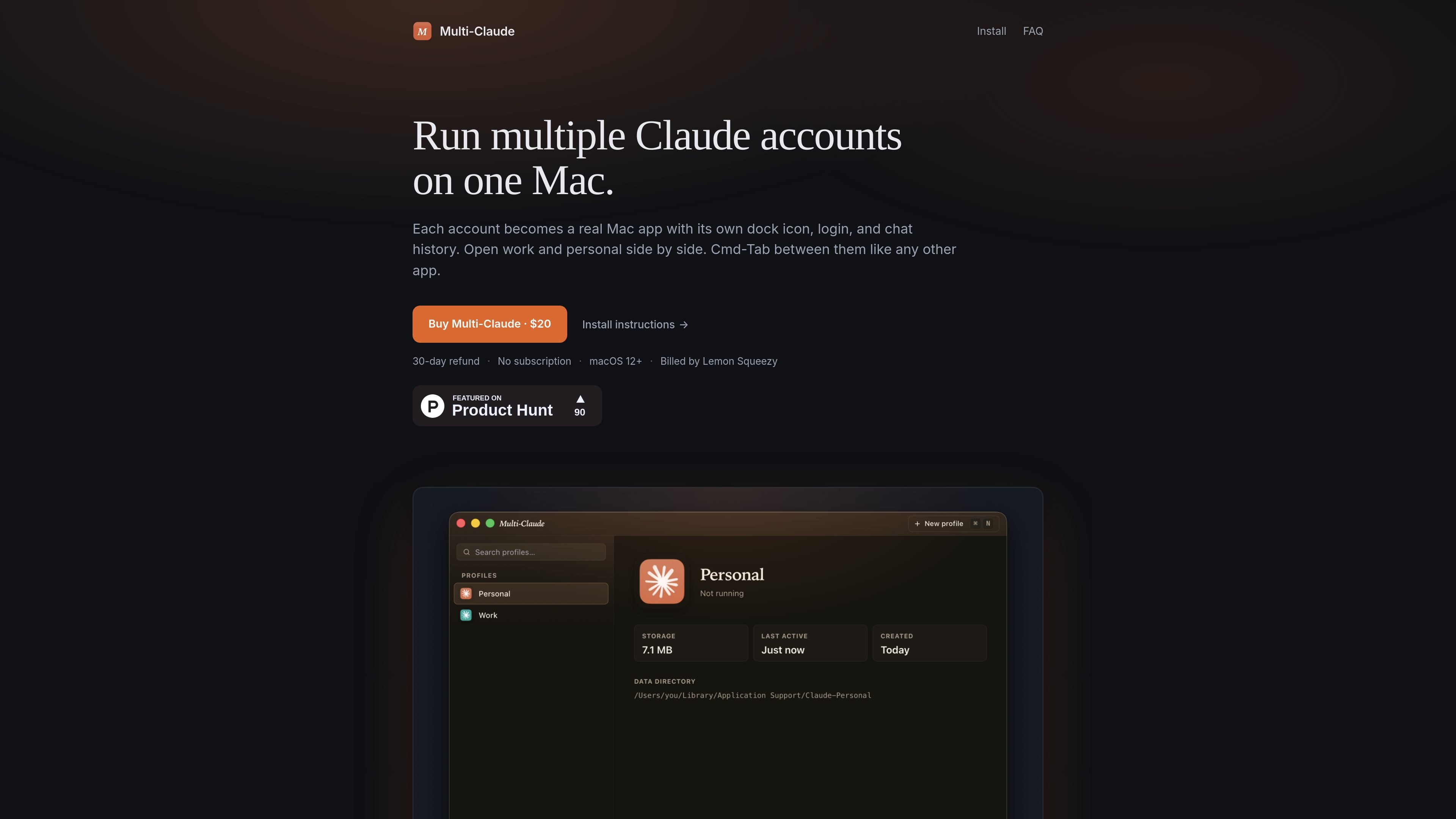
Multi-Claude is a Mac utility for running multiple Claude Desktop accounts on one machine. Each account is treated as its own real Mac app, with a separate Dock icon, login, history, and data directory.
The core idea is to make account switching feel like switching between normal Mac apps. You can keep work and personal Claude sessions open at the same time, use Cmd-Tab to move between them, and avoid quitting or logging out when you change contexts.
Create separate profiles for different Claude accounts, with each profile keeping its own login state and chat history.
Each profile runs as its own Mac app, so it gets a distinct Dock icon, Spotlight result, and Launchpad tile.
Open work and personal accounts at the same time and move between them without quitting or signing out.
On first run, the app can detect an existing Claude Desktop install and offer to import that history into a named profile.
Profiles stay on your Mac and use separate data directories, with no account creation or cloud sync required for the basic workflow.
The install flow is signed and notarized, and the app activates by pasting a license key or using the Lemon Squeezy activation link.
Keep a work Claude account and a personal Claude account open side by side so you can switch contexts quickly without signing out.
Create profiles for client, side project, or team-related accounts when you need each one to preserve its own chat history and login state.
Import an existing Claude Desktop setup into Multi-Claude, then add more profiles instead of rebuilding your history from scratch.
Use the app on a Mac where you want each account to behave like a normal app, complete with its own Dock and Launchpad presence.
Yes. The FAQ states that you can open your work and personal Claude accounts side by side, each signed in and running in its own window. It is not limited to two profiles.
Switching is done with Cmd-Tab, because each account is treated like a separate Mac app. You do not have to quit and re-log in when changing accounts.
The product runs on macOS only for now. The site says it supports macOS 12+ and that Windows is on the roadmap.
Multi-Claude is sold as a one-time purchase through Lemon Squeezy. The site shows a $20 price and says licenses include a 30-day refund window.
Yes. The install page says one license covers all the Macs you personally use.

Biji é uma plataforma versátil projetada para aumentar a produtividade por meio de ferramentas e recursos inovadores.

MacSpoof é um alterador de MAC no macOS que permite trocar ou randomizar o endereço Wi‑Fi para reconectar e reduzir o registro da identidade.

NomNak é um app gratuito para iPhone que ajuda a descobrir restaurantes com recomendações de amigos, spots salvos, passaporte gastronómico e busca por cidade.
TyeGit é um cliente Git nativo em Rust e Tauri para controle rápido e preciso de staging, commits, branches e remotes no Windows, macOS e Linux.

Carbon Voice is an asynchronous voice messaging app for teams and individuals, with transcripts, AI catch-up, and cross-device access. It helps people and agents communicate without needing a live call.
MealTime é o seu companheiro pessoal de receitas, focado no modo offline, projetado para ajudar você a salvar, organizar, planejar refeições e gerar listas de compras inteligentes, mantendo seus dados privados.