
Multi-format document input
Convert images, PDFs, Word documents, or pasted screenshots into clean text, tables, and math output. The site also supports drag-and-drop, browse, paste, and URL-based input.

OCR.chat is a browser-based OCR and document chat tool for converting images, PDFs, and Word documents into editable text. It also supports structured exports and cited question-answering over finished documents.
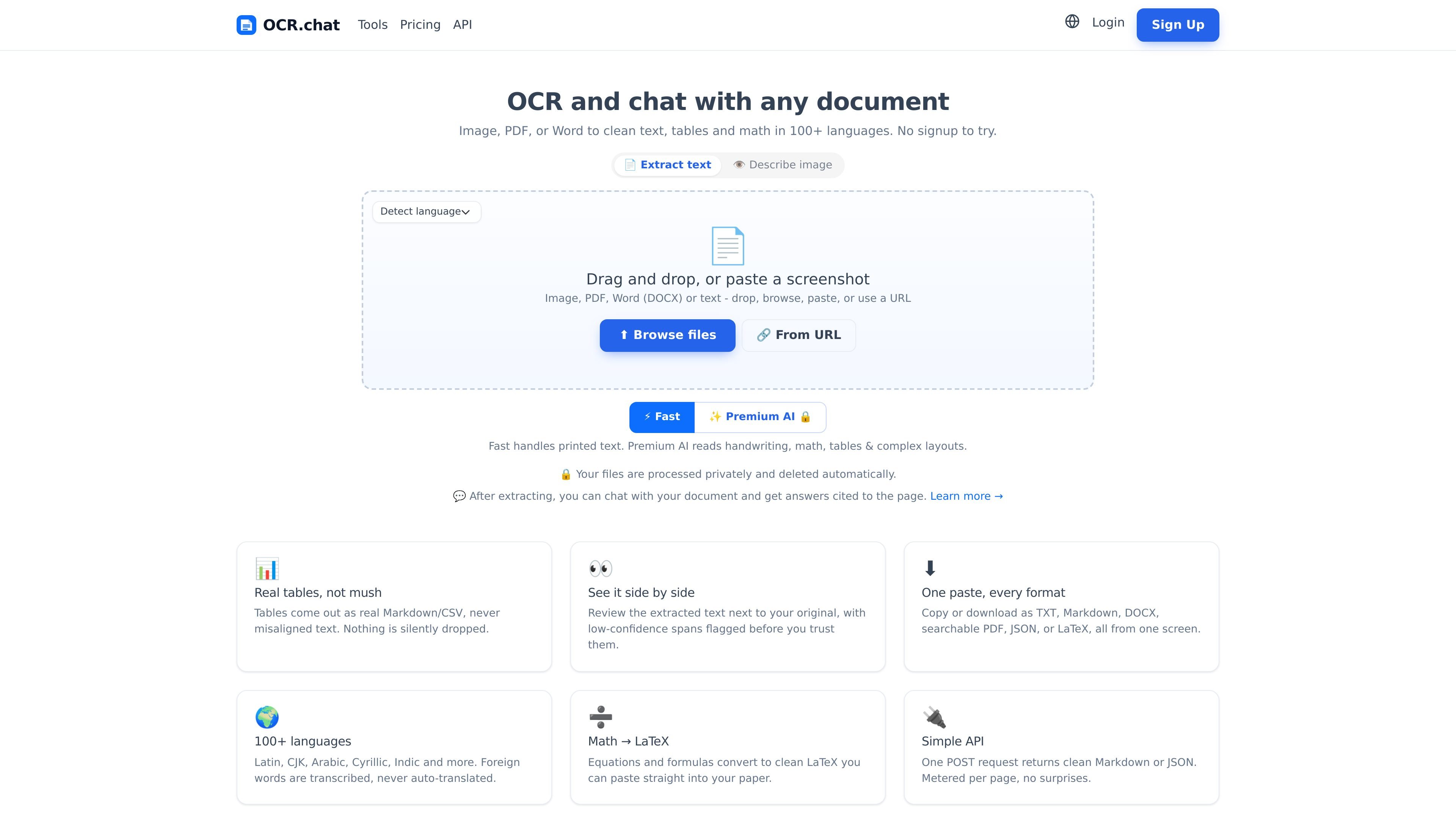
OCR.chat is a browser-based OCR and document chat tool for turning images, PDFs, and Word documents into editable text. It is built for documents that need more than plain transcription, including tables, math, handwriting, and multi-page PDFs.
The site positions the product around two workflows: fast OCR for printed content, and a Premium AI engine for harder documents. After extraction, you can review the result side by side with the source, export it in several formats, or chat with the document and get answers cited to the page.
Convert images, PDFs, Word documents, or pasted screenshots into clean text, tables, and math output. The site also supports drag-and-drop, browse, paste, and URL-based input.
Use the fast engine for printed text or the Premium AI engine for handwriting, complex layouts, tables, and math. The site says the premium engine also describes what an image shows in plain language.
Review extracted text beside the original document, with low-confidence spans flagged before you trust the result. This is meant to make correction easier before export or chat.
Export results as TXT, Markdown, DOCX, searchable PDF, CSV, JSON, or LaTeX from the same screen. The site also says tables are returned as real Markdown or CSV rather than misaligned text.
Work in 100+ languages, with foreign text transcribed rather than auto-translated. The site lists support for Latin, CJK, Arabic, Cyrillic, Indic, and other scripts.
Ask questions about a finished extraction and get answers cited to the page. The API also exposes a chat endpoint for document Q&A.
Upload scanned PDFs or images to turn them into editable text when you need a quick transcription of printed pages. The product distinguishes this from its Premium AI engine, which is used for harder documents.
Process tables, equations, and mixed-layout files when a plain text OCR pass is not enough. The site says tables can be exported as real Markdown or CSV and math can be converted to LaTeX.
Review a result against the original page and use confidence flags to catch uncertain spans before copying or exporting. This is useful when accuracy matters and you want a manual verification step.
Ask follow-up questions about a finished extraction and receive answers that cite the source page. This fits review, lookup, and summarization workflows for long documents.
Use the API to submit files, poll jobs for larger documents, and download results in the format you need. The API supports inline results for files of five pages or fewer and a downloadable workflow for larger jobs.
Yes. The site says you can extract text with no signup at all, and that a free account adds more pages each month. Paid plans unlock unlimited pages, the Premium AI engine, batch processing, and the API.
OCR.chat supports PNG, JPG, WEBP, GIF, BMP, TIFF, and multi-page PDF files. The site says it works in over 100 languages, including CJK, Arabic, Cyrillic, and Indic scripts.
The fast engine handles printed documents. The Premium AI engine is used for handwriting, complex layouts, tables, and equations, and the results can be exported as text, Markdown, Word, searchable PDF, CSV, or JSON.
No. The site says OCR.chat runs in your browser and nothing needs to be installed.
Files are processed for OCR and deleted automatically. The site says it does not sell, share, or train on your documents.

nolainocr is an AI OCR tool that extracts structured data from PDF invoices, receipts, forms, contracts, and bank statements. It helps teams move document data into Excel, Google Sheets, JSON, or CSV without manual entry.
司马阅是一款面向企业的AI文档智能体平台,帮助团队把分散在文档中的知识转成可用于问答、检索、写作和审查的结构化能力。它适合对准确性和数据安全要求较高、且有大量文档工作流程的企业。

PDFTools is a browser-based suite of free and premium PDF utilities for editing, conversion, and document handling. It helps users work on PDFs locally in the browser without uploading files to a server.

Artifacts by Samepage is a connected writing surface for product teams that turns signals and existing work context into drafts such as PRDs, release notes, feature requests, bug tickets, and status updates. It includes built-in AI editing and can publish work into tools like Jira, GitHub, Confluence, Slack, and Linear.

Letra is a menu bar OCR utility for macOS Sonoma 14 or later that copies text from screen regions, videos, PDFs, screenshots, and screen shares to the clipboard. It also supports on-device recognition, QR and barcode decoding, searchable capture history, and copied image or file input.

Vorker.ai is an AI coworker for solo operators and small teams. It helps with email, research, documents, marketing, meetings, reporting, and repetitive administrative work through authorized business tools and information sources.