
One-tap saving
Send content to Ordo from the share sheet in one tap. The guide says you do not need to copy links or open the app first, and the item saves in the background.

Ordo is a mobile app for saving content from Instagram, TikTok, YouTube, and other links into a personal library. It helps you organize saves automatically and find them later with search, categories, collections, and structured item details.
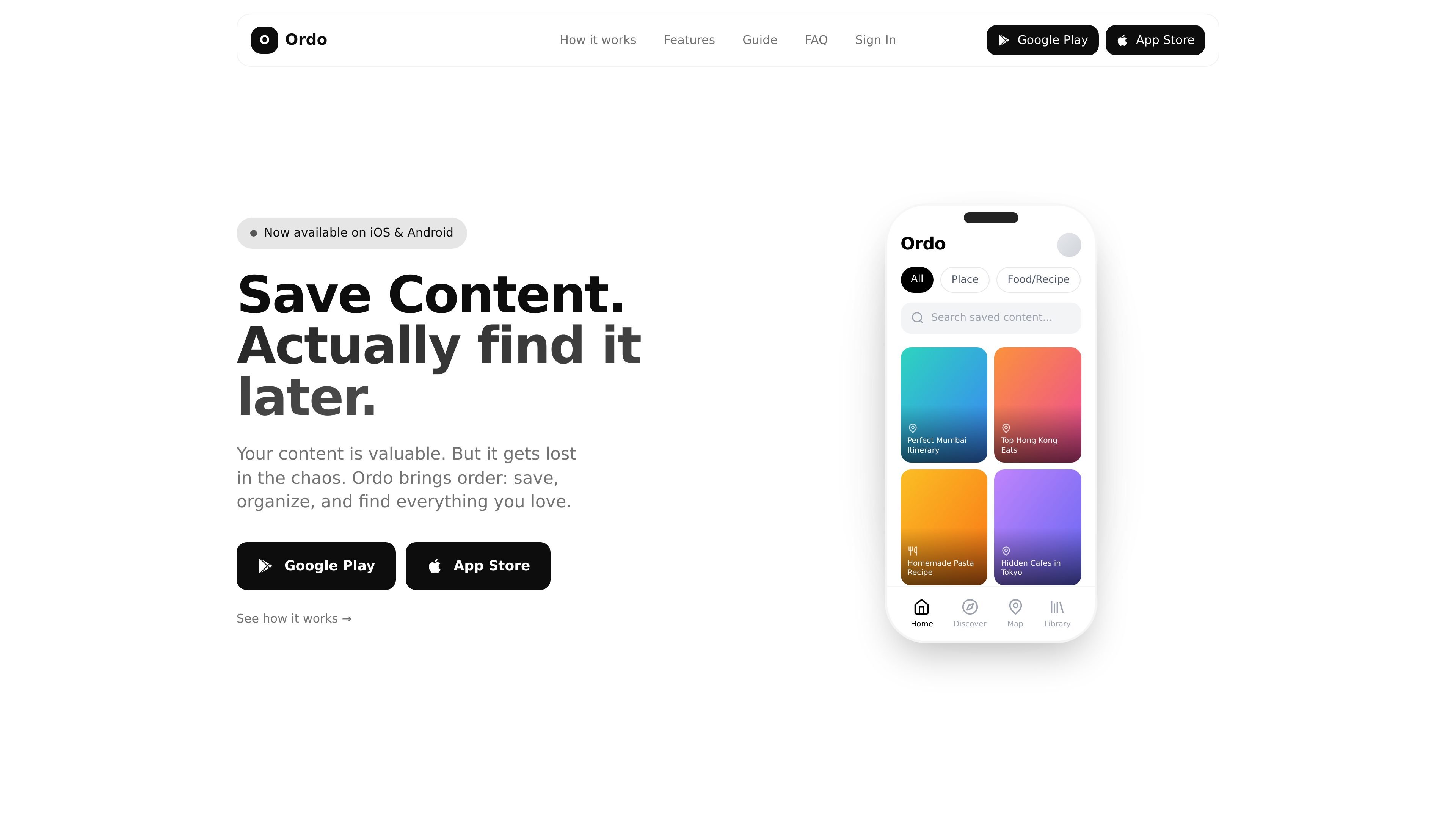
Ordo is a content-saving app for people who want a better way to keep track of things they discover on Instagram, TikTok, YouTube, and other links. It lets you share content into a personal library, then organizes that library so you can find items again later instead of relying on likes, bookmarks, or screenshots.
The product focuses on a simple workflow: save in one tap, let Ordo categorize the item, and later search or browse by category, collection, or content type. The site also shows dedicated views for places, recipes, books, films, music, workouts, and general content, with structured details that make saved items easier to use when you return to them.
Send content to Ordo from the share sheet in one tap. The guide says you do not need to copy links or open the app first, and the item saves in the background.
Ordo organizes saves automatically using AI, with folders and tags added for structure. The homepage and guide both describe categories and collections for keeping related items together.
Search saved items by title or summary, then narrow by category when needed. The product is designed so saved content can be rediscovered instead of buried in a feed.
For places, Ordo surfaces location details, ratings, photos, opening hours, and a map view. The guide also says related content that mentions the same place is grouped together.
For recipes, books, films, music, and workouts, Ordo turns the saved item into a structured view with practical details such as ingredients, steps, ratings, cast, listening links, or workout duration.
The homepage says Ordo is native, fast, and private, with no feed or suggestions. It is presented as a distraction-free library for saved content.
Save reels, short videos, and posts you do not want to lose, then return to them later through search or category filters instead of trying to rediscover them in a social feed.
Collect restaurant ideas, cafes, and travel spots, then use the map view, address, reviews, opening hours, and related content to turn saved places into a real plan.
Store recipes in a format you can actually use later, with ingredients, timings, servings, and steps visible without rewatching the original video.
Save books, films, songs, and workouts in a library that surfaces the details you need to decide quickly, such as ratings, cast, genre, links, duration, or equipment.
Group recurring interests into collections and favorites so large save lists stay organized over time, whether the theme is a trip, a workout idea bank, or a reading list.
Ordo is set up by sharing content directly to the app from Instagram, YouTube, TikTok, or another link. The guide says you tap Share, choose Ordo, and the item saves in the background without needing to copy links or open the app first.
The source describes Ordo as a personal inbox for ideas that can be searched, browsed, and organized with categories, folders, tags, and collections. It is built to help people save content they want to revisit later, especially places, food, books, movies, music, workouts, and general links.
Saved items can be searched by title or summary, and the guide says category filters help narrow things down. Ordo also adds structured details for some content types, such as locations for places, ingredients and steps for recipes, and ratings or cast for books and films.
The site says Ordo is available on iOS and Android and is free to download. The homepage also says no account is required.
The source describes Ordo as a personal library for saved content rather than a shared workspace. It emphasizes privacy and does not mention team collaboration features.
SocialKaptan is a desktop app for AI-assisted LinkedIn and Instagram growth that runs locally on your computer with your own accounts. It helps users automate engagement, warm outreach, and post publishing without relying on shared cloud logins.

Topple.lol is a public pay-to-rank leaderboard where listings start at $1 and their bid balance decays over time and with clicks. It helps makers and marketers buy short-term visibility for product sites or X profiles while tracking live board stats.

EchoTik é uma plataforma de análise de dados de e-commerce do TikTok projetada para ajudar vendedores e criadores de e-commerce a tomar decisões baseadas em dados para seleção de produtos e análise de mercado.

Radar is a self-hostable media intelligence and social listening app for monitoring public sources, analyzing mentions, and generating briefs or content outputs with optional Claude AI. It is aimed at individuals and small teams that want an enterprise-style workflow without a cloud account.

Frames ajuda a criar rapidamente pôsteres de lançamento e artes para marketing em redes sociais com molduras premium e templates para Instagram, Twitter e Product Hunt. Comece grátis.

Sumora is an autonomous outreach agent for finding, qualifying, warming, and booking leads through LinkedIn and Instagram. It helps users manage replies from one inbox while keeping final sends under review.