
Real-time response suggestions
Sayble listens to the live conversation and presents one concise line to say next, plus a backup line, while the other person is still talking.

Sayble is a real-time AI conversation copilot for Mac and Windows that suggests what to say during live calls, then creates recaps and follow-up email drafts. It is designed for sales, negotiations, recruiting, client conversations, and other calls where timely responses matter.
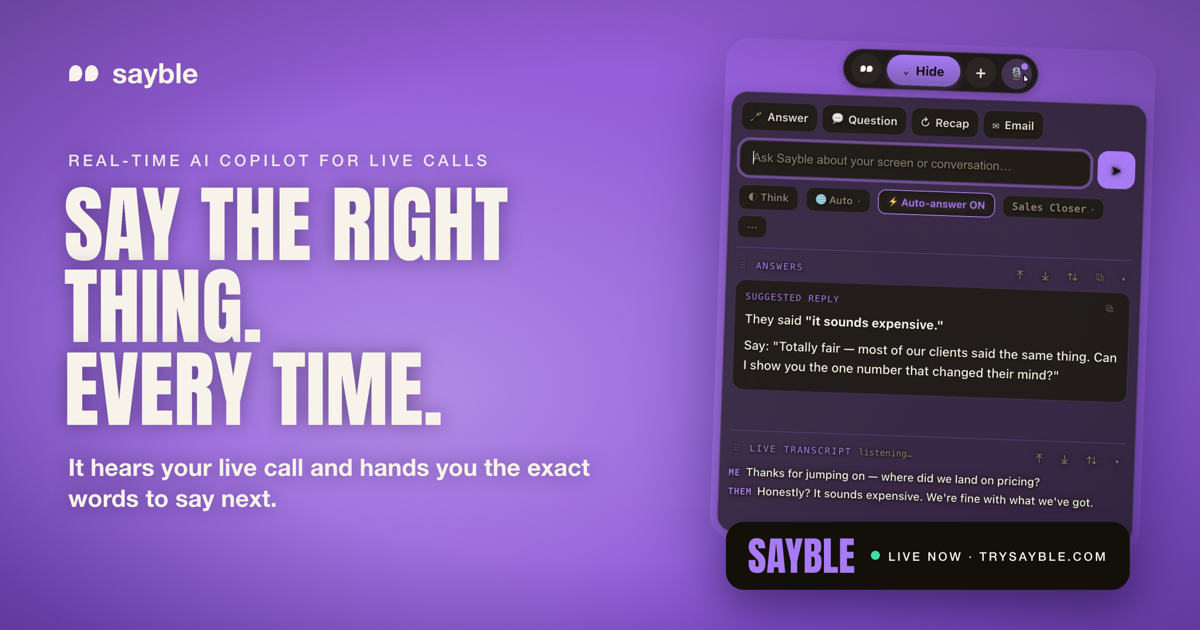
Sayble is a real-time AI conversation copilot for Mac and Windows. It listens to live calls, transcribes both sides, and turns the other person's latest question, objection, or concern into a short suggested response and backup line. The product is designed for conversations where the next reply matters, including sales calls, negotiations, recruiting, client work, and investor discussions.
After the call, Sayble converts the conversation into a structured recap and a follow-up email draft. Users can also ask questions across past calls, such as which objections recur or who still needs a follow-up. Sayble does not join meetings as a bot, speak for the user, or send messages automatically; its suggestions and generated outputs remain subject to user review and judgment.
Sayble listens to the live conversation and presents one concise line to say next, plus a backup line, while the other person is still talking.
Both sides of the conversation are transcribed live and labeled by speaker. Sayble supports 10 languages and automatically detects the conversation language, including mixed-language calls.
At the end of a call, Sayble identifies decisions, objections, and promised next steps, then creates a written recap from the transcript.
Sayble drafts a follow-up email from what was actually agreed during the conversation. The user can review, edit, and send it.
Custom Modes let users define a call goal and load reference material such as pricing sheets, pitch decks, objection notes, FAQs, and competitor documents so suggestions can reflect their own information.
The desktop app includes a Home view with Google Calendar meetings, one-click joining, recorded calls, recaps, and follow-up drafts. Its interface is designed to remain off screen share and recording software.
Use the live suggestion and backup line to handle price objections, competitor mentions, stalls, technical questions, discovery prompts, and closing asks while the prospect is still engaged. Load sales materials into a Mode so replies can reference the user's actual offer.
Prepare for partnership discussions, investor conversations, vendor negotiations, or other high-stakes meetings where participants need relevant talking points without pausing to search through notes.
Keep customer success and support conversations warm and on-message under pressure, then use the recap and drafted email to document decisions and promised actions.
Use live transcription and suggested follow-up questions to capture important details during interviews, then produce a structured recap for later review.
For back-to-back calls, use the desktop workspace to review scheduled meetings, keep a record of prior conversations, and avoid losing follow-ups between calls.
Sayble runs on Mac and Windows and can be used with Zoom, Google Meet, Microsoft Teams, Slack huddles, and phone calls. It listens through the computer during the call; no bot joins the meeting as a participant.
Create a custom Mode, describe the goal of the call, and upload materials such as a pricing sheet, pitch deck, objection notes, competitor one-pagers, product FAQ, or other supported files. Suggestions can then use that material as context.
During the call, Sayble shows a short suggested line and a backup line based on the other person's latest point. After the call, it produces a recap and drafts a follow-up email for review and editing.
Sayble suggests responses but does not speak for you or send anything without your action. Its AI output can be wrong or off-tone, so the product recommends reviewing suggestions, recaps, and emails. Users must also follow applicable recording and consent rules.
A free account includes one full three-minute live session without a card. The pricing page lists Pro at $39.99 per month, with a founder rate of $24.99 per month for the first 12 months when using a founder code; team pricing is custom. Subscriptions can be canceled from the account.

Tactiq is an AI note taker for Google Meet, Zoom, and Microsoft Teams that transcribes meetings live and turns them into summaries, action items, and follow-up outputs. It is built around a Chrome extension and supports team workflows through sharing and integrations.

Scripta is a privacy-first AI notetaker that records, transcribes, and summarizes meetings directly on your device. The public site currently shows a Mac beta download and a Windows waitlist.

QuickQuill is a macOS dictation and transcription app that runs locally on the device. It helps users record meetings, transcribe audio, generate summaries, and export notes without using a cloud service.

UserCall’s Research Triggers lets teams invite users into short AI-moderated interviews at key product moments such as signup, onboarding drop-off, cancellation, or checkout abandonment. It helps product, research, and insights teams capture contextual feedback while the experience is still fresh.

MeetStream is a meeting bot API for Zoom, Google Meet, Microsoft Teams, and Webex. It helps developers record, stream, and analyze meetings programmatically, with usage-based pricing and a $5 free credit to start.

Liam is an AI copilot for managing inboxes, writing replies, prioritizing email, and scheduling meetings. It is offered free for individuals, with custom pricing for teams and enterprise.