
Terminal-first code editing
ByteAsk edits code in your repository from the terminal, then verifies the change before you review the diff.

ByteAsk is a terminal-first AI coding agent for C and C++ that edits repositories and verifies changes with the real compiler, debugger, sanitizers, and tests before showing a diff. It offers a free tier plus paid plans, with editor connectors and zero-retention handling described in the source.
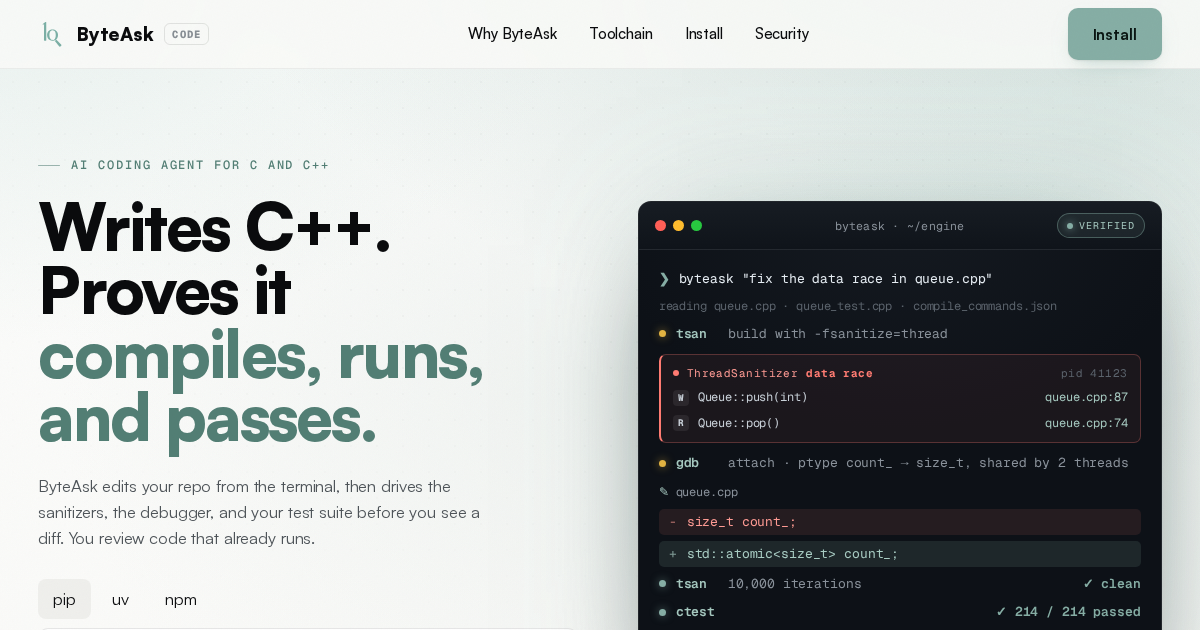
ByteAsk is an AI coding agent built specifically for C and C++ development. It runs in the terminal, edits files in your repository, and uses the real build and debugging tools in your environment to verify changes before returning a diff.
The product is centered on a simple workflow: describe a change, let ByteAsk apply it, then have it prove the result with compilers, sanitizers, gdb, and your tests. The homepage and docs emphasize that this is meant to reduce guesswork in C and C++ work, where a patch that looks correct in source code may still fail at runtime or under concurrency checks.
ByteAsk also supports editor-based workflows through connectors, while keeping the CLI at the center of the experience. The privacy policy says prompts and repository content are processed in memory and dropped, with zero data retention for prompts and code, and the pricing page shows tiered monthly plans starting with a free tier.
ByteAsk edits code in your repository from the terminal, then verifies the change before you review the diff.
The agent drives the actual compiler and runtime tools used in C and C++ work, rather than stopping at a text-only answer.
The site highlights support for sanitizers, gdb, and test execution, with examples showing ThreadSanitizer and debugger-driven diagnosis.
Docs list built-in C/C++ tools such as Compiler Explorer, clang-tidy, ASan, UBSan, TSan, Valgrind, gdb, rr, perf, and Callgrind.
Approval modes let you choose between frequent confirmation prompts and more autonomous runs, per session or globally.
The docs mention MCP support, session persistence, and image attachments for prompts.
Use ByteAsk when a C or C++ change needs more than a textual patch. It can reproduce the issue, inspect state in gdb, and re-run sanitizers or tests before you review the result.
Use it when you want a change validated against your real build flags and runtime checks. The product emphasizes compiling across targets and running the same toolchain you already use.
Use ByteAsk for concurrency or memory issues that benefit from runtime instrumentation. The homepage highlights ThreadSanitizer, Valgrind, ASan, and UBSan as part of its workflow.
Use the agent in a terminal-centric workflow, or connect it to supported editors and keep the CLI on your PATH. The docs also mention session persistence for resuming or archiving work.
Use approval modes when you want tighter control over shell access in a shared or sensitive repository. The agent can ask before commands or run more autonomously depending on the session setting.
ByteAsk is a terminal-native AI coding agent for C and C++ that edits your repository, runs the real toolchain, and returns a diff after it has been verified with sanitizers, gdb, and tests.
The source shows installation via pip, uv, npm, or a shell install script, and the docs describe starting from the terminal with the CLI. Editors are also supported through connectors such as Windsurf and VSCodium via Open VSX, with the byteask CLI on your PATH.
The documentation says it supports approval modes from asking before every shell command to fully autonomous runs, configurable per session or globally.
ByteAsk is positioned for C and C++ workflows. The site highlights a built-in C/C++ toolchain, including Compiler Explorer, clang-tidy, ASan, UBSan, TSan, Valgrind, gdb, rr, perf, and Callgrind.
The privacy policy says prompts and repository content are processed in memory, then dropped, and that repositories are not used to train models.

GitBot is a local browser-based workspace for creating reusable coding bots powered by Claude Code, Codex, or OpenCode. It helps developers run those agents across repository folders with persistent threads and configurable permissions.

Manta AI is an autonomous web app testing tool for teams that want to map application behavior, catch regressions, and generate tests without writing scripts or maintaining selectors. It works from a URL and supports plain-English test flows, run results with screenshots, and scheduled or deployment-triggered checks.

Ghost — терминальный AI-ассистент для чата, генерации кода и запуска задач в командной строке. Бесплатные модели, Linux, macOS, Windows, open source.

Vi3ecode is a maintained development environment for working with AI coding agents. It keeps project context, terminal, Git, memory, flows, review, and communication connected around the agent you already use.

Lucid Train is a local-first AI coding harness that turns repository code into architecture diagrams and uses those diagrams as specifications for coding agents. It is available as a desktop app and a lightweight Rust CLI, and it can run with local models or your own API keys.

CreateOS Sandbox is an isolated compute environment for running code and agent workloads inside Firecracker micro-VMs. It is designed for workflows that need machine-level isolation, private networking between sandboxes, and programmatic control through SDK, CLI, or MCP.