
Gmail inbox management
Connect Gmail and Google Workspace accounts, sort inboxes with Claire's categories or Gmail-style tabs, search with filters, and manage conversations using swipe actions, labels, pinning, snoozing, archiving, and undo.

Claire Mail is a beta productivity app for Mac and iPhone that combines Gmail or Google Workspace, Google and Apple calendars, and Apple Reminders in one workspace. It helps users triage email, review their day, prepare meetings, and manage follow-up tasks, with optional AI assistance.
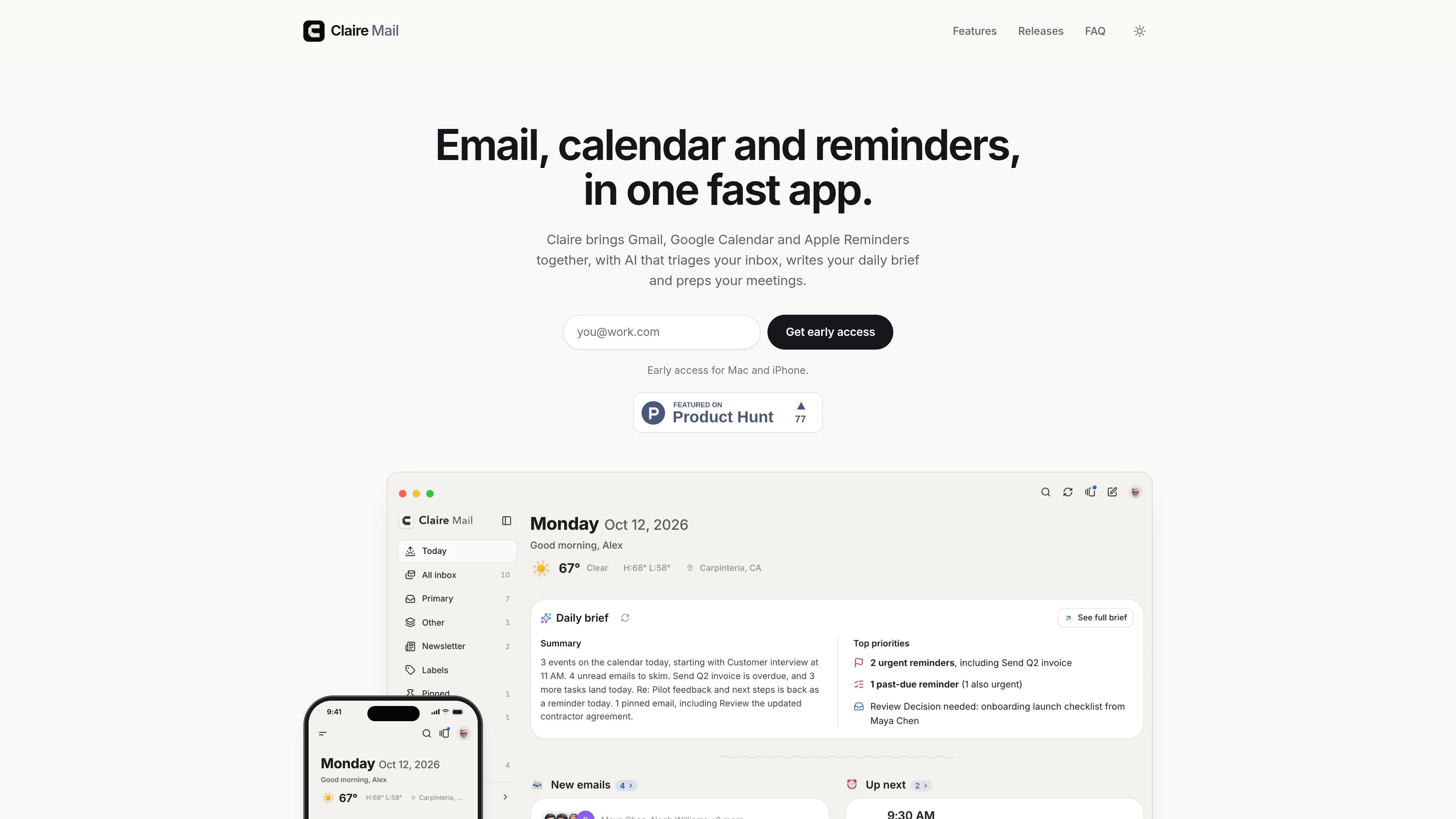
Claire Mail is a beta productivity app for Mac and iPhone that brings Gmail, Google Workspace, Google Calendar, Apple Calendar, and Apple Reminders into one interface. Its core workspace combines messages, events, and reminders so users can review their day without switching between separate apps.
The app supports detailed email workflows—from filtered search and conversation-based inbox management to scheduled sending and drafts saved in Gmail—alongside read-only calendar views and full Apple Reminders management. Optional AI features can summarize threads, prepare meetings, draft replies, and help with reminders, while actions remain under the user's control.
Connect Gmail and Google Workspace accounts, sort inboxes with Claire's categories or Gmail-style tabs, search with filters, and manage conversations using swipe actions, labels, pinning, snoozing, archiving, and undo.
Compose with rich text, attachments, contact suggestions, account-specific signatures, saved drafts, scheduled send, Undo Send, and verified Gmail aliases in the From field.
Review mail, schedule, and reminders together on Today, including a daily brief, new-mail triage, upcoming meetings, pinned and snoozed mail, reminders, and optional weather information.
Use Ask Claire on an email or reminder for thread key points, suggested next steps, editable reply drafts, meeting-time suggestions based on calendar availability, or reminder help. Actions are user-initiated rather than automatic.
View Google Calendar and Apple Calendar in read-only day, multi-day, work-week, week, or month views on Mac, with a day view and week strip on iPhone. Event pages show attendees, locations, maps, and meeting links.
Manage Apple Reminders with due dates, times, priorities, lists, repeats, and subtasks; triage reminders, add them with a Mac keyboard shortcut, or create one from an email.
Use Today to see incoming mail, the day's events, pinned or snoozed messages, and reminders in one review. The daily brief surfaces priorities, while new-mail triage lets you process messages one card at a time.
When a meeting is approaching, open the event's Prepare flow to pull in related mail. Claire can identify key points, suggest next steps when there is a specific action, and show meeting times that fit the calendar.
Process a busy inbox on iPhone with gestures or on Mac with keyboard controls. Sort mail into categories, apply labels, snooze or pin conversations, archive or delete to Gmail's Trash, and use Undo when needed.
Turn an email into a follow-up reminder or work through Apple Reminders with lists, priorities, dates, repeats, and subtasks. Reminder assistance can extract related-mail points, suggest a due date, draft an email, or write notes.
Use the Mac and iPhone apps together, with widgets, notifications, Siri and Shortcuts support, and changes that appear on other devices when they open.
Claire is in beta on Mac and iPhone. The site provides a Mac download and an iPhone TestFlight link after joining early access.
Claire can connect to Gmail and Google Workspace, including more than one account. It also supports Google Calendar and Apple Calendar as read-only calendar sources, plus Apple Reminders.
AI features are optional and remain off until configured. Users can choose Apple Intelligence on the device or provide their own key for Claude, OpenAI, Gemini, Grok, or Groq, with a separate switch for each feature.
Claire requests Gmail permissions to read, organize, and send selected mail, read signatures, view calendars, and read contacts for recipient suggestions. It cannot permanently delete Gmail messages, change calendar events, or change contacts; access can be reviewed or revoked in the Google Account.
No pricing or plan information is published in the supplied sources. The site describes Claire as a beta product and offers early access for Mac and iPhone.