

Copilot Cowork
Copilot Cowork превращает намерение в действия в Microsoft 365: делегирует задачи и координирует процессы с опорой на письма, встречи и файлы.
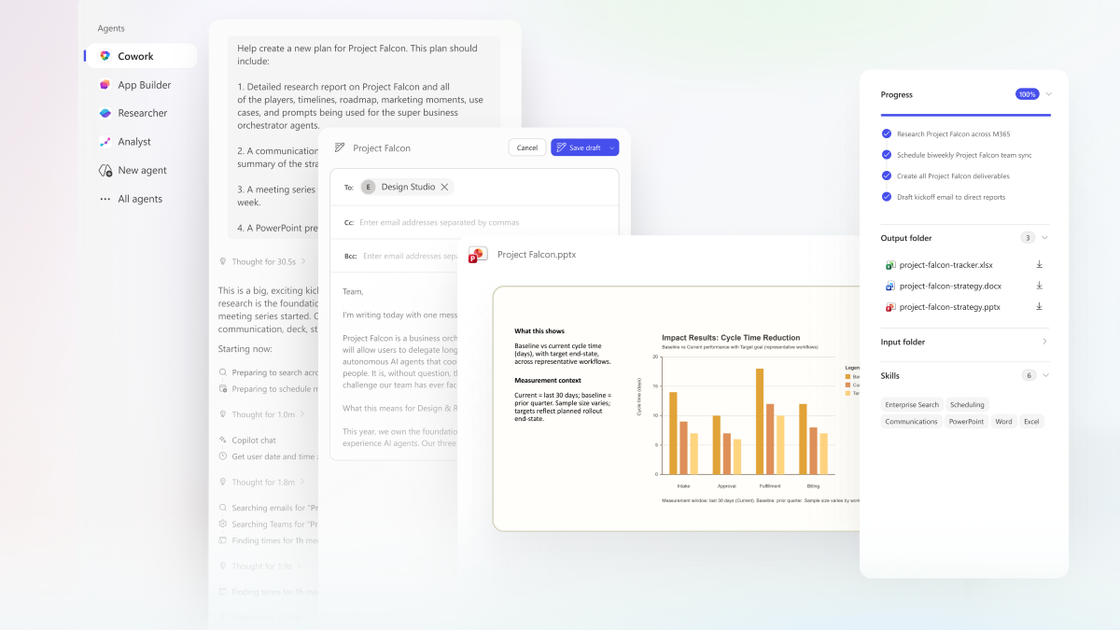
Что такое Copilot Cowork?
Copilot Cowork — это ориентированный на действия опыт для Microsoft 365, который помогает превращать ваши намерения в конкретную работу. Вместо простого создания контента или ответов в чате Cowork делегирует задачи и запускает процессы от вашего имени в Microsoft 365.
Основная цель — координировать работу на основе контекста из ваших данных Microsoft 365. На базе Work IQ Cowork использует сигналы из Outlook, Teams, Excel и других приложений Microsoft 365, чтобы понять задачу, а затем преобразовать запрос в план с контрольными точками для мониторинга.
Ключевые возможности
- Делегирование по результату: Вы описываете желаемый результат, и Cowork превращает запрос в план, а не останавливается на ответе.
- Работа на основе контента Microsoft 365: Cowork автоматически опирается на ваши письма, встречи, сообщения, файлы и данные.
- Цикл «план — действие» с контрольными точками: План выполняется в фоновом режиме с четкими контрольными точками, чтобы вы могли подтвердить прогресс, внести изменения или приостановить выполнение.
- Уточнение и одобрение пользователя: Если нужно больше информации, Cowork запрашивает; также предлагает рекомендуемые действия для вашего одобрения перед применением.
- Календарь, документы, исследования и координация процессов: В анонсе приведены примеры: перенос встреч и блоков фокуса, сбор пакетов для встреч (документы и презентации), компиляция исследований с цитатами, создание материалов для запуска и структурированных следующих шагов.
Как использовать Copilot Cowork
- Начните с запроса задачи: Опишите, что хотите сделать (например, очистить расписание, подготовить пакет для встречи, собрать корпоративные исследования или разработать план запуска).
- Просмотрите план и контрольные точки: Позвольте Cowork создать план, затем отслеживайте прогресс по контрольным точкам.
- Одобрите действия перед применением: Когда Cowork рекомендует конкретные действия (например, принятие/отклонение/перенос встреч), просмотрите и одобрите изменения.
- Итерации при необходимости: Если требуется уточнение или корректировка направления, вы можете изменить план или приостановить выполнение в любой момент.
Примеры использования
- Перенос встреч для защиты времени фокуса: Cowork анализирует расписание Outlook, выявляет конфликты и неэффективные встречи, предлагает варианты переноса и применяет изменения с вашего одобрения (включая добавление блоков фокуса). Также может создать документ подготовки к встрече.
- Создание связанного пакета для встречи: Для встречи с клиентом Cowork собирает релевантные данные из писем, встреч и файлов, планирует время подготовки в календаре и создает материалы: документ-брифинг, аналитику, готовую к клиенту презентацию и черновик письма с последними файлами.
- Быстрая компиляция корпоративных исследований с цитатами: Cowork собирает и организует источники вроде отчетов о прибылях, SEC-файлов, аналитики и новостей, акцентируя первичные финансовые данные, затем форматирует выводы: краткий обзор для email, структурированную памятную записку и книгу Excel с помеченными вкладками.
- Координация кросс-функционального процесса запуска: Cowork создает активы для планирования запуска и координирует следующие шаги, включая таблицы сравнения конкурентов в Excel, документ ценностного предложения, питч-дек для клиентов и план вех/ответственных/следующих шагов.
FAQ
Copilot Cowork — это то же самое, что Copilot Chat?
Нет. В анонсе Copilot Cowork описан как инструмент для действий — делегирования задач и запуска процессов, — а не только чат-помощи или создания контента.
Что значит «опора на Microsoft 365» в этом контексте?
В посте указано, что Cowork опирается на ваши письма, встречи, сообщения, файлы и данные, используя сигналы Work IQ из приложений Microsoft 365 для действий с тем же пониманием, что и у вас.
Могу ли я контролировать действия Cowork?
Да. Процесс включает контрольные точки, уточнения при необходимости и рекомендуемые действия, которые вы просматриваете и одобряете перед применением, с возможностью приостановки.
Какие выводы может создавать Cowork?
Пост приводит примеры: изменения календаря (переносы и блоки фокуса), материалы для встреч (брифинги, аналитика, презентации и черновики статус-писем), исследовательские выводы (обзоры, памятные записки и книги Excel с вкладками), активы для запуска (сравнения конкурентов, документы ценностного предложения и питч-дек).
Альтернативы
- AI-чат-ассистенты для создания контента в стиле Microsoft 365: Если вам в основном нужно генерировать контент (например, черновики писем или планы) без делегирования выполнения и запуска задач с контрольными точками, чат-ориентированный рабочий процесс может подойти лучше.
- Ручная координация в Outlook и Teams: Для планирования календаря и подготовки встреч команды могут выполнять расписание, сбор документов и создание черновиков последующих действий прямо в Outlook/Teams/файлах Office без зависимости от агента, предлагающего и применяющего изменения.
- Универсальные инструменты автоматизации рабочих процессов: Для организаций, уже автоматизирующих процессы с помощью правил и коннекторов, эти инструменты могут координировать шаги, хотя они могут быть не так тесно интегрированы с контекстом Microsoft 365, как описано для Cowork.
- Корпоративные инструменты для исследований и управления знаниями: Для сбора и организации источников с цитатами платформы исследований могут поддерживать рабочие процессы компиляции, особенно когда не требуется автоматизация за пределами генерации контента.
Альтернативы

Lasso
Lasso — AI-first PIM для команд e-commerce: обогащает атрибуты и описания, обрабатывает данные поставщиков и мониторит конкурентов через приложение или API.

Biji
Biji - это универсальная платформа, разработанная для повышения продуктивности с помощью инновационных инструментов и функций.

Gemma AI
Gemma AI — это умное приложение, которое звонит вам напрямую с персонализированными, интеллектуальными голосовыми напоминаниями, чтобы гарантировать, что вы никогда не пропустите важные задачи, встречи или сроки.

Tavus
Tavus создает AI для живого общения лицом к лицу: видит, слышит и отвечает в реальном времени. Доступны видео-агенты и цифровые двойники через API.

HiringPartner.ai
HiringPartner.ai — это автономная платформа для рекрутинга с агентами ИИ, которые круглосуточно ищут, отбирают, звонят и проводят интервью с кандидатами, сокращая время закрытия вакансий с недель до 48 часов.

Spotit
Spotit — macOS‑приложение: читает ваш экран в другой программе и подсвечивает, куда кликать. Попросите голосом и следуйте подсказкам.