
Live transcription and structured notes
Earnote captures microphone and system audio, displays a live transcript during recording, and turns the recording into a concise note with summaries, topics, decisions, and tasks.
Earnote is an open-source recording, transcription, and note-making app for lectures, meetings, and calls on Mac, iPhone, and iPad. It creates structured notes, study materials, and exports, with local processing available on compatible devices.
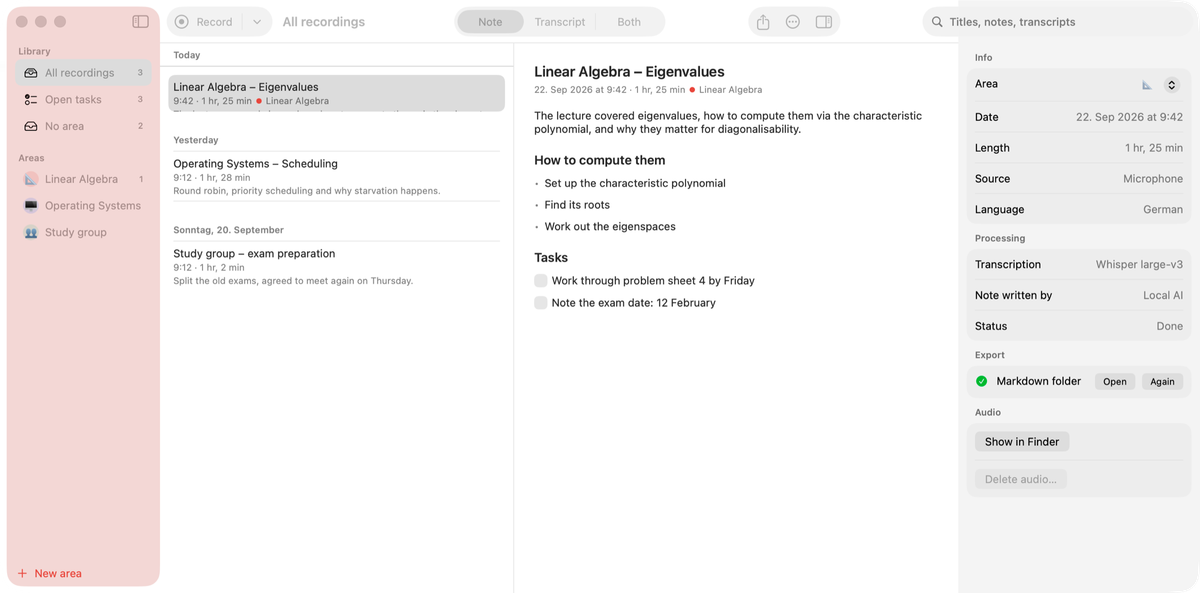
Earnote is an open-source recording, transcription, and note-making app for Mac, iPhone, and iPad. It is designed for lectures and meetings: record microphone and system audio, follow a live transcript where available, and receive a shorter note containing the main topics, decisions, and tasks rather than only a raw transcript.
The app supports a local workflow using Whisper and downloaded AI models, with recordings, transcripts, and notes kept on the device or in the user folder. Depending on the device and setup, notes can also be produced through a Mac connected via the user's iCloud or through optional cloud AI services. Outputs include editable notes, flashcards, PDF study sheets, transcript-linked audio, and exports to note and task apps.
Earnote captures microphone and system audio, displays a live transcript during recording, and turns the recording into a concise note with summaries, topics, decisions, and tasks.
Generate question-and-answer flashcards, edit them in the note, export them to Anki, and save a formatted study sheet as a PDF.
Click transcript timestamps to replay the corresponding audio, keep playback highlighted while reading, and view the note and transcript side by side with ⌘3.
Run transcription with Whisper and local note generation on a compatible Mac. The app also supports optional cloud AI providers, with a warning when text will leave the device.
Create dictionaries for names, module titles, and technical terms so corrections apply to titles, notes, and transcripts and are supplied to Whisper and the AI.
Organize work into areas with separate colors, AI instructions, and export targets; search across transcripts and send notes or tasks to supported destinations.
Record a lecture from a Mac or place an iPhone on the desk, then review a structured summary, topics, tasks, flashcards, and a PDF study sheet after class.
Keep the note and transcript together while replaying exact moments from the recording. A subject area can hold its own instructions, terminology, and semester overview.
Capture online discussions with microphone and system audio, then turn decisions and follow-up tasks into notes and send tasks to Apple Reminders, Things, or Todoist.
Use calendar naming, searchable transcripts, terminology dictionaries, and exports to Notion, Obsidian, Logseq, Apple Notes, Bear, Craft, or Markdown for an existing personal workflow.
Choose local processing for offline work or configure a supported cloud AI provider when needed, while reviewing the app's notice before text leaves the Mac.
On Mac, Earnote requires macOS 15 or newer, an Apple Silicon Mac with an M1 chip or later, and about 8 GB of memory. On first launch, it downloads a speech model of about 1.6 GB and a local AI model of about 2.3 GB.
Yes. Earnote can capture microphone and system audio together and recognize Zoom, Teams, and Meet calls. It asks whether to take notes and can stop when the call ends.
The Mac app can transcribe locally with Whisper and generate notes with a model downloaded to the device. Audio, transcripts, and notes remain in the user's folder and are not synced. Optional cloud providers such as Claude, OpenAI, Gemini, or a custom server can be selected when text may leave the Mac.
Earnote creates summaries, topics, decisions, tasks, flashcards, and a PDF study sheet. Notes can be exported to Notion, Obsidian, Logseq, Apple Notes, Bear, Craft, or a Markdown folder; tasks can be sent to Apple Reminders, Things, or Todoist.
The Mac version is free, and the project is open source under the MIT license. iPhone and iPad users can buy Earnote Pro as a one-time purchase; the source does not provide a price.

Notewarp is an AI note-taking tool that turns voice notes, uploads, or pasted text into cleaner notes, transcripts, summaries, and action items. It helps people capture rough ideas quickly and then edit, export, or share the result.

Flunkey is a voice-first productivity layer for Windows that converts speech into text, AI-assisted outputs, and remembered context. It is built for users who want to capture ideas and actions without leaving the app they are working in.

MeetStream is a meeting bot API for Zoom, Google Meet, Microsoft Teams, and Webex. It helps developers record, stream, and analyze meetings programmatically, with usage-based pricing and a $5 free credit to start.

Tactiq is an AI note taker for Google Meet, Zoom, and Microsoft Teams that transcribes meetings live and turns them into summaries, action items, and follow-up outputs. It is built around a Chrome extension and supports team workflows through sharing and integrations.

CAKIE is a Mac app for recording your screen and voice for an AI agent. It adds a transcript and screenshot highlights, then lets you copy a prompt and paste or attach the context in another AI app.

SpeakoFlow is a free, open-source desktop voice-to-text app for Windows, macOS, and Linux. It supports dictation into any app, voice-driven writing with Flow, cleanup, translation, and a screen-aware assistant.