
Prompt-based estimate drafting
Describe the job in plain language and Estimatic AI drafts most of the estimate from that prompt, using the details you provide as the starting point.

Estimatic AI is Contractor+ estimating software that helps contractors draft quotes, proposals, and contracts from a prompt, using cost books, supplier pricing, and local labor rates. It supports uploaded photos and drawings, then lets users review and edit before sending.
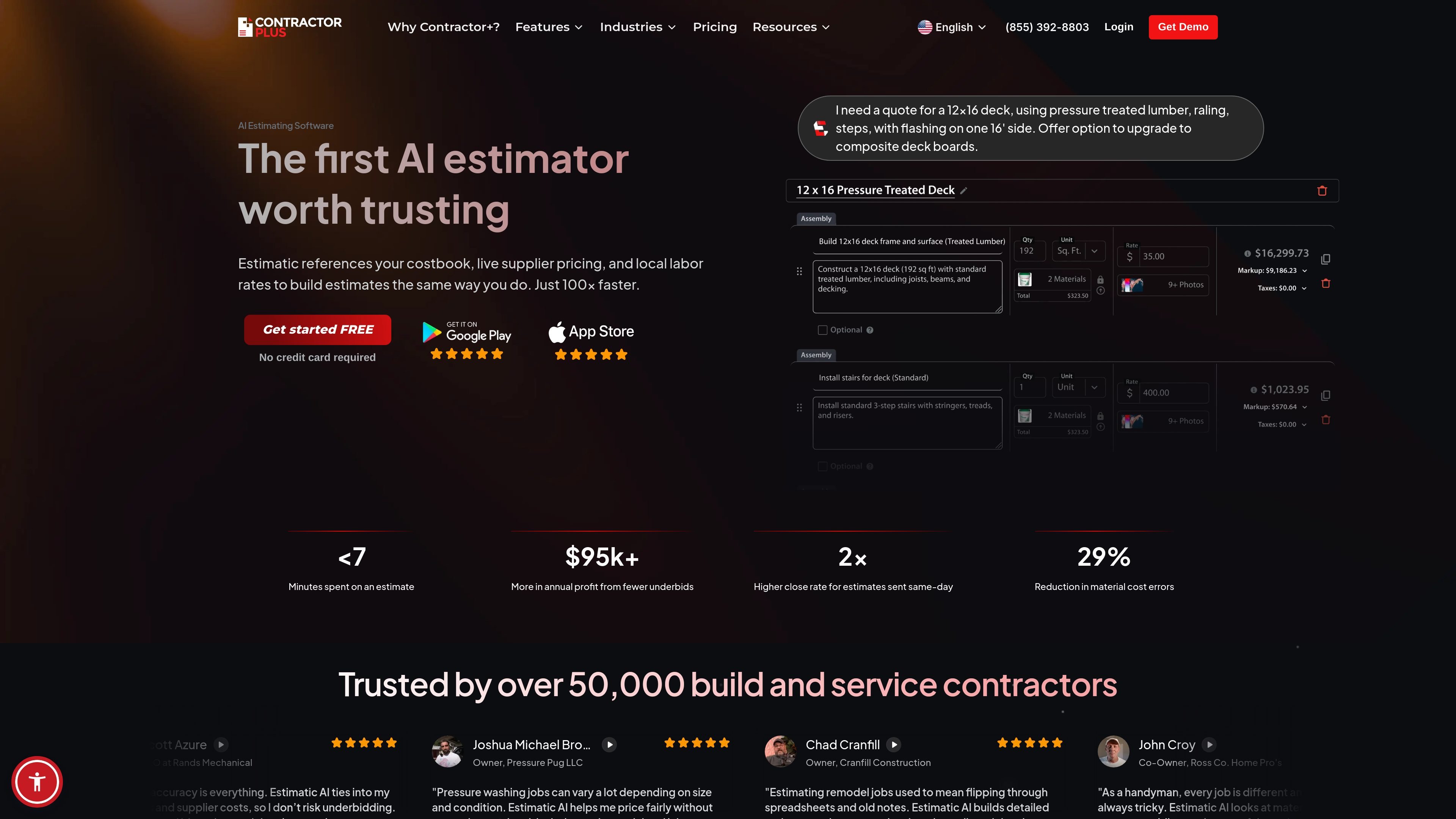
Estimatic AI is Contractor+’s estimating workflow for contractors who want to build quotes faster without giving up control over the final bid. The product generates estimates from a prompt, supports uploaded job photos, blueprints, drawings, and competing quotes, and then lets the user review and adjust the draft before sending it.
The system is designed to reference a contractor’s cost book, current supplier pricing, and local labor rates, then produce estimates, proposals, and contracts inside Contractor+. On the pricing page, Estimatic AI is listed as included in the PRO plan with 10 monthly credits and in the PRO TEAM plan with unlimited use.
Describe the job in plain language and Estimatic AI drafts most of the estimate from that prompt, using the details you provide as the starting point.
Build estimates from a cost book, live supplier pricing, and local labor rates so line items reflect current job inputs instead of static templates.
Upload photos, blueprints, drawings, or a competing quote to give the estimator more context when building a bid.
Offer Good, Better, and Best options plus optional line items so clients can choose a scope without you rebuilding the quote from scratch.
Attach scope, payment terms, and eSign in one flow to move from quote to signed job without exporting to another app.
Edit terminology, line-item language, markup defaults, and templates so the finished output matches the way your business already quotes work.
Use Estimatic when you need to turn a short job description into a client-ready estimate quickly, while still checking the numbers before the bid goes out.
Use uploaded photos, blueprints, or drawings to give the estimator more job context when the scope is not easy to describe in text alone.
Create Good, Better, and Best options when you want to offer multiple scope tiers or add-ons without building separate estimates from scratch.
Attach contracts and eSign during the estimate flow when you want to move from quote to signed job without exporting to another signing tool.
Keep estimates aligned with the rest of your operation when you want them connected to CRM, scheduling, and invoicing inside Contractor+.
Estimatic is built into Contractor+, so estimates connect to the CRM, service requests, job schedule, and invoicing within the same subscription. The pricing page says Estimatic AI is included on PRO with 10 credits per month and unlimited on PRO TEAM.
Yes. The source says you can review the draft, adjust line items, margins, or materials, and then approve the estimate before sending it.
Yes. You can upload jobsite photos, blueprints, and drawings when creating an estimate, and the product also says it can use competing quotes as context.
Yes. The product says it supports saved templates and cost books, so the output can follow your usual estimate format instead of forcing a rigid layout.
The product says it pulls pricing from real-time vendor sources such as Lowe’s, Home Depot, Menards, Ace Hardware, Ferguson Home, and ABC Supply, plus a proprietary labor rate index based on approved estimates and BLS data.

Codeswtch is an engineering subscription for founders building with AI. It provides senior engineering guidance and hands-on help through one ongoing plan, with unlimited projects and one request at a time.

Pioneer AI is an agent for fine-tuning and continuously improving open-source language models. It helps teams build production-ready models for tasks like classification and extraction without assembling a manual training pipeline.

Shodh is an AI-powered research and strategy platform for business questions that need structured investigation, source-backed evidence, and auditable recommendations. It is aimed at founders, operators, consultants, investors, and corporate development teams.

Outsource Rizz is a design and development service for pre-launch B2B startups. It helps founders ship product, website, and brand work with an embedded team of senior designers and developers.

ZeroHuman is an AI co-founder workspace for founders who want help brainstorming ideas, validating demand, building MVPs, and running growth workflows. It presents itself as an open-source-powered system that works continuously while the user reviews and approves output.

Y-Bombinator is a 100x Bot-based agent for newer YC applicants who want an independent pre-application audit. It helps users check founder merits, market math, and competitive context before submitting.