
Traffic KPI dashboard
See visitors, visits, views, bounce rate, and session time in one KPI strip, and switch the main chart to whichever metric you want to inspect.

Kobbe is privacy-friendly web analytics for tracking traffic, pages, sources, events, and revenue in one dashboard. It helps site owners and teams understand site usage without relying on cookies or browser fingerprinting in the documented default setup.
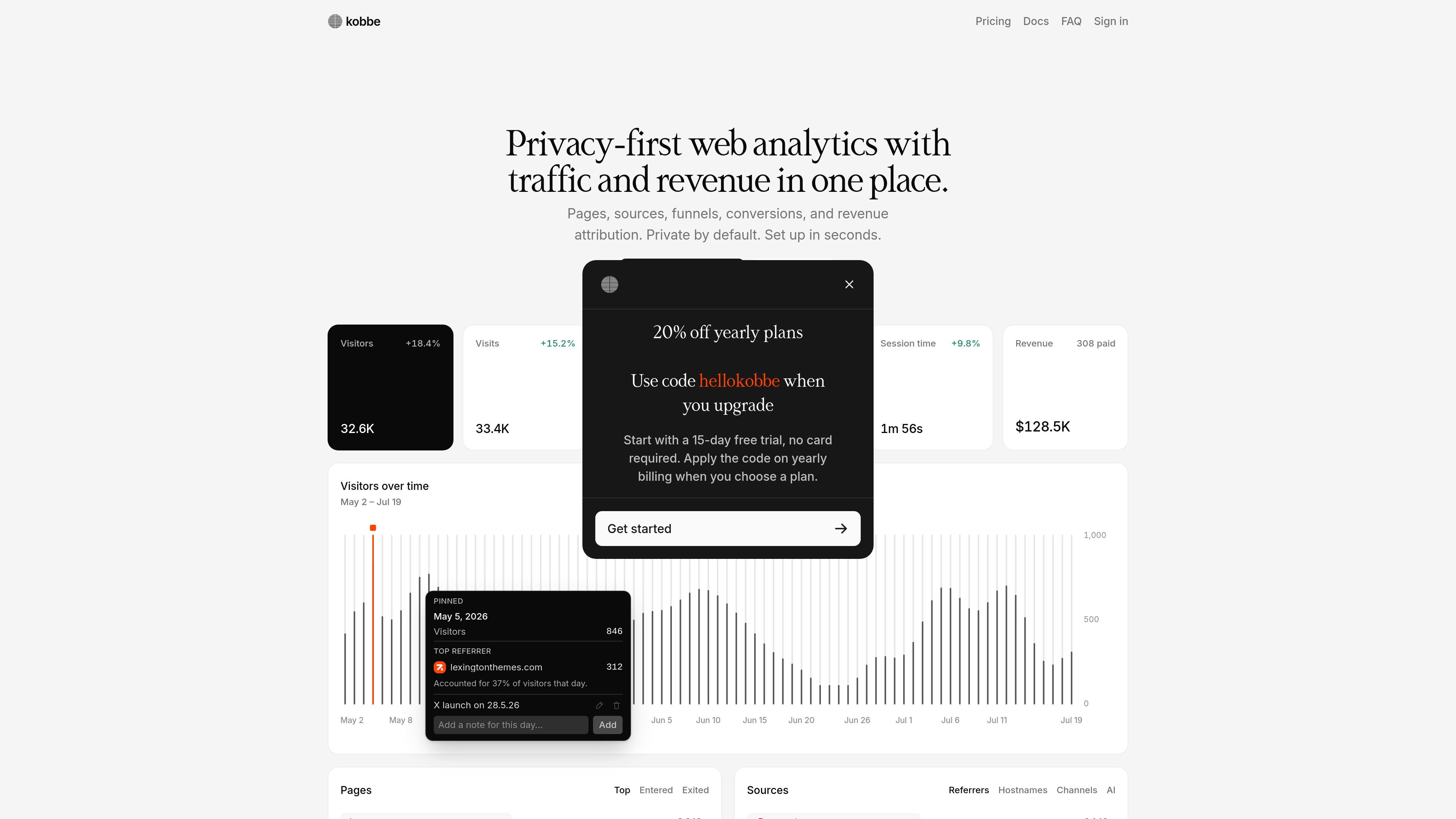
Kobbe is a privacy-friendly web analytics platform for site owners who want traffic, page, source, and revenue data in one place. The dashboard surfaces visitors, visits, views, referrers, locations, devices, events, and conversion paths so you can understand how people use a site without building a heavy analytics stack.
The product is designed around private-by-default collection. According to the docs, the default tracker does not use cookies or browser fingerprinting techniques, does not rely on localStorage or sessionStorage for cross-session tracking, and strips query strings from URLs by default. Optional features such as scroll tracking, hash paths, and cross-domain tracking can be enabled when they fit the site and its privacy requirements.
Kobbe also extends beyond basic pageview reporting. It can show realtime visitors, support page-level drill-downs, connect Search Console and Web Vitals data, and attribute revenue from supported checkout providers so traffic and outcomes can be read in the same dashboard context.
For setup, the docs describe a quick start that involves adding the site, copying the tracker script into the website, and opening the dashboard. The site also mentions a 15-day free trial and support for CLI, Raycast, and MCP-compatible AI agents for users who want to inspect analytics or setup health from their editor or terminal.
See visitors, visits, views, bounce rate, and session time in one KPI strip, and switch the main chart to whichever metric you want to inspect.
Inspect top pages, entry pages, exit pages, and 404s, then open a page drill-down to view traffic, sources, events, and exits for that path.
Break down referrers, channels, hostnames, UTM campaigns, and AI traffic so you can understand where visits come from.
Track custom events and common conversions such as form submits, contact clicks, messaging links, outbound links, and other JavaScript goals.
View current activity as it happens, connect Search Console and Web Vitals data, and combine those signals with the rest of your analytics.
Pass revenue attribution through checkout with Stripe, Polar, Paddle, or Creem, so revenue appears next to the same traffic and page data.
Watch live traffic, recent events, and the pages people are viewing to understand what is happening on the site during a launch, campaign, or incident.
Review referrers, channels, AI traffic, and UTM campaigns to see which marketing links and sources are bringing visits and conversions.
Trace form submits, contact clicks, messaging links, and custom goals through funnels to spot where visitors drop off before conversion.
Open page drill-downs for a single URL to inspect traffic, exits, sources, and events for pages such as pricing, docs, or landing pages.
Compare visitors, visits, views, and revenue over a selected range, then use period comparisons or chart annotations to read performance changes against launches or incidents.
Kobbe adds a tracker script to your site, then shows visitors, visits, views, sources, locations, devices, pages, events, and revenue in the dashboard.
The docs say the default tracker collects pageviews and custom events without cookies, persistent identifiers, or personal data. Optional features such as scroll tracking, cross-domain tracking, and hash paths are off by default.
Kobbe can summarize traffic in a KPI strip, show page-level drill-downs, track custom events and conversions, build funnels, display realtime visitors, and connect revenue attribution from Stripe, Polar, Paddle, or Creem.
The home page offers a 15-day free trial. The pricing page returned a not-found response in the provided sources, so plan details are not confirmed here.
The docs mention team access, read-only dashboards, exports, monthly reports, traffic alerts, and use from the CLI, Raycast, or MCP-compatible AI tools.

PromptScout tracks how ChatGPT, Gemini, Google AI Overviews, and Perplexity mention your brand or competitors, then pairs those results with source analysis and website audits. It helps teams decide what to fix in content, positioning, or site readiness next.

SaveMRR is a Stripe retention tool for SaaS teams that scans billing data for churn and MRR leaks, then automates recovery through dunning, cancel-save offers, win-back emails, and onboarding nudges. It is built for founders and bootstrapped teams using Stripe.

Hype is a web tool for finding trending YouTube topics by category, time range, and scoring mode. It helps creators spot emerging ideas, inspect source videos, and decide what to cover next.

Sleek Analytics is a privacy-friendly web analytics tool with real-time visitor tracking, Core Web Vitals, and revenue attribution. It helps site owners understand traffic and conversions without cookie banners or a heavy setup.

Struere is an AI-native platform for turning spreadsheet data into structured operational software with dashboards, alerts, and automations. It is aimed at teams that want to replace manual spreadsheet workflows without building custom tools from scratch.

ClayHog — платформа для AI-поиска, которая помогает отслеживать видимость бренда в ChatGPT, Gemini, Perplexity, Claude и Google AI Overviews из одной панели.