
Text-to-image generation controls
Generate images from text prompts with a choice of model version, aspect ratio, resolution and output format. The interface supports up to 9 input images and 5,000 prompt characters.

NanoImagine is a web-based AI image generator and editor for creating images from text prompts, editing uploaded photos, and upscaling low-resolution visuals. It offers a free entry plan alongside paid plans for higher usage.
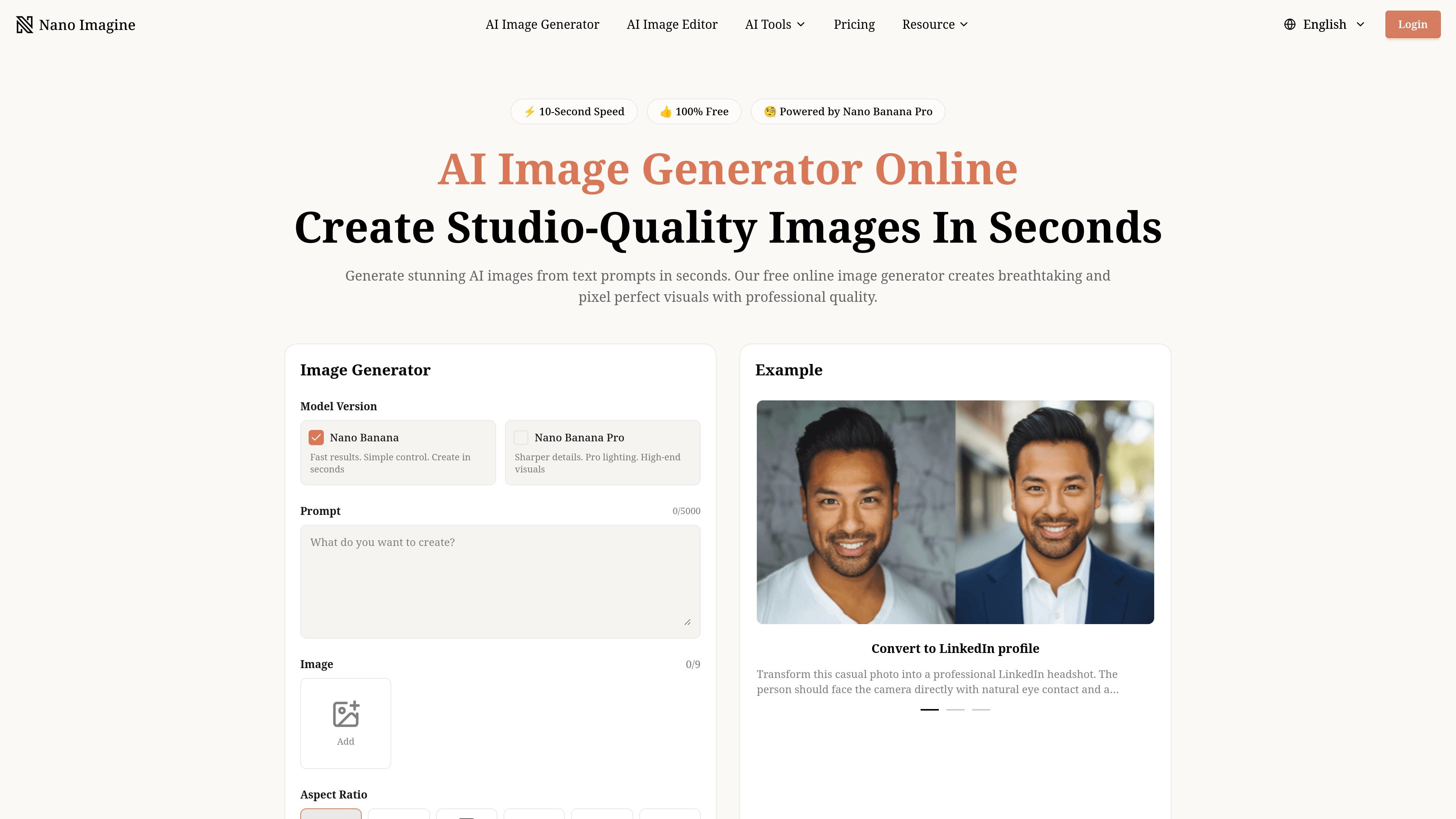
NanoImagine is an AI image generator and editor for creating, modifying, and enhancing visuals from text prompts and uploaded images. The site combines a text-to-image workflow with separate tools for image editing, background removal, and image upscaling.
The generator page emphasizes fast creation, prompt-based control, and export options such as aspect ratio, resolution, and output format. Supporting pages add practical workflows for removing unwanted objects, switching backgrounds, restoring clarity in low-resolution images, and preparing assets for print, web, or social use.
Generate images from text prompts with a choice of model version, aspect ratio, resolution and output format. The interface supports up to 9 input images and 5,000 prompt characters.
Create images quickly with the Nano Banana model family, including a faster standard mode and a sharper Nano Banana Pro mode for higher-detail output.
Upscale outputs to 2K or 4K and export in PNG or JPEG from the generator, or use the dedicated upscaler to improve low-resolution photos and AI images.
Edit existing images with text instructions to remove objects, replace elements, switch backgrounds, and refine product or social assets without manual selection tools.
Improve clarity in old photos, product shots, logos and graphics with the upscaler, which supports batch processing for multiple files.
Generate without watermarks, with privacy-first handling on the generator and secure processing on the editor.
Create concept art, portraits, posters, and other visuals directly from prompts, then adjust aspect ratio, resolution, and file format before downloading.
Remove unwanted objects, swap backgrounds, replace items, or refine product shots by describing the change instead of making manual selections.
Improve low-resolution, blurry, or damaged images for web, print, or portfolio use by upscaling them to a sharper output.
Prepare e-commerce, social, and brand assets by cleaning up product photos, boosting clarity, or creating visuals sized for different platforms.
Turn uploaded photos into stylized or context-specific variants such as LinkedIn headshots, action-figure concepts, or anime-inspired portraits.
Yes. The homepage says you can start creating on a free plan, and the pricing page lists paid plans for higher usage and additional features.
Yes. The pricing page says generated images include no watermark, and the homepage describes downloads as watermark free.
The site says images can be generated for commercial projects, and the pricing page includes a commercial use license on its plans.
The editor supports JPG, PNG and WebP uploads up to 10 MB, and the upscaler accepts JPEG, PNG, JPG, WEBP and BMP files up to 10 MB with a minimum width and height of 300 px.
The site says the image editor processes uploads securely, clears them after a short period, and does not use them for training or share them externally.

Kling AI is an AI creative studio for generating and editing images and videos, with web, mobile, and API access for creators and developers. It supports a broad set of visual workflows, including video generation, image creation, editing, and native 4K output for the V3 series.

Skybox AI by Blockade Labs generates 360° skyboxes and environments for games, XR, film, education, architecture, and other production workflows. The site also shows integrations for tools like Unity, Blender, Godot, SketchUp, Figma, and Roblox.

Генератор живописи AI - это онлайн-программное обеспечение, которое автоматически создает произведения искусства на основе текстовых описаний, предоставленных пользователями.

Все-в-одном AI платформа, которая объединяет инструменты для изображения, видео, голоса, письма и чата для повышения креативности и сотрудничества.

PixelDrive is a bulk image generation API for creating many on-brand images from one template through a browser editor, REST API, CSV batch, or MCP. It suits teams that need repeatable image output with cacheable renders and usage-based pricing.

PicCopilot is an AI content platform for e-commerce that turns product photos into marketing visuals, model shots, videos, and social content. It offers a free plan plus paid tiers for templates, model swap, virtual try-on, and batch-oriented creation.