
Video-based motion capture
Upload a video and extract motion data from footage such as smartphone videos or online clips.

Plask Motion is a web-based AI motion capture and 3D animation tool that converts video footage into motion data and rendered animations. It supports exporting to common 3D formats and working with tools such as Unreal, Maya, Blender, and Unity.
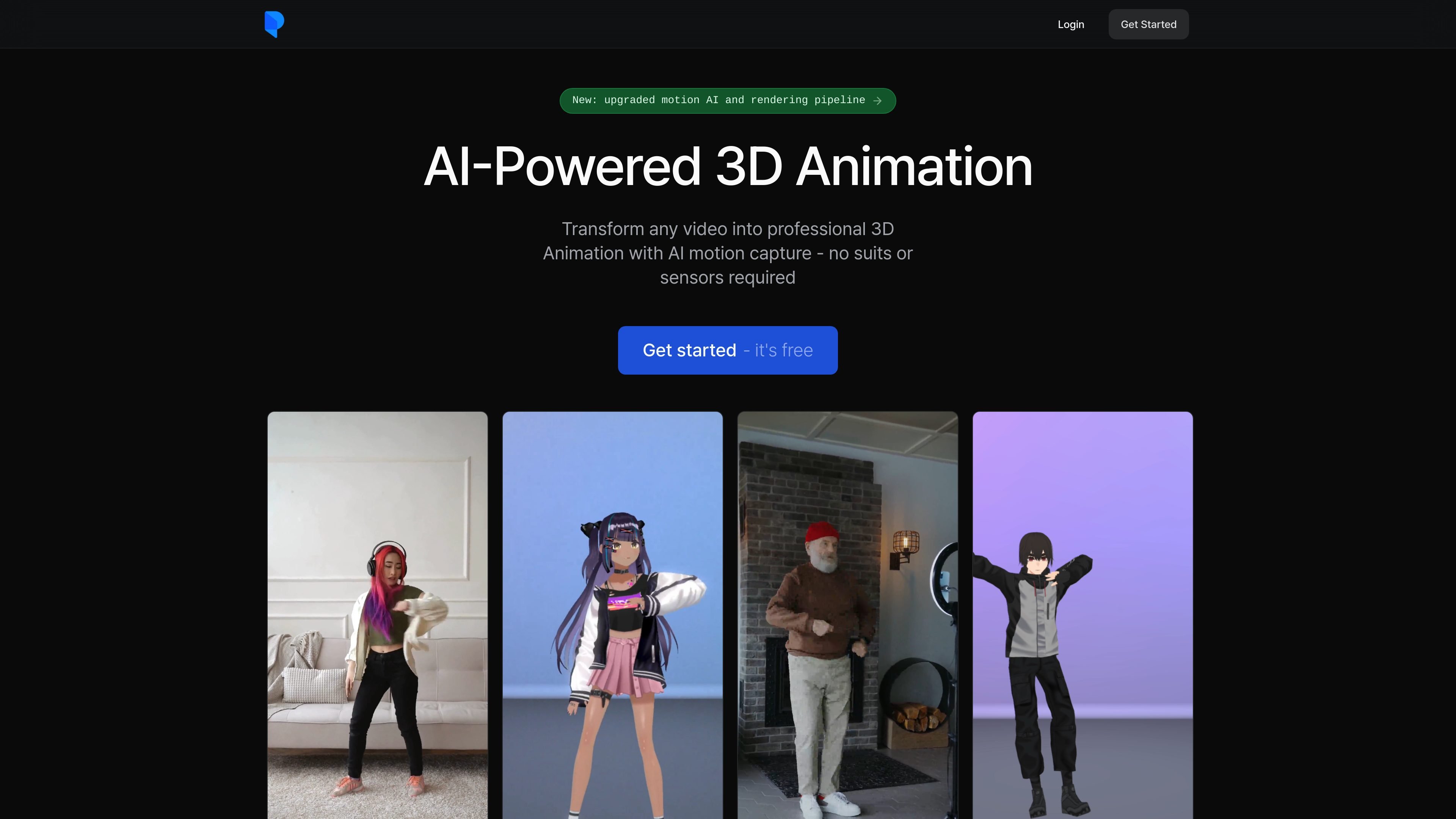
Plask Motion is an AI-powered motion capture and 3D animation tool that turns video footage into animation data. The homepage positions it as a way to create 3D animation from a single camera source without suits or sensors, and the documentation shows a simple workflow for importing a video and extracting motion.
The product is aimed at users who want to animate characters from video, render the result, or export assets to external 3D tools. The site also highlights support for full-body and hand capture, multi-person motion capture, and collaboration features across its plans.
Upload a video and extract motion data from footage such as smartphone videos or online clips.
Apply captured motion to imported 3D characters, with support for blinking and physics on MMD and VRM models.
Control lighting, camera movement, and post-processing effects such as motion blur and depth of field.
Export motion and animation assets in FBX, GLB, and BVH formats, and send work to tools such as Unreal, Maya, Blender, and Unity.
Work with multi-person mocap, storage, scene sharing, and realtime collaboration across the listed plans.
Use automated camera and lighting controls plus customizable effects to tailor the rendered result.
Import a recorded clip, extract body motion, and apply it to a 3D character for animation work.
Render a finished animation with lighting, camera movement, motion blur, depth of field, and tone mapping handled in the product.
Export animation assets to other 3D pipelines when you need to continue work in Unreal, Maya, Blender, or Unity.
Use the platform for multi-person motion capture when a scene involves more than one performer.
Explore motion capture on the free tier, or use the paid plans for longer limits, storage, collaboration, and faster processing.
Plask provides AI motion capture from video, so the basic workflow is to import a video, extract motion, and apply it to a 3D character or export the result. The documentation page for motion extraction says to use the "Import Video" button in the Asset panel.
The pricing page shows a Free tier, a Standard plan, and a Pro plan. The paid plans are billed yearly, and both Standard and Pro include a 7-day free trial.
The homepage says exported 3D assets are compatible with tools like Unreal, Maya, Blender, and Unity. The pricing page also lists FBX, GLB, and BVH export.
The homepage says Plask supports multi-person motion capture, full-body and hand capture, and blinking and physics for MMD and VRM models. The motion-extraction doc also recommends using videos where the full body is visible, with good lighting and a simple background.
The source pages do not provide a detailed public setup or team workflow guide, but the pricing page does mention storage, collaboration, scene sharing, and realtime collaboration on all listed plans.

VIDEOAI.ME is an AI video generator for making spokesperson-style videos, ads, explainers, and social content from a script. It is aimed at founders, marketers, agencies, and creators who want to produce videos without filming.

Official HeyGen API documentation for building AI avatar videos, translations, lipsync, and interactive video-agent sessions. It supports direct API use plus MCP and CLI-style workflows for developers and AI agents.

艺映AI is a free AI video creation tool for generating video from text, images, or existing footage. It is positioned for short-form social content, promotional clips, and stylized AI video projects.

讯飞绘镜 (iFlytek Huijing) — это платформа для создания видео на базе ИИ, которая быстро и эффективно преобразует творческие идеи в сценарии, раскадровки и динамические видеоролики.

Topview AI is a web-based AI video creation platform for social ads, ecommerce creatives, avatar videos, and short drama workflows. It combines channel-based templates, prompt-driven generation, reference uploads, and storyboard-based production tools.
MIRA vision develops synthetic-data-driven AI for pathology image analysis in medical diagnostics. Its website positions the product for teams that need privacy-compliant training data, automatic annotations, and controlled data generation.