
One-touch recording
Press and hold for 2 seconds to begin recording. The device is built for quick capture without setup steps or menus.

SecondBrain Note is a card-sized AI voice recorder that captures meetings and conversations, then turns them into transcripts, summaries, and key points. It is built for people who want a portable recorder with simple controls and app-based review.
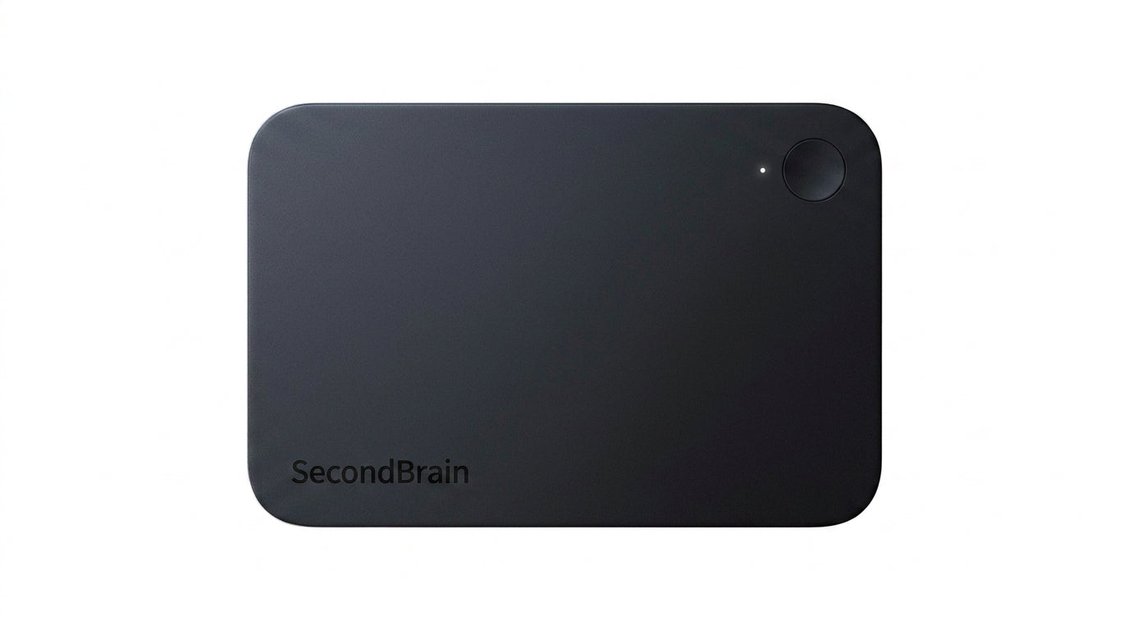
SecondBrain Note is an AI voice recorder designed to capture meetings and conversations, then convert them into transcripts, summaries, and key points through the Genspark app. It is presented as a standalone device with a card-like form factor, a single recording control, and on-device indicators for recording status.
The product focuses on fast capture and later review. The source says you press and hold for two seconds to start recording, can record offline, and can transfer files through Bluetooth or Wi‑Fi. It is positioned for people who want a small recorder they can carry daily and use in meetings without spending time on setup or manual note-taking.
Press and hold for 2 seconds to begin recording. The device is built for quick capture without setup steps or menus.
Up to 35 hours of continuous recording is listed on the product page, making it suitable for long meetings or all-day use.
The source says the device records offline and can transfer files by Bluetooth or Wi‑Fi through the Genspark app for faster file transfer.
The product page describes transcription, note-taking, key-point marking, and intelligent summarization, so the workflow goes beyond raw audio capture.
The device includes vibration feedback, a white recording light, an RGB light, and a button for simple on-device interaction and status confirmation.
A magnetic card holder is included and can also serve as a phone stand, adding a storage and desktop use case alongside the recorder itself.
Use the recorder during meetings to capture the discussion while staying focused on the conversation. Afterward, review transcripts and summaries instead of rebuilding notes from memory.
Carry it as a daily note-taker for thoughts, reminders, and ideas that come up during the day. The compact card form factor is meant to be easy to keep on hand.
Record longer sessions, then transfer the files to the Genspark app for transcription and summarization. This suits users who want a post-meeting workflow rather than live typing.
Use the included magnetic card holder as a wallet accessory or phone stand while keeping the recorder with you. This combines storage and desk use with the device's portability.
Use the device across supported platforms through the Genspark app when you want to view notes on different devices. The source also indicates the recorder can support shared or multi-platform use, though the exact team workflow is not specified.
SecondBrain Note is an AI voice recorder for capturing meetings and conversations, then turning them into transcripts and concise summaries. It is designed for people who want to record hands-free and review notes later through the Genspark app.
No. The source says the microphone only activates after you press and hold the recording button for 2 seconds. During recording, a white light flashes, and there is also vibration feedback for silent confirmation.
The product page says purchase includes 300 minutes of AI transcription and summarization per month, and Genspark members can use it unlimitedly up to 24 hours a day. The pricing page also shows a regular price and sale price, but no additional plan structure is provided.
The device supports offline recording. To sync or transfer recording files, you need the Genspark app; the source says the app supports iOS, Android, Windows, and Mac versions.
The support page lists options for using the device across multiple platforms and asks about sharing one device among multiple people, which suggests the product is designed to be usable across devices and in shared workflows. However, detailed team-sharing rules are not provided in the source.

QuickQuill is a macOS dictation and transcription app that runs locally on the device. It helps users record meetings, transcribe audio, generate summaries, and export notes without using a cloud service.

Tactiq is an AI note taker for Google Meet, Zoom, and Microsoft Teams that transcribes meetings live and turns them into summaries, action items, and follow-up outputs. It is built around a Chrome extension and supports team workflows through sharing and integrations.

Notewarp is an AI note-taking tool that turns voice notes, uploads, or pasted text into cleaner notes, transcripts, summaries, and action items. It helps people capture rough ideas quickly and then edit, export, or share the result.

Scripta is a privacy-first AI notetaker that records, transcribes, and summarizes meetings directly on your device. The public site currently shows a Mac beta download and a Windows waitlist.
Parrot is a free, open-source AI meeting recorder and live assistant for macOS 14 or later on Apple Silicon. It records calls without a meeting bot, answers questions from locally indexed documents, and helps users review, search, and act on their meetings.

MeetStream is a meeting bot API for Zoom, Google Meet, Microsoft Teams, and Webex. It helps developers record, stream, and analyze meetings programmatically, with usage-based pricing and a $5 free credit to start.