GoEnhance AI icon

GoEnhance AI

GoEnhance AI is a web-based AI video and image generation platform for turning text, images, and existing clips into finished visual content. It offers a free tier with tokens, plus paid plans for faster generation, more jobs, and commercial use on higher tiers.

GoEnhance AI

GoEnhance AI overview

GoEnhance AI is an all-in-one AI video and image generation platform that turns text, images, and existing clips into new visual content. The site positions it as a tool for creators who want to make videos, photos, and short-form effects without manual editing.

Its video stack covers text-to-video, image-to-video, and video-to-video workflows, along with face swap, lip sync, consistent character generation, talking avatars, and animated effects. The platform also includes an AI image generator, image editing tools, and a library of model choices spanning GoEnhance and several third-party engines.

The product is designed for use on both PC and mobile, and the homepage says it is used by more than 3 million creators. On the pricing page, GoEnhance notes a free tier with tokens and paid plans that add more tokens, faster generation, more concurrent jobs, and premium features.

Core features

Text, image, and video inputs

Create videos from text prompts, uploaded images, or existing clips, with outputs that can include script, visuals, captions, and music.

Video-to-video editing

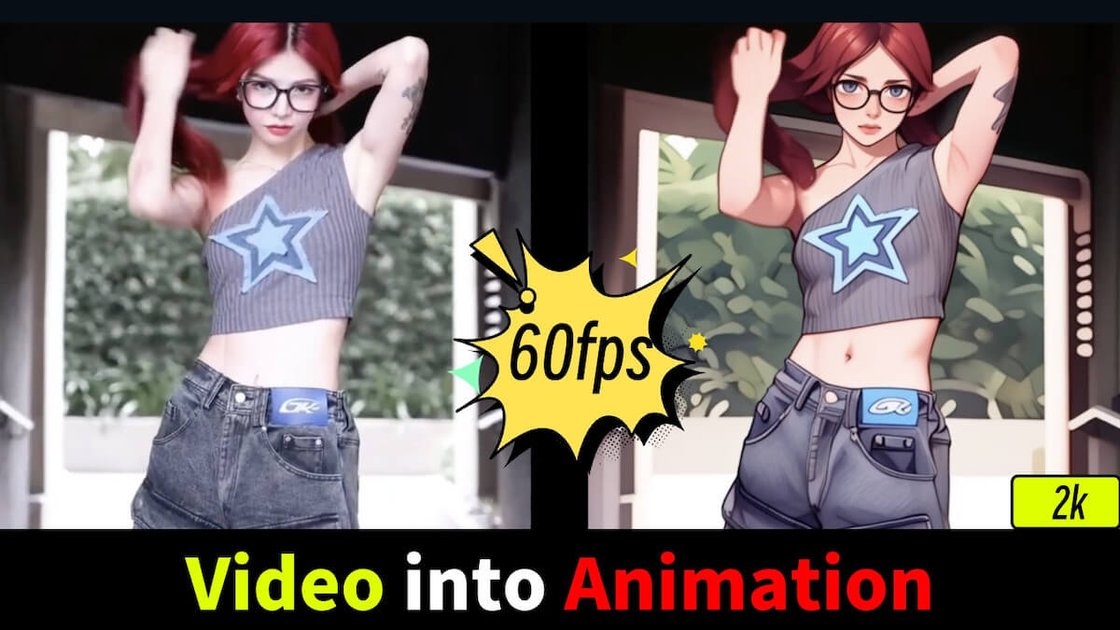
Restyle footage with video-to-video tools such as anime conversion, face swap, lip sync, character animation, and other visual effects.

Photo animation and effects

Turn still photos into motion content, including image-to-video generation and effect-driven clips like Hug, Kissing, and Dance.

AI image generation and editing

Generate images from text with multiple styles and model choices, including image editing and face swap tools for photos.

Multi-model workflow

Use a broad model library that includes GoEnhance’s own models alongside third-party options such as Kling, Runway, Hailuo, Luma, Wan, Vidu, Hunyuan, Sora, Veo 3, and others.

High-resolution and effects library

Produce content for social formats and higher-resolution outputs, with the site citing HD and 4K-ready video generation and 100+ video and photo effects.

Common use cases

  • Create short-form AI videos

    Generate clips from a prompt, then refine model choice, motion intensity, and aspect ratio before downloading a finished video.

  • Animate images for social content

    Turn a still photo into animated content or apply one-click effects such as Hug, Kissing, or Dance for social posts.

  • Edit and transform video footage

    Restyle existing footage with anime conversion, face swap, or lip sync when you want to adapt an already recorded clip.

  • Create and refine AI images

    Produce AI images for marketing, digital art, or concept visuals, then enhance or edit them inside the same platform.

  • Make character-led or branded videos

    Build character-driven or branded outputs with consistent character video, AI avatars, and talking character tools.

Pros and Cons

Pros

  • Combines video generation, video editing, image generation, and image tools in one product.
  • Supports multiple input types, including text prompts, images, and existing clips.
  • Offers a broad model selection, including GoEnhance and third-party engines.
  • Includes workflow options for short-form social content, such as effects, avatars, lip sync, and anime-style transformations.
  • Provides a free tier with tokens so users can try features before subscribing.

Cons

  • Some advanced usage is tied to paid plans, and commercial use is limited to Standard, Pro, and Mega subscribers according to the site.
  • Fast Mode uses tokens, while Relax Mode is only available for selected functions and can be queued, so speed and availability vary by mode.

FAQ

What is GoEnhance AI used for?

GoEnhance AI is an all-in-one AI video platform that also includes image generation and editing tools. Its video workflow supports text-to-video, image-to-video, video-to-video, video face swap, lip sync, character animation, and AI avatar creation.

Is there a free plan?

Yes. The site says GoEnhance AI offers a free tier with some tokens that can be used across the platform's features. Paid subscriptions add more tokens, faster generation, more concurrent jobs, and access to premium features.

How does the video generation workflow work?

The platform says content can be generated on PC and mobile devices. It also describes a simple workflow: provide text or upload an image, choose settings such as model and motion intensity, then generate and download the result.

Can I use creations commercially?

The pricing page states that commercial usage is permitted only for subscribers on the Standard, Pro, and Mega plans. Free users and Basic plan subscribers are limited to personal use only.

How are payments and cancellations handled?

The site says paid plans use Stripe for payment collection, and subscription management is handled through Stripe's billing portal. It also notes that refunds are not offered.

Quick Facts

Category
AI video and image generation
Platform
Web app, with access on PC and mobile devices
Primary users
Creators, marketers, businesses, educators, individuals, and video editors
Source domain
goenhance.ai
Pricing model
Free tier plus paid subscriptions
Payments
Stripe